Thursday, March 12, 2015
Changes to minimum password length for Google Apps accounts
This new policy aligns Google Apps accounts with consumer accounts that already require passwords to be at least 8 characters long.
Existing users can keep their current password even if it doesn’t match the new security requirements, but they will be required to comply when changing their password for the first time. Administrators will also need to comply when resetting passwords for users.
With this change, passwords set via the Google Apps Control Panel from March 14 will need to be at least 8 characters long. Calls to the Provisioning API that try to set a users password that is shorter than 8 characters will also fail with an InvalidPassword error message. For more information on how to programmatically manage user accounts, please check the Provisioning API Developer’s Guide.
Want to weigh in on this topic? Discuss on Buzz

Google Apps Developer Blog for developers by developers
- code snippets and samples
- reviews of customer integration and deployment cases
- interviews with developers on best practices for developing in Apps
- voting on most-requested developer extensions in Apps
- discussion of OAuth roadmap
- references to OpenID
- smart ways to do logging (and analysis/reporting) in AppEngine, etc.
- Storing JSON in AppEngine
Also, dont forget to register for Google I/O, which is May 19-20, 2010 in San Francisco. Google I/O will feature 80 sessions, more than 3,000 developers, and over 100 demonstrations from developers showcasing their technologies. Youll be able to talk shop with engineers building the next generation of web, mobile, and enterprise applications. Last years I/O sold out before the start of the conference, so we encourage you to sign up soon.
Well do our best to bring you the most relevant developer content right here on this blog, and you can also check out these excellent sources of information for Google developers:
Google Apps Discussion Forum
Google Apps Client Libraries and Sample Code
Google Apps API Overview
Google Apps API Help Forum
Google Enterprise Blog
Finally, we want your feedback! Ask questions, suggest topics, and even submit your own stories for possible inclusion in this blog. Contact me at GADBeditor at google if you have a story for submission, or story suggestion. Comments will be enabled on this blog, and we hope youll join the discussion.
Thanks,
Don Dodge
Developer Advocate
Developer Relations Team
Wednesday, March 11, 2015
Automate Google Analytics Reporting Using Google Apps Script
Editors note: This has been cross-posted with the Google Analytics blog and the Google Developers blog -- Jan Kleinert
Many people have been asking for a simple way to put Google Analytics data into a Google Spreadsheet. Once the data is inside a Google Spreadsheet, users can easily manipulate Google Analytics data, create new visualizations, and build internal dashboards.
So today we released a new integration that dramatically reduces the work required to put Google Analytics data into any Apps Script supported product, such as Google Docs, Sites, or Spreadsheets.
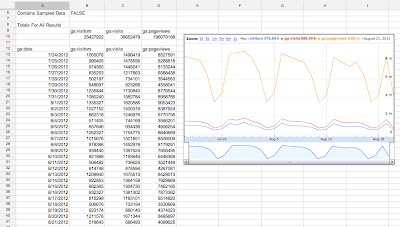
Here’s an example of Google Analytics data accessed through Apps Script and displayed in a Google Spreadsheet.
Custom API Dashboards - No Code Required
We know that a popular use case of this integration will be to create dashboards that automatically update. To make this easy to do, we’ve added a script to the Spreadsheets script gallery that handles all this work - no code required. The script is called Google Analytics Report Automation (Magic).
This script is a great template for starting your own project, and we’ve had many internal Google teams save hours of time using this tool. Here’s a video demoing how to build a dashboard using this script:
You can find this script by opening or creating a Google Spreadsheet, clicking Tools -> Script Gallery and searching for “analytics magic”.
Writing Your Own Script
Of course many developers will want to write their own code. With the new Analytics – Apps Script integration, you can request the total visitors, visits, and pageviews over time and put this data into a spreadsheet with just the following code:
// Get Data.
var results = Analytics.Data.Ga.get(
    tableId,
    startDate,
    endDate,
    ga:visitors,ga:visits,ga:pageviews,
    {‘dimensions’: ‘ga:date’});

// Output to spreadsheet.
var sheet = SpreadsheetApp.getActiveSpreadsheet().insertSheet();
sheet.getRange(2, 1, results.getRows().length, headerNames.length)
    .setValues(results.getRows());

// Make Sandwich.
To get started now, read our Automated Access to Google Analytics Data in Google Spreadsheets tutorial. Also check out the Google Analytics Apps Script reference docs.
Solving Business Problems
Are you ready to start building solutions using Google Analytics and Google Apps Script?
We’d love to hear new ways you use this integration to help manipulate, visualize and present data to solve business problems. To encourage you to try out this integration, we are giving out Google Analytics developer t-shirts to the first 15 developers to build a solution using both APIs.
To be eligible, you must publish your solution to either the Chrome Web Store or the Spreadsheets Script Gallery and include a description of a business problem the script solves. We’ll then collect these scripts and highlight the solutions in an upcoming blog post. After you publish your script, fill out this form to share what you’ve built.
We’re looking forward to seeing what you can do with this integration.
 | Nick Mihailovski profile Nick is a Senior Developer Programs Engineer working on the Google Analytics API. In his spare time he likes to travel around the world. |
Tuesday, March 10, 2015
Introducing the Google Drive Android API
 By Magnus Hyttsten, Developer Advocate, Google Drive
With todays developer preview of the Google Drive Android API in Google Play Services 4.1, you can add the convenience of Google Drive cloud storage to your apps without breaking a sweat.
While Drive integration on Android was possible in the past, the new API creates a faster, seamless experience that enables your apps to integrate with the Drive backend within minutes.
The new API offers a number of benefits:
1. Transparent use and syncing of local storage
The Google Drive Android API temporarily uses a local data store in case the device is not connected to a network. So, no need to worry about failed API calls in your app because the user is offline or experiencing a network connectivity problem. Data stored locally in this fashion will automatically and transparently be stored in the Google Drive cloud by Android’s sync scheduler when connectivity is available to minimize impact on battery life, bandwidth, and other resources.
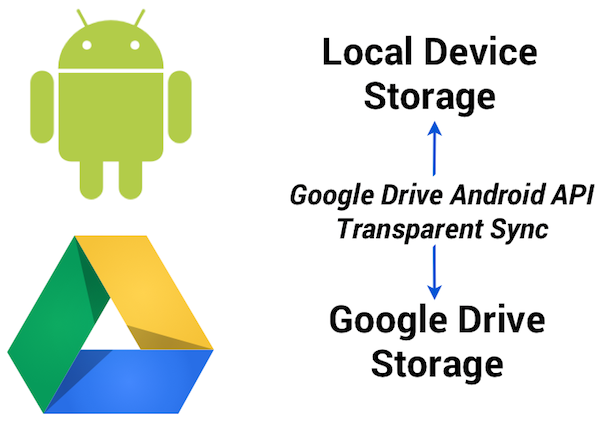
2. Designed for Android and available everywhere
The API was developed for Android and conforms to the latest Android design paradigms, such as using the new uniform client API GoogleAPIClient. And being part of the latest release of Google Play Services provides additional benefits:
- There’s minimal impact on the weight of your apps. As the client library is a stub to Google Play Services, incorporating the API has minimal impact on the size of your .apk binaries, resulting in faster downloads, fewer updates, and smaller execution footprint.
- User files are automatically synced between different devices (provided the app has the same namespace and is signed with the same key).
- Any device running the Gingerbread or later releases of Android and Google Play Services will automatically have support for the Google Drive Android API.
3. User interface components
File picker and creator user interface components are provided with this initial release of the Google Drive Android API, enabling users to select files and folders in Google Drive.
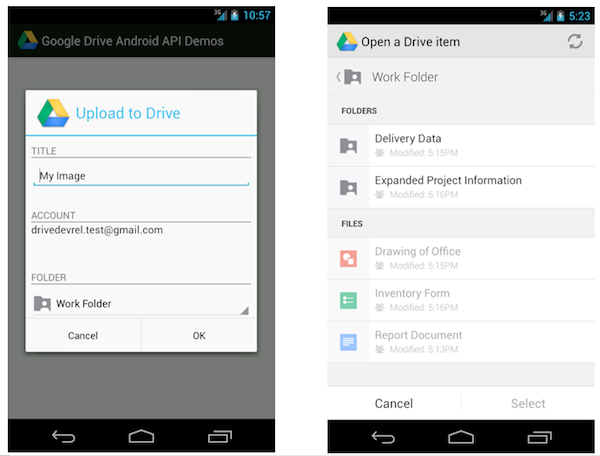
For example, the file picker is implemented as an Intent and allows you develop a native Android user experience with just a couple lines of code. This following code snippet launches the picker and allows the user to select a text file:
// Launch user interface and allow user to select file
    IntentSender i = Drive.DriveApi
        .newOpenFileActivityBuilder()
        .setMimeType(new String[] { “text/plain” })
        .build(mGoogleApiClient);
    startIntentSenderForResult(i, REQ_CODE_OPEN, null, 0, 0, 0);
The result is provided in the onActivityResult callback as usual.
4. Direct access to Drive functionality
You may be wondering how the Google Drive Android API relates to the Storage Access Framework released as part of Android 4.4 KitKat.
The Storage Access Framework is a generic client API that works with multiple storage providers, including cloud-based and local file systems. While apps can use files stored on Google Drive using this generic framework, the Google Drive API offers specialized functionality for interacting with files stored on Google Drive — including access to metadata and sharing features.
Additionally, as part of Google Play services the Google Drive APIs are supported on devices running Android 2.3 Gingerbread and above.
How to get started
As you incorporate the Google Drive Android API into your apps, we hope it makes your life a little bit easier, and enables you to create fun, powerful apps that take advantage of all that Android and Google Drive can do together.
For more information visit our documentation or explore our API demo and other sample applications on the official Google Drive GitHub repository.
Also check out the official launch video:
Let’s keep the discussions going on +GoogleDrive, and Stack Overflow (google-drive-sdk).
Magnus Hyttsten is a Developer Advocate on the Google Drive team. Beyond work, he enjoys trying out new technologies, thinking about product strategies, and exploring California.
Posted by Scott Knaster, Editor
Cross posted on the Google Developers Blog.
Smartsheet Inside Google Apps Marketplace
The Challenge
Last summer, the Smartsheet team had what I expect is a fairly typical Software as a Service (SaaS) company priorities discussion: should we integrate with one of the big application marketplaces? Here are some of the questions we considered:- Are our customers asking for it?
- Will it give us access to a significantly larger lead flow?
- Do the people that use these apps typically pay for them?
- Would our target customer expect to find our type of tool there?
- What does the competition look like on each platform?
- What is the scope of the development effort?
Decision Time
Google Apps seemed to rank highly across all 6 criteria. Of the dozen major application marketplaces competing for ISV mindshare, Google Apps seemed to be the most natural upstream app from Smartsheet. Google Apps customers were most likely to look next toward solutions that are addressed by our application.Weaving SmartSheet collaboration and workflow features in amongst the Google Apps was a very natural fit for our users. As you can see in the video, the familiar spreadsheet-like interface and direct access from the Google menu bar makes Smartsheet an effective companion app. The integration of Smartsheet with Google Apps turns the combination into the companys operating software.
It was therefore fortunate that the Google Apps APIs proved to be just as natural a fit. Well done, well documented, easy to implement and, as we later discovered, solid developer support.
The Details
Once the decision was made, we dedicated one senior architect and one product manager to designing and delivering the integration. It required about 4 days of technical investigation to validate the design concepts. The Google Apps API documentation and developer support were first rate, which made the delivery nearly as easy as the design.Virtually every part of Googles application stack had a natural fit within our customers common workflow.
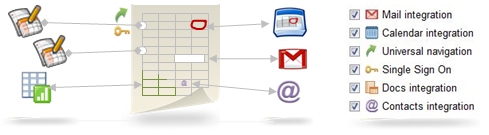
- Universal Navigation and Single Sign-on
- Move Data to and from Google Spreadsheets
- Attach Google Docs to Any Row
- Open any attached file as a Google Doc
- Synchronize Contacts
- Display & Manage dates between Sheets & Calendars
- Share individual parts of the sheet via Gmail
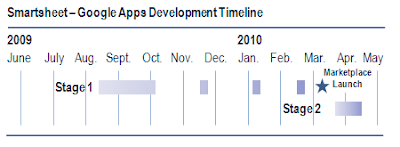
Stage 1
We first implemented single-sign-on via OpenID and Google Docs API integration using OAuth for standard Google Accounts. This included data import/export, attaching Google Docs to rows, uploading office documents to Google Docs, and importing Contacts. We then extended this integration to support Google Apps users. These features were rolled out in Q3 of 2009, well in advance of the Google Apps Marketplace launch. It took a senior developer roughly 6 weeks to implement this first stage. With the core integration features completed, we were able to quickly implement new Apps Marketplace functionality, including Universal Navigation and the Licensing API, as they were made available in the sandbox.Stage 2
We are developing full-featured Google Calendar integration, utilizing both the Google Calendar Data API and Calendar Event Gadgets, to be delivered in May 2010. Gmail integration will follow quickly, utilizing both the OAuth access to IMAP and SMTP and Gmail Contextual Gadgets. With the experience we have integrating other APIs, the development of these features is greatly simplified, as the infrastructure – implementation of OpenID, OAuth, and the GData Java Client Library – is already in place.The Mechanics
We chose to enter three variations of Smartsheet into the Google Apps Marketplace: two mainstream solutions and one emerging technology solution.Mainstream:
- Smartsheet Sales Pipeline for Google Apps
- Smartsheet Project Management for Google Apps
- Smartsheet Crowdsourcing for Google Apps
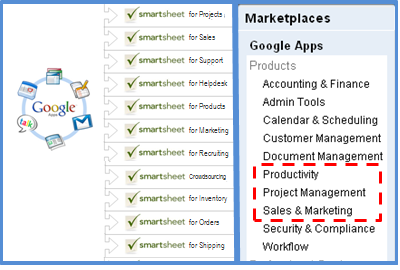 The decision to start with the Project Management and Sales Pipeline applications was based on the belief that they would have the broadest appeal to two Google Apps customer types: Small Businesses and Large Scale Education customers.
We included Smartsheet Crowdsourcing as a test of an entirely unique product that pushes an emerging trend.
The Results
Google Apps Marketplace has performed very well across several of Smartsheets key performance indicators.Strong Leads - the percentage of signups that accrue a statistically significant quantity of behavioral actions within the application. A strong lead is highly correlated with an eventual paying customer.
Convert to Paid - the percentage of total leads that eventually become paying customers.
Average MRR - Monthly Recurring Revenue is the average monthly spend of the leads that become paying customers.
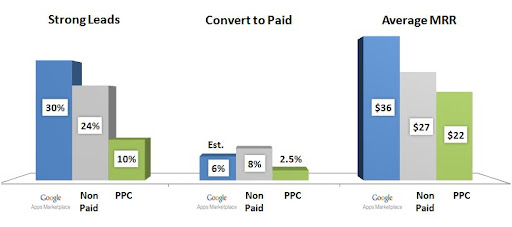
The statistics are fantastic, and have improved the profitability of our customer acquisition programs significantly. Today, we get "free" leads generated by SEO, PR and buzz (Non-Paid). These are the Holy Grail source of profitable customers. We add $2,160 a month in recurring revenue for every 1,000 leads that come in via non-paid channels. At $1,740 a month per 1,000 leads, Google Apps Marketplace is also a very profitable channel that brings up the overall averages (subtract the 20% Google is planning to charge for Apps customers).
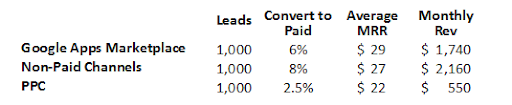 None of the statistics above matter without lead volume to power them. Thats where the Google Apps Marketplace really makes these numbers sing. Weve seen a very meaningful increase in high quality, non-paid lead flow directly attributable to Google Apps customers.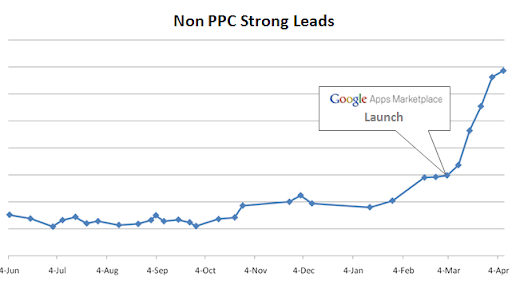
Moving Forward
Customer requests for features and enhancements to our Apps integration have already started pouring in. They are great guideposts toward attracting a larger percentage of these great Apps users.The Google Apps Marketplace is a rich source of customers, so staying above the noise as it attracts more ISVs will be a priority. Were confident we can continue refining our product and services to deliver a superior solution. And, well count on the Google team to value customer success and application utility as primary criteria for rating and ranking the vendor directories.
Monday, March 9, 2015
Automatically Generate Maps and Directions with Google Apps Script
Following up on our recent post about the new Doc List capability in Google Apps Script, we thought we’d take a moment to look a little more closely at another new feature in Apps Script - integration with Google Maps. Google Maps has had an API for quite some time, but now we’ve made it very easy to generate customized maps and driving directions straight from a script.
A mail merge is often used to automate some of the drudgery involved in sending invitations to a large number of people. With the new Apps Script Maps Service you can easily add a map image to the email, and even add a marker showing the event location.
While that’s nice, it’s hardly a time saver - why write code to generate the same image repeatedly? A much more useful feature is generating a custom map for each guest, along with personalized driving directions. We’ve made a spreadsheet template that includes just such a script - it’s available here.
Let’s look at a short code snippet that illustrates the calls required to generate a map image and add a marker at the start and end addresses:
function getMap (start, end) {
// Generate personalized static map.
var directions = Maps.newDirectionFinder()
.setOrigin(start)
.setDestination(end)
.getDirections();
var map = Maps.newStaticMap().setSize(500, 350);
map.setMarkerStyle(Maps.StaticMap.MarkerSize.MID,
"red", null);
map.addMarker(start);
map.addMarker(end);
return map.getMapUrl()
}
Running the function with start and end set to Google, San Francisco and Google, Mountain View, we get a link to the following image:

Along with generating maps images, the Maps feature can also find directions, retrieve elevation data and even perform some geocoding operations. Please note that any data returns by these APIs should not be used without displaying an associated map image - see the Google Maps API Terms of Service for more details.
Posted by Evin Levey, Google Apps Script Product Manager
Thursday, February 26, 2015
Use Google Translator To Translate OER Into 47 Languages!
- Google Translator Toolkit
- Demo Video
- Via Joseph Hart

"...Of course translation services are vital components to facilitate the world-wide sharing of educational resources. " - Joseph Hart
WHAT?
"Google Translator Toolkit is part of Googles effort to make information universally accessible through translation. Google Translator Toolkit helps translators translate better and more quickly through one shared, innovative translation technology.
Heres what you can do with Google Translator Toolkit:
- Upload Word documents, OpenOffice, RTF, HTML, text, Wikipedia articles and knols.
- Use previous human translations and machine translation to pretranslate your uploaded documents.
- Use our simple WYSIWYG editor to improve the pretranslation.
- Invite others (by email) to edit or view your translations.
- Edit documents online with whomever you choose.
- Download documents to your desktop in their native formats --- Word, OpenOffice, RTF or HTML.
- Publish your Wikipedia and knol translations back to Wikipedia or Knol." - Source
EXAMPLE PLEASE!
"For example, if an Arabic-speaking reader wants to translate a Wikipedia™ article into Arabic, she loads the article into Translator Toolkit, corrects the automatic translation, and clicks publish. By using Translator Toolkits bag of tools — translation search, bilingual dictionaries, and ratings, she translates and publishes the article faster and better into Arabic. The Translator Toolkit is integrated with Wikipedia, making it easy to publish translated articles. Best of all, our automatic translation system "learns" from her corrections, creating a virtuous cycle that can help translate content into 47 languages, or over 98% of the worlds Internet population." - Michael Galvez and Sanjay Bhansali
EASE-TO-USE?
I suppose English to Arabic, Chinese, Korean, Japanese, etc. might not be as accurate as English to Norwegian (or other European languages), but I am sure it is sufficient to understand, and then we could always use the new toolkit to touch up the remaining 2-10% out of context. When I have used Googles Language arsenal to translate my posts into Norwegian, it is if it is reading my mind about what I want to say (except for a few glitches here and there). It is amazing!
I suppose many translators might say these translation tools are not up to mark, but I suppose they are in a way trying hard to protect their profession and pay. But these tools are going to get better and better, and if they arent using such tools to speed up their translation work, or simply arent that good (at translation), they better start looking for a new job and profession. Be smart, use the tools and add your contextualized expertise to perfect the translation (99.97%).
Also, this growing collection of freely available translation tools are going to do wonders in translating Open Educational Resources (OER) to 47 languages (over 98% of the worlds Internet population). Lets use these tools to globalize OER into everyone corner of the world. At least 98% of it!
Translation professionals out there, dont be proud and stubborn, start using Google translator kit (or other better alternatives out there!)! You might argue, it was bad before, but they are getting better, and they might within a few years challenge you word for word to the extreme. Master them now, so when they eventually meet your expectations, you are ready. If you are already using such tools, RESPECT!
Finally, if I had to sum up my opinion on Googles translator toolkit using just one word, it would be:
Awesome!
Hopefully, it translated correctly :)
Wednesday, February 18, 2015
Microsoft Investing in Cyanogen Which Wants to Take Android from Google

Microsoft is getting ready for a newer and unexpected battle with Google. This time, Microsoft plans to take on Android by investing in Cyanogen.
Cyanogen is a startup which makes and maintains its own version of Android. Cyanogen is currently being used in the OnePlus One, the flagship killer, a smartphone which has garnered rave reviews last year.
The Wall Street Journal reports that Microsoft is investing $70 million in Cyanogen which is best known for its customized version of Android. Cyanogen has reportedly raised $100 million to date. This should be noted that Cyanogen recently refused an offer from Google and hopes to live its dream of being an open version of Android alive.
WSJ writes:
“Microsoft would be a minority investor in a roughly $70 million round of equity financing that values Cyanogen in the high hundreds of millions.”
What could be Microsoft’s intentions?

This is important and unusual because Microsoft is owner of its very own Windows Phone operating system and is gearing up for the upcoming launch of Windows 10 for mobile devices. This move of Microsoft can be attributed to its commitment to embrace open source and maybe some mischief.
Cyanogen claims to have a team of 9,000 volunteer software developers. Cyanogen’s Chief Executive Kirt McMaster told WSJ last week:
“We’re going to take Android away from Google.”

Buy OnePlus One – The Flagship Killer here: OnePlus One (64GB, Sandstone Black)- Invite Only

Apart from different versions of Android for the smartphone makers, Google also releases the Android core under an open-source license. This version is free for everybody and anyone can use and modify or fork this core without linking the Google services. The best examples are Amazon’s products which run on forked Android. These independent versions are already very popular in China where Google has struggled to leave its mark.
These types of Android versions, which are not under Google’s control, are a problem for Google because not every forked version promotes and uses Google’s services and hence, Google makes no money. Due to this Microsoft’s investment in Cyanogen, it will be harder for Google to bring all version of Android under its control.
Microsoft and Cyanogen, both have declined to comment. By investing in Cyanogen, Microsoft can get more users and claim a bigger share of the mobile market. Under the new CEO Satya Nadella, Microsoft has shown such commitments to open source in the past.
Tuesday, February 10, 2015
HowTo Install Flash on Firefox Google Chrome on Fedora 17
Step 1:
su -
yum install flash-plugin -y
updatedb
locate libflashplayer.so
take note of path given by locate
Step 2a: (Firefox)
cd /home/server/.mozilla/plugins/
Step 2b: (Chrome)
cd /opt/google/chrome/plugins/
(if plugins folder doesnt exists create one)
Step 3:
ln -s /path/to/libflashplayer.so
Monday, February 2, 2015
MyPhone Agua Hail Hard Reset Hang Google Account Removal Pattern Lock
In this tutorial I will gonna teach you how to hard reset your MyPhone Agua Hail. This can fix the following issues that you are experiencing in your phone:
1. Force Close Apps
2. If you forgot your Google Account
3. Hang in Logo (sometimes)
4. Pattern Lock

If you find the tutorial incorrect please drop us a comment. Thank you.
Friday, January 30, 2015
Acer Iconia B1 Hard Reset Hang Google Account Removal Pattern Lock
In this tutorial I will gonna teach you how to hard reset your Acer Iconia B1. This can fix the following issues that you are experiencing in your phone:
1. Force Close Apps
2. If you forgot your Google Account
3. Hang in Logo (sometimes)
4. Pattern Lock

If you find the tutorial incorrect please drop us a comment. Thank you.
Saturday, January 17, 2015
Samsung Google Nexus 10 P8110 Android Tablet Firmware
Samsung Google Nexus 10 " Mantaray " P8110 Android Tablet Firmware.
Specifications:
LCD | 10" Capacitive Touch Screen 16M Color |
Screen Resolution | 2560 x 1600 Pix 300PPI |
Processor | 1.7 Ghz Dual Core A15 , Mali T604 Quad core |
Chipset / Boxchip | Exynos 5250 |
RAM | 2GB DDR3 |
Built in Memory | 16 GB - 32GB |
External Memory | Support Micro Card (MAX. 32GB) |
Wifi | 802.11 b/g/n supported |
Blue tooth | Yes |
3G | N/A |
Camera | 1.9 MP Front ,5 MP with auto Focused +flash |
HDMI | 1.4 |
Speaker | Available |
Weight | 603g |
Android Version | 4.2 also support 4.4 Kitkat |
Battery | 11hrs |
| |
- Go to setting---->backup & restore
- Click restore to factory setting
- Click erase everything to confirm
- you are done.
Tuesday, January 13, 2015
Caffeine to Hummingbird An Upgrade to Google Search Algorithm!

- Capable of handling large and complex queries
- Precise and Faster Processing of Queries
- Focus on the meaning behind the query words
- Pay more attention to earch word in a query
- Consider the relevance of the pages rather than focusing on the page rank only.
- Improved converstional search (People When Speaking Searches)
What about Pagerank?
Most of you know that pagerank indicates the overall quality of a site. But in Google search, pagerank is not everything. There are more than 200 search signals used by Google to sort search results. And pagerank is one of them.
Hummingbird considers pagerank too. But it emphasizes on the relevance of the query. If the search query matches your contents, no matter who you are and what is your ranking, you will be the in the first page. And thats how Marks PC Solution competes with storng sites even with a page rank 0.
Is there any Feature of Caffeine?
Sure! Some parts of old search algorithm is still being used by Hummingbird. It just changes the unncessary parts and adds some new. But nobody can guarantee about the old parts. Because they could be changed anytime if Google finds something better.
What Happened to Updates like Penguine, Panda etc?
From time to time, Google updated their algorithm. Sometimes they added new tools like penguine, panda etc. Some of them are being cosidered as the parts of old engine in a new engine. I mean, these were not changed entierly.
But I personally dont believe this. Definitely the new algorithm will affect the search appearance of a site either positively or negatively.
So far I know, Hummingbird doesnt hamper the search result position of Marks PC Solution. My suggestion is- Increase your Google+ Sharings. Grow your followers in Google Plus if youd like to be favoured by Google!