Thursday, March 12, 2015
Changes to minimum password length for Google Apps accounts
This new policy aligns Google Apps accounts with consumer accounts that already require passwords to be at least 8 characters long.
Existing users can keep their current password even if it doesn’t match the new security requirements, but they will be required to comply when changing their password for the first time. Administrators will also need to comply when resetting passwords for users.
With this change, passwords set via the Google Apps Control Panel from March 14 will need to be at least 8 characters long. Calls to the Provisioning API that try to set a users password that is shorter than 8 characters will also fail with an InvalidPassword error message. For more information on how to programmatically manage user accounts, please check the Provisioning API Developer’s Guide.
Want to weigh in on this topic? Discuss on Buzz

Google Apps Developer Blog for developers by developers
- code snippets and samples
- reviews of customer integration and deployment cases
- interviews with developers on best practices for developing in Apps
- voting on most-requested developer extensions in Apps
- discussion of OAuth roadmap
- references to OpenID
- smart ways to do logging (and analysis/reporting) in AppEngine, etc.
- Storing JSON in AppEngine
Also, dont forget to register for Google I/O, which is May 19-20, 2010 in San Francisco. Google I/O will feature 80 sessions, more than 3,000 developers, and over 100 demonstrations from developers showcasing their technologies. Youll be able to talk shop with engineers building the next generation of web, mobile, and enterprise applications. Last years I/O sold out before the start of the conference, so we encourage you to sign up soon.
Well do our best to bring you the most relevant developer content right here on this blog, and you can also check out these excellent sources of information for Google developers:
Google Apps Discussion Forum
Google Apps Client Libraries and Sample Code
Google Apps API Overview
Google Apps API Help Forum
Google Enterprise Blog
Finally, we want your feedback! Ask questions, suggest topics, and even submit your own stories for possible inclusion in this blog. Contact me at GADBeditor at google if you have a story for submission, or story suggestion. Comments will be enabled on this blog, and we hope youll join the discussion.
Thanks,
Don Dodge
Developer Advocate
Developer Relations Team
Wednesday, March 11, 2015
Automate Google Analytics Reporting Using Google Apps Script
Editors note: This has been cross-posted with the Google Analytics blog and the Google Developers blog -- Jan Kleinert
Many people have been asking for a simple way to put Google Analytics data into a Google Spreadsheet. Once the data is inside a Google Spreadsheet, users can easily manipulate Google Analytics data, create new visualizations, and build internal dashboards.
So today we released a new integration that dramatically reduces the work required to put Google Analytics data into any Apps Script supported product, such as Google Docs, Sites, or Spreadsheets.
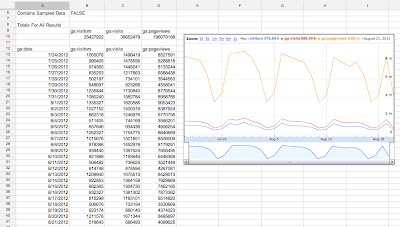
Here’s an example of Google Analytics data accessed through Apps Script and displayed in a Google Spreadsheet.
Custom API Dashboards - No Code Required
We know that a popular use case of this integration will be to create dashboards that automatically update. To make this easy to do, we’ve added a script to the Spreadsheets script gallery that handles all this work - no code required. The script is called Google Analytics Report Automation (Magic).
This script is a great template for starting your own project, and we’ve had many internal Google teams save hours of time using this tool. Here’s a video demoing how to build a dashboard using this script:
You can find this script by opening or creating a Google Spreadsheet, clicking Tools -> Script Gallery and searching for “analytics magic”.
Writing Your Own Script
Of course many developers will want to write their own code. With the new Analytics – Apps Script integration, you can request the total visitors, visits, and pageviews over time and put this data into a spreadsheet with just the following code:
// Get Data.
var results = Analytics.Data.Ga.get(
    tableId,
    startDate,
    endDate,
    ga:visitors,ga:visits,ga:pageviews,
    {‘dimensions’: ‘ga:date’});

// Output to spreadsheet.
var sheet = SpreadsheetApp.getActiveSpreadsheet().insertSheet();
sheet.getRange(2, 1, results.getRows().length, headerNames.length)
    .setValues(results.getRows());

// Make Sandwich.
To get started now, read our Automated Access to Google Analytics Data in Google Spreadsheets tutorial. Also check out the Google Analytics Apps Script reference docs.
Solving Business Problems
Are you ready to start building solutions using Google Analytics and Google Apps Script?
We’d love to hear new ways you use this integration to help manipulate, visualize and present data to solve business problems. To encourage you to try out this integration, we are giving out Google Analytics developer t-shirts to the first 15 developers to build a solution using both APIs.
To be eligible, you must publish your solution to either the Chrome Web Store or the Spreadsheets Script Gallery and include a description of a business problem the script solves. We’ll then collect these scripts and highlight the solutions in an upcoming blog post. After you publish your script, fill out this form to share what you’ve built.
We’re looking forward to seeing what you can do with this integration.
 | Nick Mihailovski profile Nick is a Senior Developer Programs Engineer working on the Google Analytics API. In his spare time he likes to travel around the world. |
Announcing Election Info Using Apps Script to Provide Voting Information
It’s time for the 2012 General Election in the United States and along with it comes the tedious process of finding your voter registration, polling sites, times, directions, etc. The previously announced Google Civic Information API provides a great service to programmatically obtain much of this information based on the your home address. Google Apps Script makes it really quick and easy to build a web application that queries this information and uses various Google services to organize and track your information.
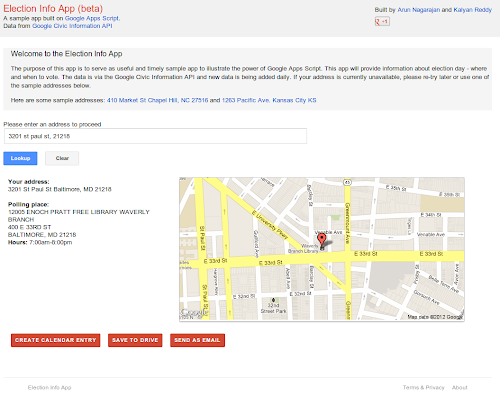
Election Info is a sample application built using Apps Script that can:
- Query the Google Civic Information API to find polling locations and hours using client side JavaScript and AJAX.
- Display polling information using
HtmlServicewith jQuery for a clean effective UI. - Generate static maps via
UrlFetchand theMapsServiceto show polling maps and directions. - Create a calendar event for election day with your polling location using the Calendar service.
- Generate a bring-along document with poll directions and hours using the Document service.
- Send you an email with a summary with your polling place information using the Gmail service.
- Store your previous searches in
UserPropertiesso it will remember your likely home address the next time you launch the app.
As you can see, this is a comprehensive sample app that is useful while also highlighting key Apps Script capabilities.
Install the app from the Chrome Web Store. Check back soon as we will be writing a blog post with details and sample code on how the sample was built.
 | Arun Nagarajan profile | twitter Arun is a Developer Advocate on Google Apps Script. Arun works closely with the community of partners, customers and developers to help them build compelling applications on top of Google Apps using Apps Script. In the past, he spent over 9 years building and designing platforms and infrastructure for enterprise mobile applications.. Arun is originally from the Boston area and enjoys basketball and snowboarding. |
Tuesday, March 10, 2015
Smartsheet Inside Google Apps Marketplace
The Challenge
Last summer, the Smartsheet team had what I expect is a fairly typical Software as a Service (SaaS) company priorities discussion: should we integrate with one of the big application marketplaces? Here are some of the questions we considered:- Are our customers asking for it?
- Will it give us access to a significantly larger lead flow?
- Do the people that use these apps typically pay for them?
- Would our target customer expect to find our type of tool there?
- What does the competition look like on each platform?
- What is the scope of the development effort?
Decision Time
Google Apps seemed to rank highly across all 6 criteria. Of the dozen major application marketplaces competing for ISV mindshare, Google Apps seemed to be the most natural upstream app from Smartsheet. Google Apps customers were most likely to look next toward solutions that are addressed by our application.Weaving SmartSheet collaboration and workflow features in amongst the Google Apps was a very natural fit for our users. As you can see in the video, the familiar spreadsheet-like interface and direct access from the Google menu bar makes Smartsheet an effective companion app. The integration of Smartsheet with Google Apps turns the combination into the companys operating software.
It was therefore fortunate that the Google Apps APIs proved to be just as natural a fit. Well done, well documented, easy to implement and, as we later discovered, solid developer support.
The Details
Once the decision was made, we dedicated one senior architect and one product manager to designing and delivering the integration. It required about 4 days of technical investigation to validate the design concepts. The Google Apps API documentation and developer support were first rate, which made the delivery nearly as easy as the design.Virtually every part of Googles application stack had a natural fit within our customers common workflow.
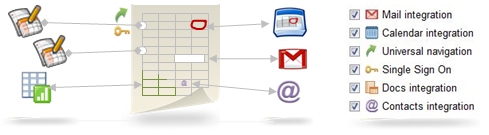
- Universal Navigation and Single Sign-on
- Move Data to and from Google Spreadsheets
- Attach Google Docs to Any Row
- Open any attached file as a Google Doc
- Synchronize Contacts
- Display & Manage dates between Sheets & Calendars
- Share individual parts of the sheet via Gmail
Stage 1
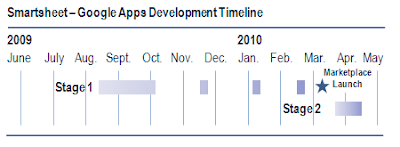
We first implemented single-sign-on via OpenID and Google Docs API integration using OAuth for standard Google Accounts. This included data import/export, attaching Google Docs to rows, uploading office documents to Google Docs, and importing Contacts. We then extended this integration to support Google Apps users. These features were rolled out in Q3 of 2009, well in advance of the Google Apps Marketplace launch. It took a senior developer roughly 6 weeks to implement this first stage. With the core integration features completed, we were able to quickly implement new Apps Marketplace functionality, including Universal Navigation and the Licensing API, as they were made available in the sandbox.Stage 2
We are developing full-featured Google Calendar integration, utilizing both the Google Calendar Data API and Calendar Event Gadgets, to be delivered in May 2010. Gmail integration will follow quickly, utilizing both the OAuth access to IMAP and SMTP and Gmail Contextual Gadgets. With the experience we have integrating other APIs, the development of these features is greatly simplified, as the infrastructure – implementation of OpenID, OAuth, and the GData Java Client Library – is already in place.The Mechanics
We chose to enter three variations of Smartsheet into the Google Apps Marketplace: two mainstream solutions and one emerging technology solution.Mainstream:
- Smartsheet Sales Pipeline for Google Apps
- Smartsheet Project Management for Google Apps
- Smartsheet Crowdsourcing for Google Apps
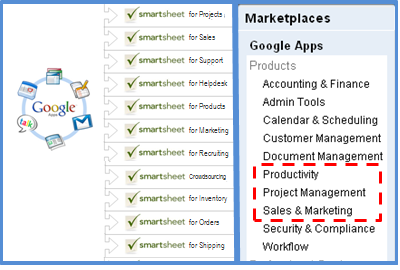 The decision to start with the Project Management and Sales Pipeline applications was based on the belief that they would have the broadest appeal to two Google Apps customer types: Small Businesses and Large Scale Education customers.
We included Smartsheet Crowdsourcing as a test of an entirely unique product that pushes an emerging trend.
The Results
Google Apps Marketplace has performed very well across several of Smartsheets key performance indicators.Strong Leads - the percentage of signups that accrue a statistically significant quantity of behavioral actions within the application. A strong lead is highly correlated with an eventual paying customer.
Convert to Paid - the percentage of total leads that eventually become paying customers.
Average MRR - Monthly Recurring Revenue is the average monthly spend of the leads that become paying customers.
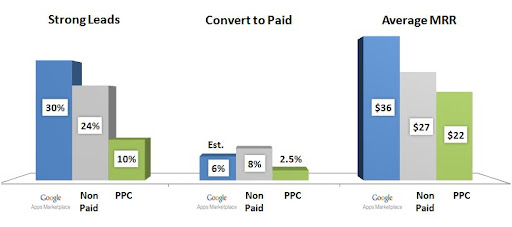
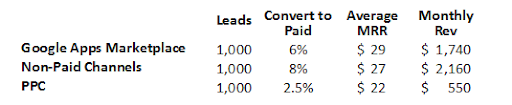
The statistics are fantastic, and have improved the profitability of our customer acquisition programs significantly. Today, we get "free" leads generated by SEO, PR and buzz (Non-Paid). These are the Holy Grail source of profitable customers. We add $2,160 a month in recurring revenue for every 1,000 leads that come in via non-paid channels. At $1,740 a month per 1,000 leads, Google Apps Marketplace is also a very profitable channel that brings up the overall averages (subtract the 20% Google is planning to charge for Apps customers).
 None of the statistics above matter without lead volume to power them. Thats where the Google Apps Marketplace really makes these numbers sing. Weve seen a very meaningful increase in high quality, non-paid lead flow directly attributable to Google Apps customers.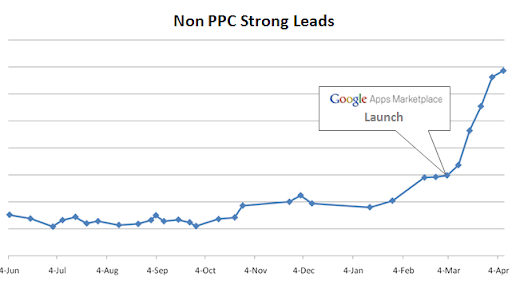
Moving Forward
Customer requests for features and enhancements to our Apps integration have already started pouring in. They are great guideposts toward attracting a larger percentage of these great Apps users.The Google Apps Marketplace is a rich source of customers, so staying above the noise as it attracts more ISVs will be a priority. Were confident we can continue refining our product and services to deliver a superior solution. And, well count on the Google team to value customer success and application utility as primary criteria for rating and ranking the vendor directories.
Monday, March 9, 2015
Automatically Generate Maps and Directions with Google Apps Script
Following up on our recent post about the new Doc List capability in Google Apps Script, we thought we’d take a moment to look a little more closely at another new feature in Apps Script - integration with Google Maps. Google Maps has had an API for quite some time, but now we’ve made it very easy to generate customized maps and driving directions straight from a script.
A mail merge is often used to automate some of the drudgery involved in sending invitations to a large number of people. With the new Apps Script Maps Service you can easily add a map image to the email, and even add a marker showing the event location.
While that’s nice, it’s hardly a time saver - why write code to generate the same image repeatedly? A much more useful feature is generating a custom map for each guest, along with personalized driving directions. We’ve made a spreadsheet template that includes just such a script - it’s available here.
Let’s look at a short code snippet that illustrates the calls required to generate a map image and add a marker at the start and end addresses:
function getMap (start, end) {
// Generate personalized static map.
var directions = Maps.newDirectionFinder()
.setOrigin(start)
.setDestination(end)
.getDirections();
var map = Maps.newStaticMap().setSize(500, 350);
map.setMarkerStyle(Maps.StaticMap.MarkerSize.MID,
"red", null);
map.addMarker(start);
map.addMarker(end);
return map.getMapUrl()
}
Running the function with start and end set to Google, San Francisco and Google, Mountain View, we get a link to the following image:

Along with generating maps images, the Maps feature can also find directions, retrieve elevation data and even perform some geocoding operations. Please note that any data returns by these APIs should not be used without displaying an associated map image - see the Google Maps API Terms of Service for more details.
Posted by Evin Levey, Google Apps Script Product Manager
Tuesday, February 17, 2015
The Top 4 Websites to Create Android Apps Online for Free

In this article I am sharing the 4 best websites that allows the facility to create genuine android apps without any programming knowledge. You can create your own app online using your browser for absolutely free. There is no need of any android development tool.
Also Read: Top 5 Cheapest Android Tablets below Rs. 5000 in India in 2013
Also Read: 4 Best Tips to Clean Your Touch Screen Device
AppsGeyser
AppsGeyser comes at first in this list. It is free web platform that allows you to create android app in easy steps. There is no need to code or even know how it works.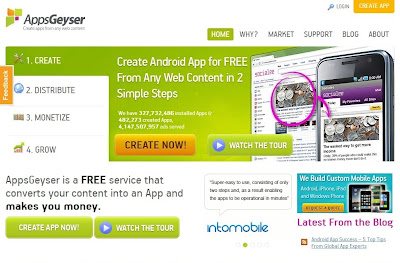
Andromo
With Andromo, anyone can make a professional android app. There is no programming required. Andromo generates 100% genuine android apps. They are faster, more efficient, better looking and more reliable than apps made with any other app development tool.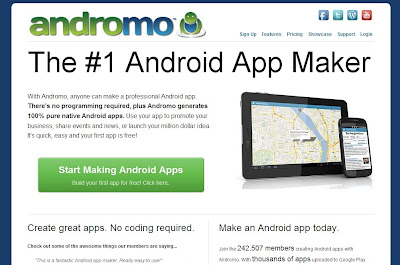
App.Yet
Using App.Yet, you can easily create a professional Android app. It is simple, easy and reliable. It will only take few minutes to build your own app.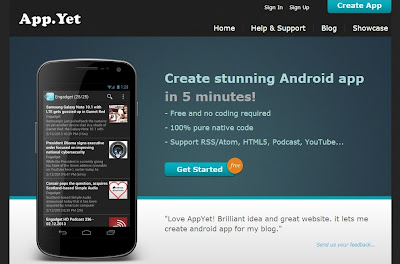
Also Read: C4droid: Download Free C/C++ Compiler for Android Platform
Also Read: Top 8 Free Alternatives to Paid Softwares
App Maker
It allows you to create your own android apps for free with easy-to-use builder. You can create your own applications online with your web browser. No special android development SDK software is required.
I have created this list on my own knowledge and by doing research on the internet. There are lots of other websites better then these. So try them, build your app and share your experience.
Source: http://www.shoutmeloud.com/5-sites-to-create-your-own-android-apps-for-free.html