Tuesday, March 10, 2015
Introducing the Google Drive Android API
 By Magnus Hyttsten, Developer Advocate, Google Drive
With todays developer preview of the Google Drive Android API in Google Play Services 4.1, you can add the convenience of Google Drive cloud storage to your apps without breaking a sweat.
While Drive integration on Android was possible in the past, the new API creates a faster, seamless experience that enables your apps to integrate with the Drive backend within minutes.
The new API offers a number of benefits:
1. Transparent use and syncing of local storage
The Google Drive Android API temporarily uses a local data store in case the device is not connected to a network. So, no need to worry about failed API calls in your app because the user is offline or experiencing a network connectivity problem. Data stored locally in this fashion will automatically and transparently be stored in the Google Drive cloud by Android’s sync scheduler when connectivity is available to minimize impact on battery life, bandwidth, and other resources.
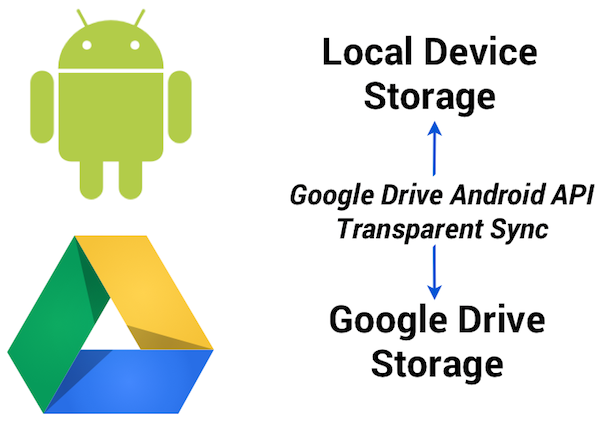
2. Designed for Android and available everywhere
The API was developed for Android and conforms to the latest Android design paradigms, such as using the new uniform client API GoogleAPIClient. And being part of the latest release of Google Play Services provides additional benefits:
- There’s minimal impact on the weight of your apps. As the client library is a stub to Google Play Services, incorporating the API has minimal impact on the size of your .apk binaries, resulting in faster downloads, fewer updates, and smaller execution footprint.
- User files are automatically synced between different devices (provided the app has the same namespace and is signed with the same key).
- Any device running the Gingerbread or later releases of Android and Google Play Services will automatically have support for the Google Drive Android API.
3. User interface components
File picker and creator user interface components are provided with this initial release of the Google Drive Android API, enabling users to select files and folders in Google Drive.
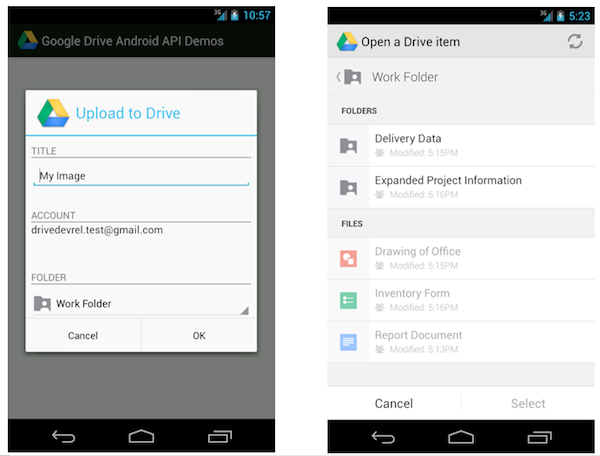
For example, the file picker is implemented as an Intent and allows you develop a native Android user experience with just a couple lines of code. This following code snippet launches the picker and allows the user to select a text file:
// Launch user interface and allow user to select file
    IntentSender i = Drive.DriveApi
        .newOpenFileActivityBuilder()
        .setMimeType(new String[] { “text/plain” })
        .build(mGoogleApiClient);
    startIntentSenderForResult(i, REQ_CODE_OPEN, null, 0, 0, 0);
The result is provided in the onActivityResult callback as usual.
4. Direct access to Drive functionality
You may be wondering how the Google Drive Android API relates to the Storage Access Framework released as part of Android 4.4 KitKat.
The Storage Access Framework is a generic client API that works with multiple storage providers, including cloud-based and local file systems. While apps can use files stored on Google Drive using this generic framework, the Google Drive API offers specialized functionality for interacting with files stored on Google Drive — including access to metadata and sharing features.
Additionally, as part of Google Play services the Google Drive APIs are supported on devices running Android 2.3 Gingerbread and above.
How to get started
As you incorporate the Google Drive Android API into your apps, we hope it makes your life a little bit easier, and enables you to create fun, powerful apps that take advantage of all that Android and Google Drive can do together.
For more information visit our documentation or explore our API demo and other sample applications on the official Google Drive GitHub repository.
Also check out the official launch video:
Let’s keep the discussions going on +GoogleDrive, and Stack Overflow (google-drive-sdk).
Magnus Hyttsten is a Developer Advocate on the Google Drive team. Beyond work, he enjoys trying out new technologies, thinking about product strategies, and exploring California.
Posted by Scott Knaster, Editor
Cross posted on the Google Developers Blog.

Introducing JavaScript Support for the Drive API
Did you know you can write a complete Google Drive App with JavaScript that runs completely in the web browser? You can! Your browser-based application, including Chrome extensions, can take advantage of our client library, or just use CORS requests to the API.
Your app can support all the functionality of the Drive API, including uploading files, downloading files, tracking changes, listing files and managing revisions. Also you can take advantage of our user interface components that make opening and sharing files easy.
We are really keen to offer first-class support to browser-based applications, so we have added JavaScript snippets to all our API reference documentation. Please let us know how we are doing by posting to Stack Overflow.
Want to try it out? Check out our Javascript Quickstart Guide, which helps you get your application up and running in five minutes or so.
 | Ali Afshar profile | twitter Tech Lead, Google Drive Developer Relations. As an eternal open source advocate, he contributes to a number of open source applications, and is the author of the PIDA Python IDE. Once an intensive care physician, he has a special interest in all aspects of technology for healthcare |
Documents List API Best Practices Sharing Multiple Documents Using Collections
Google Docs supports sharing collections and their contents with others. This allows multiple Google Docs resources to be shared at once, and for additional resources added to the collection later to be automatically shared.
Class.io, an EDU application on the Google Apps Marketplace, uses this technique. When a professor creates a new course, the application automatically creates a Google Docs collection for that course and shares it with all the students. This gives the students and professor a single place to go in Google Docs to access and manage all of their course files.
A collection is a Google Docs resource that contains other resources, typically behaving like a folder on a file system.
A collection resource is created by making an HTTP POST to the feed link with the category element’s term set to http://schemas.google.com/docs/2007#folder, for example:
<?xml version=1.0 encoding=UTF-8?>
<entry xmlns="http://www.w3.org/2005/Atom">
  <category scheme="http://schemas.google.com/g/2005#kind"
      term="http://schemas.google.com/docs/2007#folder"/>
  <title>Example Collection</title>
</entry>
To achieve the same thing using the Python client library, use the following code:
from gdata.docs.data import Resource

collection = Resource(folder)
collection.title.text = Example Collection

# client is an Authorized client
collection = client.create_resource(entry)
The new collection returned has a content element indicating the URL to use to add new resources to the collection. Resources are added by making HTTP POST requests to this URL.
<content
  src="https://docs.google.com/feeds/default/private/full/folder%3A134acd/contents"
  type="application/atom+xml;type=feed" />
This process is simplified in the client libraries. For example, in the Python client library, resources can be added to the new collection by passing the collection into the create_resource method for creating resources, or the move_resource method for moving an existing resource into the collection, like so:
# Create a new resource of document type in the collection
new_resource = Resource(type=document, title=New Document)
       client.create_resource(new_resource, collection=collection)

# Move an existing resource
client.move_resource(existing_resource, collection=collection)
Once resources have been added to the collection, the collection can be shared using ACL entries. For example, to add the user user@example.com as a writer to the collection and every resource in the collection, the client creates and adds the ACL entry like so:
from gdata.acl.data import AclScope, AclRole
from gdata.docs.data import AclEntry

acl = AclEntry(
    scope = AclScope(value=user@example.com, type=user),
    role = AclRole(value=writer)
)

client.add_acl_entry(collection, acl)
The collection and its contents are now shared, and this can be verified in the Google Docs user interface:
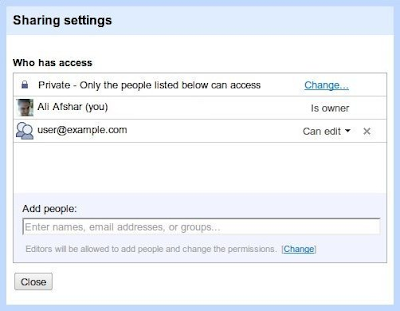
Note: if the application is adding more than one ACL entry, it is recommended to use batching to combine multiple ACL entries into a single request. For more information on this best practice, see the latest blog post on the topic.
The examples shown here are using the raw protocol or the Python client library. The Java client library also supports managing and sharing collections.
For more information on how to use collections, see the Google Documents List API documentation. You can also find assistance in the Google Documents List API forum.
| Ali Afshar profile | twitter Ali is a Developer Programs engineer at Google, working on Google Docs and the Shopping APIs which help shopping-based applications upload and search shopping content. As an eternal open source advocate, he contributes to a number of open source applications, and is the author of the PIDA Python IDE. Once an intensive care physician, he has a special interest in all aspects of technology for healthcare. |