Showing posts with label best. Show all posts

Tuesday, March 10, 2015

Documents List API Best Practices Sharing Multiple Documents Using Collections

Google Docs supports sharing collections and their contents with others. This allows multiple Google Docs resources to be shared at once, and for additional resources added to the collection later to be automatically shared.

Class.io, an EDU application on the Google Apps Marketplace, uses this technique. When a professor creates a new course, the application automatically creates a Google Docs collection for that course and shares it with all the students. This gives the students and professor a single place to go in Google Docs to access and manage all of their course files.

A collection is a Google Docs resource that contains other resources, typically behaving like a folder on a file system.

A collection resource is created by making an HTTP POST to the feed link with the category element’s term set to http://schemas.google.com/docs/2007#folder, for example:

<?xml version=1.0 encoding=UTF-8?>
<entry xmlns="http://www.w3.org/2005/Atom">
<category scheme="http://schemas.google.com/g/2005#kind"
term="http://schemas.google.com/docs/2007#folder"/>
<title>Example Collection</title>
</entry>

To achieve the same thing using the Python client library, use the following code:

from gdata.docs.data import Resource

collection = Resource(folder)
collection.title.text = Example Collection

# client is an Authorized client
collection = client.create_resource(entry)

The new collection returned has a content element indicating the URL to use to add new resources to the collection. Resources are added by making HTTP POST requests to this URL.

<content 
src="https://docs.google.com/feeds/default/private/full/folder%3A134acd/contents"
type="application/atom+xml;type=feed" />

This process is simplified in the client libraries. For example, in the Python client library, resources can be added to the new collection by passing the collection into the create_resource method for creating resources, or the move_resource method for moving an existing resource into the collection, like so:

# Create a new resource of document type in the collection
new_resource = Resource(type=document, title=New Document)
client.create_resource(new_resource, collection=collection)

# Move an existing resource
client.move_resource(existing_resource, collection=collection)

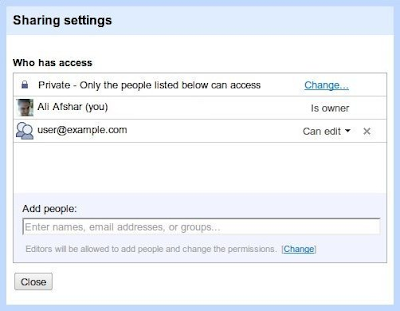
Once resources have been added to the collection, the collection can be shared using ACL entries. For example, to add the user user@example.com as a writer to the collection and every resource in the collection, the client creates and adds the ACL entry like so:

from gdata.acl.data import AclScope, AclRole
from gdata.docs.data import AclEntry

acl = AclEntry(
scope = AclScope(value=user@example.com, type=user),
role = AclRole(value=writer)
)

client.add_acl_entry(collection, acl)

The collection and its contents are now shared, and this can be verified in the Google Docs user interface:
Note: if the application is adding more than one ACL entry, it is recommended to use batching to combine multiple ACL entries into a single request. For more information on this best practice, see the latest blog post on the topic.

The examples shown here are using the raw protocol or the Python client library. The Java client library also supports managing and sharing collections.

For more information on how to use collections, see the Google Documents List API documentation. You can also find assistance in the Google Documents List API forum.


Ali Afshar profile | twitter

Ali is a Developer Programs engineer at Google, working on Google Docs and the Shopping APIs which help shopping-based applications upload and search shopping content. As an eternal open source advocate, he contributes to a number of open source applications, and is the author of the PIDA Python IDE. Once an intensive care physician, he has a special interest in all aspects of technology for healthcare.

Read more »

Monday, March 2, 2015

The Best Quick Reference Guides to Web 2 0 on the Planet Period!


CLICK HERE
...for the Scoop.it version to all!

THE STORY!

Last year, the amazing Prof. Dr. Mohamed Amin (Deputy Director, e-Learning, Centre for Academic Development, UKM) discovered through a large survey he conducted to academics and students from mostly public universities in Malaysia that there was a lack of awareness (and training opportunities) about Web 2.0, and how Web 2.0 can be used for learning and teaching. 

So, what did Prof. Amin do? Sit down and write another white paper, or research report recommending this and that? That is typical old school mentality, which I suppose some academics would probably still do. No, instead....   


QUICK REFERENCE GUIDES

Prof. Amin started using several different types of Web 2.0 tools (Scribd, SlideShare, GoAnimate, YouTube, etc) to create/publish quick reference guides in creative ways exploring the "What, Why and How" of using Web 2.0 tools for learning and teaching. Since then, he has continued his increasingly successful mission to make a change, and here is a growing list of his amazing work to provide a gentle introduction to using Web 2.0 tools for learning and teaching: 
  • JiT2U - Mobile Version to Learning Web 2.0 
  • Web 2.0 Presentation Tools: A Quick Guide
  • Web 2.0 Content Creation Tools
  • Web 2.0 Research Tools
  • Web 2.0 Survey & Polling Tools
  • Web 2.0 Sharing Tools
  • Web 2.0 Collaboration Tools
  • Web 2.0 Social Networking Tools
  • Web 2.0 Tools in Education
  • Web 2.0 e-Publishing Tools
  • Web 2.0 Annotation & Bookmarking Tools 
  • Web 2.0 Mindmapping & Brainstorming Tools
  • 40 Must-know Web 2.0 Edutools
  • Web 2.0 Interactive Tools: A Quick Guide
  • More...
Here is one of his GoAnimate animations exploring how to use YouTube for learning and teaching (Check out his YouTube channel, too):


RESULTS?

So far, his Web 2.0 (OER) work has reached people from more than a hundred countries, and this growing collection has now been viewed more than a 150,000 times. However, his amazing work has yet to go really viral, and if it does...WOW!

However, as I discussed with my dear friend Prof. Amin yesterday (before my OER Talk at UKM) is that it will be difficult to keep all the quick reference guides updated as he adds new Web 2.0 tools to the growing collection. The navigation and especially the interface of many Web 2.0 tools keep on changing as they evolve, and to keep that updated in quick reference guides will certainly require a lot of extra work (and headaches). 

One way, is to convert these quick reference guides into Wiki format using for example Google Sites, and then easily invite other interested educators to participate in keeping them updated. Another way is to focus more on the WHAT and WHY (including learning and teaching tips), and then simply link to the HOW, which now many Web 2.0 tools (e.g. Twitter help) are doing a pretty good job (also they will certainly update the screenshots and changes faster).

Whatever, Prof. Amin plans for the future, his amazing work deserves a BIG KUDOS!

Yes, his quick reference guides to Web 2.0 tools is certainly a learning treasure for anyone (who can read English or Malay) :)

Read more »

Saturday, February 28, 2015

Five Best Antivirus Softwares

Now a days Computer and internet is the basic need of everyone. Internet is widely used all across the world, through which users can exchange files, data, and informations with one another while consuming a very little time. Since almost have access to internet, while some of other users that uses computer and internet in negative ways like creating Viruses and Malwares that can access others system and can cause serious harm to others pc. A Virus or a malware can directly or indirectly attacks your system files that can make your system to stop working or either you can loose your personal data. In this computer tip, ill tell you about worlds best and renowned Anti Virus Software that will help users to keep themselves safe and secure from different viruses. You can compare all the Antivirus Software, then you can choose the right one for you.

Best Antivirus Software

What should someone look and observe while choosing an Anti Virus software? The answer to this question is the Main thing to look after is Features means the antivirus has what features and what types of viruses it can detect and delete. And the other main thing to look is Performance, that either by installing this antivirus can effect your Systems performance or not. Take a look at the Best Antiviruses So far below.
Bitdefender Antivirus Plus:
Bit-defender is the most economical and mostly featured antivirus program that can help you to keep yourself safe from all kind of viruses, malwares, worms and trojan etc. The price of Bitdefender is 29.95$.
Official website: http://www.bitdefender.com

 Kaspersky Anti-Virus 2014:
Kaspersky Anti-virus is the most famous and widely used safety tool that can help users to stay safe while using internet. It has all the features to secure you from any kind of Trojans, spywares, viruses and other infected files. This product costs you about 59.95$ a bit Expensive but quite helpful.
Official Website: http://www.kaspersky.com

Norton Antivirus:
Norton AntiVirus software is also third best antivirus software that help you to stay secure while using computer. It can detect any files that will try to make some suspicious activity in your system. It also detects all types of malwares and spywares automatically. This handy software will cost you about 39.99$.
Official Website: http://www.norton.com


F-Secure AntiVirus:
F-Secure is also an important antivirus tool that comes handy if you always copy new files and data. Because viruses and other trojans can come with the data and can enter in your system files and can Damage them. F-Secure AntiVirus can keep you secure. This tool does not support gaming mode. This tool will costs you 39.99$.
Official Website: http://www.f-secure.com/


AVG AntiVirus:
AVG Antivirus is another very good antivirus software that has almost all the features including in it. Mostly users has used this AntiVirus program. This software has all the features but performance is lower then the above ones but still a very good anti Virus software. The cost of this software is 34.99$.
Official Website: http://www.avg.com/


Read more »