Monday, March 2, 2015
The Best Quick Reference Guides to Web 2 0 on the Planet Period!

THE STORY!
QUICK REFERENCE GUIDES
- JiT2U - Mobile Version to Learning Web 2.0
- Web 2.0 Presentation Tools: A Quick Guide
- Web 2.0 Content Creation Tools
- Web 2.0 Research Tools
- Web 2.0 Survey & Polling Tools
- Web 2.0 Sharing Tools
- Web 2.0 Collaboration Tools
- Web 2.0 Social Networking Tools
- Web 2.0 Tools in Education
- Web 2.0 e-Publishing Tools
- Web 2.0 Annotation & Bookmarking Tools
- Web 2.0 Mindmapping & Brainstorming Tools
- 40 Must-know Web 2.0 Edutools
- Web 2.0 Interactive Tools: A Quick Guide
- More...
RESULTS?

Wetpaint 1 2 3 My Free Wiki Is Up!
- Link to Wetpaint
- Wetpaint Videos

WIKI?
A wiki is a type of website that anyone can easily edit and help grow through collaboration.
 WETPAINT?
Is a 100% Free wiki (collaborative) authoring tool (it claims to be! Visit Professional Services and explore.), which enables anyone easily to start a free wiki that they can share with students, colleagues, friends, family, etc.
FEATURES?
Wetpaint is a reasonably easy-to-learn/use wiki tool, which has an amazingly attractive look-and-feel (subject to subjectivity!). Yeah, I can tell you also that this tool has an amazing list of features, and they are adding new features all the time (according to them), so theres always something new to try. Here are some of the juicy features:
- 1-2-3 Simple Site Creation
- Public or Private Sites
- Pre-Populated Templates (Classrooms, Group Projects, Gaming Clans, etc)
- Easy Photo/Video Integration
- Page Level Discussion Threads
- Customizable Page Templates
- Spell Check
- Menu of Popular Widgets
- Private Onsite Messaging
- Address Book Upload
- Site Statistics (Google Analytics and SiteMeter)
- RSS updates
- Email Notifications
- Etc.
Except for the annoying Google Ads (which is probably the main source of income for Wetpaint), floating toolbars, and the clipboard bug (minor fix needed!), this tool I believe is going to be a global Wiki smash hit soon. Dont ask me why! Just try it out for yourself :)
Sunday, March 1, 2015
Faculty 2 0 Joel L Hartman Charles Dziuban and James Brophy Ellison
 "(Conclusion)...As faculty members confront the expanding impact that technology is having on their scholarship, research, teaching, and students—what Peter Vaill calls "Permanent White Water"—IT organizations must assess what role they will play in shaping, implementing, and supporting the assimilation of IT into the teaching and learning process. Should the goal be to persuade and assist faculty members to adopt technology, or should it be to enable systemic transformation? When technology is "bolted on" to an existing process, the usual result is a modest improvement in the process and also higher costs. To obtain both greater improvement and reduced costs, higher education institutions must redesign the process so as to take maximum advantage of the enabling capabilities of technologies. Such initiatives, as Bates suggests, will ultimately produce the greatest benefit for the largest number of faculty in a manner that aligns with institutional goals, is sustainable, and will lead to transformation at course, program, and institutional levels."
Wednesday, February 11, 2015
C program to find the sum of the series x x 2 2 x 3 3 x n n
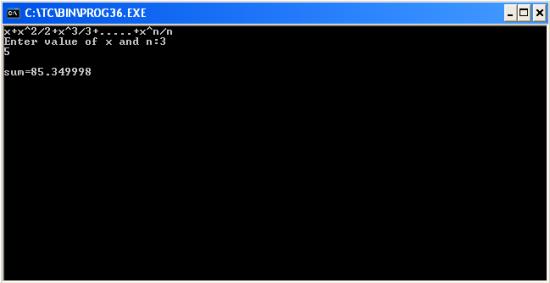
#include<stdio.h>
#include<conio.h>
#include<math.h>
void main()
{
int i,n;
float x,sum=0;
clrscr(); //to clear the screen
printf("x+x^2/2+x^3/3+.....+x^n/n");
printf("
Enter value of x and n:");
scanf("%f%d",&x,&n);
for(i=1;i<=n;++i)
sum+=pow(x,i)/i;
printf("
sum=%f",sum);
getch(); //to stop the screen
}
Tuesday, January 27, 2015
Up all night the LinkedIn Intern Hackday Day 2
In my previous post, I showed you the sights and sounds from day 1 of the LinkedIn Intern Hackday. This post will do the same for day 2, Saturday July 30. The Intern Hackday was an overnight affair and just about all the interns worked straight through the night to get their hacks done by noon. 45 projects were submitted, featuring a wide range of ideas, platforms and technologies. We saw games, music apps, UI frameworks, augmented reality, AI, location apps, IDE extensions, p2p file sharing, and even a 20 page report.
The pictures below are, as usual, mostly from iPhones. Keep your eyes on the Intern Hackday site for the official event photos, videos and project submissions soon!
| 12:00am: one of the interns turns 21! |
| 2:30am: Dylan Field gives us a preview of his teams hack |
 |
| 5:00am: the hackers are still going strong |
 |
| Well, most of them anyway |
 |
| Programmer, noun: an ingenious device that turns caffeine into code |
 |
| 6:30am: the sun comes up |
 |
| 10:00am: Brooke and her dog drop by to provide emotional support |
 |
| 11:00am: Allen announces the 1 hour warning |
 |
| Less than 60 minutes to get the hacks submitted. Crunch time! |
 |
| 11:55am: 5 minute warning. |
 |
| 12:01pm: the hacks are submitted. Time to crash. |
 |
| Sandwiched between bean bags |
 |
| 3:00pm: picking the 15 finalists |
 |
| 4:00pm: celebrity judges James Gosling, Kevin Scott and Omar Hamoui in the house! |
 |
| Adam Nash kicks things off |
 |
| The judges look on as some amazing projects are presented |
 |
| Rocks: a 3d, in-browser, multiplayer game using node.js, socket.io, WebGL and some serious technical wizardry |
 |
| LinkedUp: like Chat Roulette, but with less... genitalia. Thanks for cleaning that up Adam! |
 |
| After deliberating, the judges picked the winners. 3rd place went to the beam.it team! |
 |
| 2nd place: LinkedOut! |
 |
| 1st place: rocks! |
http://twitter.com/adamnash/status/97481275065110528
Friday, January 16, 2015
Android MySQL Client Part 2
My first tutorial Android MySQL client is about read data from a MySQL database. Here Im going to insert data to MySQL database using an Android program. Concept is same as before (Before start test this read first tutorial.)
Program has three main parts.
1. Database (MySQL)
2. Java web service.
3. Android application.
Java web service deployed on Tomcat server has a method which accepts two values and it runs a quarry on database to insert data & also this method returns a string.
The Android application calls that web service method remotely with two values using ksoap library. Then web service runs a query on database table and inserts data

CREATE DATABASE login;
USE login;
CREATE TABLE users(
name varchar(20),
password  varchar(20)
);
import java.sql.Connection;In line 12 root and chathura are user and the password. Change those with your username and the password.
import java.sql.DriverManager;
import java.sql.PreparedStatement;
public class Users {
public String insertData(String userName,String userPassword){
try{
Class.forName("com.mysql.jdbc.Driver");
Connection con = DriverManager.getConnection("jdbc:mysql://localhost:3306/login","root","chathura");
PreparedStatement statement = con.prepareStatement("INSERT INTO users(name,password) VALUES ("+userName+","+userPassword+");");
int result = statement.executeUpdate();
}
catch(Exception exc){
System.out.println(exc.getMessage());
}
return "Insertion successfull!!";
}
}
This java web service has JDBC connector to access the database. Click here to download the connector.Import JDBC connector to your project. This tutorial is about importing the ksaop library. In the same way you can import JDBC library also. It is simple
You can implement the web service easily by following my these posts.
1. Create java web service in Eclipse using Axis2 (Part 01)
2. Create java web service in Eclipse using Axis2 (Part 02)
3. Android application.
The Android application uses ksoap2 library to access java web service. You can find More details about implementation of Android client applications from here. If you are planning to use new Android version read this tutorial.
Here is the code for Android application.
You need to change name space, url, soap action and method name according to your web service.
import org.ksoap2.SoapEnvelope;
import org.ksoap2.serialization.PropertyInfo;
import org.ksoap2.serialization.SoapObject;
import org.ksoap2.serialization.SoapPrimitive;
import org.ksoap2.serialization.SoapSerializationEnvelope;
import org.ksoap2.transport.HttpTransportSE;
import android.app.Activity;
import android.os.Bundle;
import android.view.View;
import android.widget.Button;
import android.widget.EditText;
import android.widget.TextView;

public class AndroidMySQLClientActivity extends Activity{
    private final String NAMESPACE = "http://ws.login.com";
    private final String URL = "http://175.157.3.42:8085/InsertToUsers/services/Users?wsdl";
    private final String SOAP_ACTION = "http://ws.login.com/insertData";
    private final String METHOD_NAME = "insertData";
    Button btninsert;
    /** Called when the activity is first created. */
    @Override
    public void onCreate(Bundle savedInstanceState) {
        super.onCreate(savedInstanceState);
        setContentView(R.layout.main);

        btninsert = (Button)findViewById(R.id.btn_insert);
        btninsert.setOnClickListener(new View.OnClickListener() {
            public void onClick(View v) {
             insertValues();
            }
        });
    }

    public void insertValues(){
     SoapObject request = new SoapObject(NAMESPACE, METHOD_NAME);
     EditText userName = (EditText) findViewById(R.id.editText1);
     String user_Name = userName.getText().toString();
     EditText userPassword = (EditText) findViewById(R.id.editText2);
     String user_Password = userPassword.getText().toString();

     //Pass value for userName variable of the web service
        PropertyInfo unameProp =new PropertyInfo();
        unameProp.setName("userName");//Define the variable name in the web service method
        unameProp.setValue(user_Name);//Define value for fname variable
        unameProp.setType(String.class);//Define the type of the variable
        request.addProperty(unameProp);//Pass properties to the variable

      //Pass value for userPassword variable of the web service
        PropertyInfo passwordProp =new PropertyInfo();
        passwordProp.setName("userPassword");
        passwordProp.setValue(user_Password);
        passwordProp.setType(String.class);
        request.addProperty(passwordProp);

        SoapSerializationEnvelope envelope = new SoapSerializationEnvelope(SoapEnvelope.VER11);
        envelope.setOutputSoapObject(request);
        HttpTransportSE androidHttpTransport = new HttpTransportSE(URL);

        try{
         androidHttpTransport.call(SOAP_ACTION, envelope);
            SoapPrimitive response = (SoapPrimitive)envelope.getResponse();

            TextView result = (TextView) findViewById(R.id.textView2);
            result.setText(response.toString());

     }
     catch(Exception e){

     }
    }

}
5. Content of the Manifest.xml (Add internet permission)
Note : Click here to download the Android project.
Do you think this is helpful ? Please write your ideas :)
Sunday, January 11, 2015
HOW TO DRAW AN APPLE IN MS WORD PART 2
