Showing posts with label c. Show all posts
Showing posts with label c. Show all posts
Wednesday, February 18, 2015
First C Program Hello World
We have gained lots of theoretical knowledge. Now its time to move on and write our first C program and understand it.
Now try to understand this program step by step.
1. #include<stdio.h>: First statement started with #, it is called pre-processor directive. We will learn about them thoroughly in later tutorials. #include<stdio.h> is used to include the stdio.h header file in our program. Header files contains the functions that we use in our program. Here we have used printf() function which is present in stdio.h header file.
2. void main(): Here main() is the function. A program always starts with the main() function and every program must have main(). Here void is the return type of this function. It means main() function will not return anything. The opening curly braces ({) and closing curly braces (}) shows the body of the function.
main() can also be called as a collection of statements.
3. printf(): Here printf() is another function. This is used to print the values on the screen. Its general form is
printf(“Statement you want to print on screen”);
4. Semicolon (;) is used for denoting the termination of statement. It is also called statement terminator in C Language.
1. Open Turbo C and type the program.
2. After that press F2 to save the program with .c extension. Eg: program.c
3. Now Press ALT + F9 to compile and CTRL + F9 to run the program.
4. Press ALT + F5 to view the output.
Well this is the easiest C program. Now lets move on and try slightly complicated program of multiplication of two numbers.
Hello World C Program
This is a program to print “Hello World”#include<stdio.h>
void main()
{
printf("Hello World");
}
Output
Hello WorldNow try to understand this program step by step.
1. #include<stdio.h>: First statement started with #, it is called pre-processor directive. We will learn about them thoroughly in later tutorials. #include<stdio.h> is used to include the stdio.h header file in our program. Header files contains the functions that we use in our program. Here we have used printf() function which is present in stdio.h header file.
2. void main(): Here main() is the function. A program always starts with the main() function and every program must have main(). Here void is the return type of this function. It means main() function will not return anything. The opening curly braces ({) and closing curly braces (}) shows the body of the function.
main() can also be called as a collection of statements.
3. printf(): Here printf() is another function. This is used to print the values on the screen. Its general form is
printf(“Statement you want to print on screen”);
4. Semicolon (;) is used for denoting the termination of statement. It is also called statement terminator in C Language.
How to compile and execute?
Here we are using TURBO C compiler. If you have not downloaded it yet than download it from here.1. Open Turbo C and type the program.
2. After that press F2 to save the program with .c extension. Eg: program.c
3. Now Press ALT + F9 to compile and CTRL + F9 to run the program.
4. Press ALT + F5 to view the output.
Well this is the easiest C program. Now lets move on and try slightly complicated program of multiplication of two numbers.
C Program to multiply two numbers
#include<stdio.h>

void main()
{
 int a, b, c;
 a=3;
 b=4;
 c=a*b;
 printf("Answer is %d",c);
}
Output
Now lets try to understand this program.
1. First two statements are same as above program. In the third statement I have written
int a, b, c;
Here int is the keyword for integer and a, b and c are the integer variables. So they can only store integer values.
2. In the next two statements I have written
a=3;
b=4;
In these statements we are storing the values 3 and 4 in a and b variables respectively.
3. In the next statement
c=a*b;
We are multiplying the values in a and b, and storing them in the variable c.
4. Now in the last statement we are printing the value which is in c. A new thing %d which we have used in this program. It is called format specifier. It usually tell the compiler that it has to print the integer value on screen which is present in a variable.
Some common format specifiers are given below
a. %d for integers
b. %c for characters
c. %f for floating point numbers or real numbers
A bit elaborated form of printf() is given below
printf(“string you want to print ”, variable);
Suppose we have to print the value in b so we will use the function.
printf(“%d”,b);
Things to keep in mind
1. Use semicolon at the end of each statement.2. Type the statements in main program as the way you want them to be executed.
3. Never try to memorise any program. Just try to understand it.
4. Learning programming is all about practical. So start doing practical from now.

C program to produce the folowing design using s

#include<stdio.h>
#include<conio.h>
void main()
{
int i,j,n;
char ch=A;
clrscr(); //to clear the screen
printf("How many lines?");
scanf("%d",&n);
for(i=0;i<n;++i)
{
for(j=0;j<=i;++j)
printf("%c",ch+j);
printf("
");
}
getch(); //to stop the screen
}
Tuesday, February 17, 2015
C Program and Algorithm for Conversion of an Expression from Infix to Postfix
In infix notation or expression operators are written in between the operands while in postfix notation every operator follows all of its operands.
6. If a right parenthesis is encountered, then

Example:
Infix Expression: 5+3*2
Postfix Expression: 5 3 2*+.
Algorithm for Conversion of an Expression from Infix to Postfix
Let Q be any infix expression and we have to convert it to postfix expression P. For this the following procedure will be followed.
1. Push left parenthesis onto STACK and add right parenthesis at the end of Q.
2. Scan Q from left to right and repeat step 3 to 6 for each element of Q until the STACK is empty.
3. If an operand is encountered add it to P.
4. If a left parenthesis is encountered push it onto the STACK.
5. If an operator is encountered, then
- Repeatedly pop from STACK and add to P each operator which has same precedence as or higher precedence than the operator encountered.
- Push the encountered operator onto the STACK.
6. If a right parenthesis is encountered, then
- Repeatedly pop from the STACK and add to P each operator until a left parenthesis is encountered.
- Remove the left parenthesis; do not add it to P.
7. Exit
Also Read: C Program and Algorithm for Evaluation of a Postfix Expression
Also Read: What is Quick Sort? Algorithm and C Program to Implement Quick Sort
An example of converting infix expression into postfix form, showing stack status after every step is given below. Here RPN stands for reverse polish notation (postfix notation).
C Program for Conversion of an Expression from Infix to Postfix
// Operator supported: +,-,*,/,%,^,(,)
// Operands supported: all single character operands
#include<stdio.h>
#include<conio.h>
#include<ctype.h>
#define MAX 50
typedef struct stack
{
int data[MAX];
int top;
}stack;
int precedence(char);
void init(stack *);
int empty(stack *);
int full(stack *);
int pop(stack *);
void push(stack *,int);
int top(stack *); //value of the top element
void infix_to_postfix(char infix[],char postfix[]);
void main()
{
char infix[30],postfix[30];
printf("Enter an infix expression(eg: 5+2*4): ");
gets(infix);
infix_to_postfix(infix,postfix);
printf("
Postfix expression: %s",postfix);
Postfix expression: %s",postfix);
}
void infix_to_postfix(char infix[],char postfix[])
{
stack s;
char x,token;
int i,j; //i-index of infix,j-index of postfix
init(&s);
j=0;
for(i=0;infix[i]!=
Read more »
Saturday, February 14, 2015
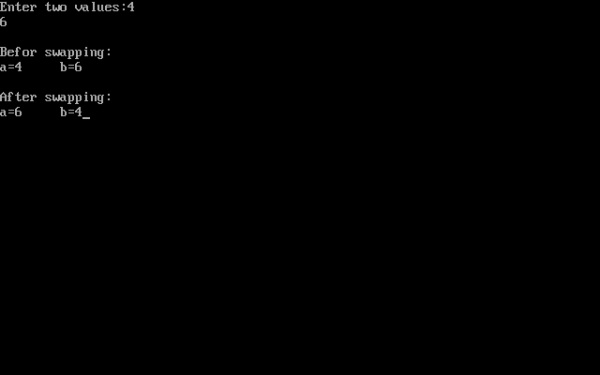
C program to swap values of two variables using pass by reference method
#include<iostream.h>
#include<conio.h>
void main()
{
clrscr();
int a,b;
void swap(int &,int &);
cout<<"Enter two values:";
cin>>a>>b;
cout<<"
Befor swapping:
a="<<a<<" b="<<b;
swap(a,b);
cout<<"
After swapping:
a="<<a<<" b="<<b;
getch();
}
void swap(int & x,int & y)
{
int temp;
temp=x;
x=y;
y=temp;
}
Wednesday, February 11, 2015
C program to produce the following design using s

#include<stdio.h>
#include<conio.h>
void main()
{
int i,j,k,n;
clrscr(); //to clear the screen
printf("How many lines:");
scanf("%d",&n);
n*=2;
printf("
");
for(i=1;i<n;i+=2)
{
for(j=n-1;j>i;j-=2)
printf(" ");
for(k=1;k<=i;++k)
{
if(i==n-1)
printf("*");
else
if(k==1||k==i)
printf("*");
else
printf(" ");
}
printf("
");
}
getch(); //to stop the screen;
}
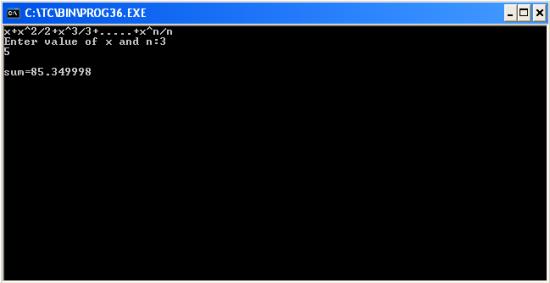
C program to find the sum of the series x x 2 2 x 3 3 x n n
#include<stdio.h>
#include<conio.h>
#include<math.h>
void main()
{
int i,n;
float x,sum=0;
clrscr(); //to clear the screen
printf("x+x^2/2+x^3/3+.....+x^n/n");
printf("
Enter value of x and n:");
scanf("%f%d",&x,&n);
for(i=1;i<=n;++i)
sum+=pow(x,i)/i;
printf("
sum=%f",sum);
getch(); //to stop the screen
}
Subscribe to:
Posts (Atom)