Showing posts with label part. Show all posts
Showing posts with label part. Show all posts
Tuesday, February 3, 2015
Creating a Flex AIR text editor Part 66
In this tutorial we will update our find/replace panel to make it more efficient and fix some problems.
When searching through really big files (thousands of lines is what Im talking about), forcing the code to perform the search operation every time the user changes something in the main text area or the search field may be slow. It is especially slow if highlighting is turned on. Actually, higlighting is pretty slow on its own - I tried searching through a 1000 line code and I was searching for the space character " ". It found over 2500 instantly with highlighting turned off, but if I turn it on - the program freezes. It froze for about a minute before I just closed it.
Lets turn the highlighting off by default - set selected to false.
Lets not call updateSearch() function on every change event of the search text input, but rather do it when the user presses enter (enter event of the text input) or presses a button underneath:
Lets also remove this function from the change event of the main TextArea and instead call resetSearch() there:
The resetSearch() function sets the search text field to blank and calls updateSearch():
Lets also call this function in changePanelTab():
Now lets update moveResults() so that it also scrolls to the current selection:
And finally, lets update updateSearch() so that it selects the first result:
And were done for today.
Full code:
Thanks for reading!
Read more »
When searching through really big files (thousands of lines is what Im talking about), forcing the code to perform the search operation every time the user changes something in the main text area or the search field may be slow. It is especially slow if highlighting is turned on. Actually, higlighting is pretty slow on its own - I tried searching through a 1000 line code and I was searching for the space character " ". It found over 2500 instantly with highlighting turned off, but if I turn it on - the program freezes. It froze for about a minute before I just closed it.
Lets turn the highlighting off by default - set selected to false.
<s:CheckBox label="Highlight all" id="checkHighlight" change="updateSearch()" />
Lets not call updateSearch() function on every change event of the search text input, but rather do it when the user presses enter (enter event of the text input) or presses a button underneath:
<s:TextInput id="searchInput" width="100%" enter="updateSearch();" />
<s:Button id="searchButton" label="Search"  width="100%" click="updateSearch();" />
Lets also remove this function from the change event of the main TextArea and instead call resetSearch() there:
<s:TextArea id="textArea" width="{textWidth}" height="{textHeight}" y="{textY}" x="{textX}" lineBreak="{(pref_wrap)?(toFit):(explicit)}" click="cursorFix(); updateStatus();" change="updateStatus(); countLines(); textChange(); saveUpdate(); resetSearch();" keyDown="updateStatus();" borderVisible="false" focusThickness="0" />
The resetSearch() function sets the search text field to blank and calls updateSearch():
private function resetSearch():void {
if(searchInput!=null){
searchInput.text = "";
updateSearch();
}
}
Lets also call this function in changePanelTab():
private function changePanelTab():void {
if (sidePaneButtons.selectedIndex == 3) {
focusManager.setFocus(searchInput);
}else {
focusManager.setFocus(textArea);
resetSearch();
}
updateSearch();
}
Now lets update moveResults() so that it also scrolls to the current selection:
private function moveResults(ind:int):void {
if (searchResults.length > 0) {
focusManager.setFocus(textArea);
textArea.selectRange(searchResults[ind], searchResults[ind] + searchInput.text.length);
textArea.scrollToRange(searchResults[ind], searchResults[ind] + searchInput.text.length);
selectedResult = ind;
}
}
And finally, lets update updateSearch() so that it selects the first result:
private function updateSearch():void {
var allFormat:TextLayoutFormat = new TextLayoutFormat();
allFormat.color = pref_fontsettings.fontcolor;
textArea.setFormatOfRange(allFormat, 0, textArea.text.length);
if (searchInput != null) {
searchResults = [];
if (searchInput.text != "") {
var lastIndex:int = 0;
var selectFormat:TextLayoutFormat = new TextLayoutFormat();
selectFormat.color = 0xff0000;

var tempText:String = textArea.text;
var tempInput:String = searchInput.text;
if (!checkCase.selected) {
tempText = textArea.text.toLowerCase();
tempInput = searchInput.text.toLowerCase();
}
while (tempText.indexOf(tempInput, lastIndex) >= 0) {
var thisIndex:int = tempText.indexOf(tempInput, lastIndex);
searchResults.push(thisIndex);
lastIndex = thisIndex + 1;
if(checkHighlight.selected){
textArea.setFormatOfRange(selectFormat, thisIndex, thisIndex + searchInput.text.length);
}
}
moveResults(0);
resultText.text = "Matches found: " + searchResults.length;
}else{
resultText.text = "";
}
}
}
And were done for today.
Full code:
<?xml version="1.0" encoding="utf-8"?>
<s:WindowedApplication xmlns:fx="http://ns.adobe.com/mxml/2009"
xmlns:s="library://ns.adobe.com/flex/spark"
xmlns:mx="library://ns.adobe.com/flex/mx"
xmlns:custom="*"
creationComplete="init();" title="Kirpad" showStatusBar="{pref_status}"
minWidth="400" minHeight="200" height="700" width="900">
<s:menu>
<mx:FlexNativeMenu dataProvider="{windowMenu}" showRoot="false" labelField="@label" keyEquivalentField="@key" itemClick="menuSelect(event);" />
</s:menu>
<fx:Script>
<![CDATA[
import flash.data.SQLConnection;
import flash.events.KeyboardEvent;
import flash.events.Event;
import flash.events.MouseEvent;
import flash.events.NativeWindowBoundsEvent;
import flash.filesystem.File;
import flash.filesystem.FileStream;
import flash.net.SharedObject;
import flashx.textLayout.accessibility.TextAccImpl;
import flashx.textLayout.edit.EditManager;
import flashx.textLayout.edit.TextScrap;
import flashx.textLayout.formats.TextLayoutFormat;
import mx.collections.ArrayCollection;
import mx.controls.Alert;
import mx.controls.TextArea;
import mx.events.FlexNativeMenuEvent;
import flashx.textLayout.elements.TextFlow;
import flashx.textLayout.elements.Configuration;
import flash.system.System;
import flash.desktop.Clipboard;
import flash.desktop.ClipboardFormats;
import flash.ui.Mouse;
import mx.events.CloseEvent;
import flash.ui.ContextMenu;
import flash.ui.ContextMenuItem;
import flash.events.ContextMenuEvent;
import mx.events.ResizeEvent;
import mx.core.FlexGlobals;
import mx.printing.FlexPrintJob;
import mx.printing.FlexPrintJobScaleType;
import flashx.undo.UndoManager;
import flashx.textLayout.operations.UndoOperation;
import flash.data.SQLConnection;
import flash.events.SQLEvent;
import flash.data.SQLStatement;
import flash.data.SQLResult;
import flash.data.SQLMode;
import flash.net.Responder;
import XML;
import XMLList;
private var preferences:SharedObject = SharedObject.getLocal("kirpadPreferences");
[Bindable]
private var pref_wrap:Boolean = true;
[Bindable]
private var pref_status:Boolean = true;
[Bindable]
private var pref_toolbar:Boolean = true;
[Bindable]
private var pref_sidepane:Boolean = true;
[Bindable]
private var pref_linecount:Boolean = true;
[Bindable]
public var pref_fontsettings:Object = new Object();
private var initHeight:Number;
private var heightFixed:Boolean = false;
private var statusMessage:String;
[Bindable]
private var textHeight:Number;
[Bindable]
private var textWidth:Number;
[Bindable]
private var textY:Number;
[Bindable]
private var textX:Number;
[Bindable]
private var tabY:Number;
[Bindable]
private var sidePaneY:Number;
[Bindable]
private var sidePaneX:Number;
[Bindable]
private var sidePaneHeight:Number;
[Bindable]
private var sidePaneWidth:Number = 180;
[Bindable]
private var sideContentWidth:Number = 170;
[Bindable]
private var tabWidth:Number;
[Bindable]
private var lineCountWidth:Number = 40;
[Bindable]
private var lineNumbers:String = "1";
[Bindable]
private var lineDisplayedNum:int = 1;
[Bindable]
private var tabSelectedIndex:int = 0;
[Bindable]
private var canUndo:Boolean = false;
[Bindable]
private var canRedo:Boolean = false;
private var previousTextInOperation:String = "";
private var currentTextInOperation:String = "";
private var previousIndex:int = 0;
private var rightclickTabIndex:int = 0;
private var untitledNum:int = 0;
private var tabsToClose:int = 0;
private var closeAfterConfirm:Boolean = false;
public var fontWindow:FontWindow = new FontWindow();
public var snippetWindow:SnippetWindow = new SnippetWindow();
private var undoManager:UndoManager;
private var editManager:EditManager;
private var saveWait:Boolean = false;
private var saveAsQueue:Array = [];
public var connection:SQLConnection;
public var connection2:SQLConnection;
private var snippetData:Array;
private var categoryData:Array;
[Bindable]
public var snippetXML:XMLList;
private var searchResults:Array = [];
private var selectedResult:int = 0;
private function init():void {
// Create a listener for every frame
addEventListener(Event.ENTER_FRAME, everyFrame);
// Set initHeight to the initial height value on start
initHeight = height;
// Set preferences if loaded for the first time
if (preferences.data.firsttime == null) {
preferences.data.firsttime = true;
preferences.data.wrap = false;
preferences.data.status = true;
preferences.data.toolbar = true;
preferences.data.sidepane = true;
preferences.data.linecount = true;
preferences.data.fontsettings = {fontfamily:"Lucida Console", fontsize:14, fontstyle:"normal", fontweight:"normal", fontcolor:0x000000, bgcolor:0xffffff};
preferences.flush();
}
// Set preferences loaded from local storage
pref_wrap = preferences.data.wrap;
pref_status = preferences.data.status;
pref_toolbar = preferences.data.toolbar;
pref_sidepane = preferences.data.sidepane;
pref_fontsettings = preferences.data.fontsettings;
pref_linecount = preferences.data.linecount;
// Allow insertion of tabs
var textFlow:TextFlow = textArea.textFlow;
var config:Configuration = Configuration(textFlow.configuration);
config.manageTabKey = true;
// Set status message
statusMessage = "[ " + new Date().toLocaleTimeString() + " ] Kirpad initialized";
updateStatus();
// Close all sub-windows if main window is closed
addEventListener(Event.CLOSING, onClose);
// Add listener for the event that is dispatched when new font settings are applied
fontWindow.addEventListener(Event.CHANGE, fontChange);
// Update real fonts with the data from the settings values
updateFonts();
// Create a listener for resizing
addEventListener(NativeWindowBoundsEvent.RESIZE, onResize);
// Context menu declaration for the tabbar control
var cm_close:ContextMenuItem = new ContextMenuItem("Close tab");
cm_close.addEventListener(ContextMenuEvent.MENU_ITEM_SELECT, tabContextClose);
var cm_closeother:ContextMenuItem = new ContextMenuItem("Close other tabs");
cm_closeother.addEventListener(ContextMenuEvent.MENU_ITEM_SELECT, tabContextCloseOther);
var cm_save:ContextMenuItem = new ContextMenuItem("Save");
cm_save.addEventListener(ContextMenuEvent.MENU_ITEM_SELECT, tabContextSave);
var cm_duplicate:ContextMenuItem = new ContextMenuItem("Duplicate");
cm_duplicate.addEventListener(ContextMenuEvent.MENU_ITEM_SELECT, tabContextDuplicate);
var cm:ContextMenu = new ContextMenu();
cm.items = [cm_close, cm_closeother, cm_save, cm_duplicate];
cm.hideBuiltInItems();
tabBar.contextMenu = cm;
tabBar.addEventListener(MouseEvent.RIGHT_MOUSE_DOWN, tabRightClick);
// Context menu declaration for the tab management list control
sideList.contextMenu = cm;
sideList.addEventListener(MouseEvent.RIGHT_MOUSE_DOWN, listRightClick);
// Listen to keyboard
addEventListener(KeyboardEvent.KEY_DOWN, onKeyDown);
// Undo management
undoManager = new UndoManager();
editManager = new EditManager(undoManager);
textArea.textFlow.interactionManager = editManager;
// Select first tab
tabChange();
// Database management
var dbFile:File = File.applicationStorageDirectory.resolvePath("database.db");
connection = new SQLConnection();
connection2 = new SQLConnection();
connection2.open(dbFile, SQLMode.CREATE);
connection.addEventListener(SQLEvent.OPEN, onOpen);
connection.openAsync(dbFile, SQLMode.CREATE);
}
private function menuSelect(evt:FlexNativeMenuEvent):void {
(evt.item.@label == "New")?(doNew()):(void);
(evt.item.@label == "Open")?(doOpen()):(void);
(evt.item.@label == "Save")?(doSave(tabSelectedIndex)):(void);
(evt.item.@label == "Save As")?(doSaveAs(textArea.text, tabSelectedIndex)):(void);
(evt.item.@label == "Save All")?(doSaveAll()):(void);
(evt.item.@label == "Word wrap")?(pref_wrap = !pref_wrap):(void);
(evt.item.@label == "Cut")?(doCut()):(void);
(evt.item.@label == "Copy")?(doCopy()):(void);
(evt.item.@label == "Paste")?(doPaste()):(void);
(evt.item.@label == "Select all")?(doSelectall()):(void);
(evt.item.@label == "Status bar")?(pref_status = !pref_status):(void);
(evt.item.@label == "Tool bar")?(pref_toolbar = !pref_toolbar):(void);
(evt.item.@label == "Side pane")?(pref_sidepane = !pref_sidepane):(void);
(evt.item.@label == "Line count")?(pref_linecount = !pref_linecount):(void);
(evt.item.@label == "Font...")?(doFont()):(void);
(evt.item.@label == "Print")?(doPrint()):(void);
(evt.item.@label == "Undo")?(doUndo()):(void);
(evt.item.@label == "Redo")?(doRedo()):(void);
(evt.item.@label == "Find/Replace...")?(doFind()):(void);
savePreferences();
updateStatus();
if (pref_wrap) {
pref_linecount = false;
}
updateTextSize();
countLines();
}
private function savePreferences():void {
preferences.data.wrap = pref_wrap;
preferences.data.status = pref_status;
preferences.data.toolbar = pref_toolbar;
preferences.data.fontsettings = pref_fontsettings;
preferences.data.sidepane = pref_sidepane;
preferences.data.linecount = pref_linecount;
preferences.flush();
}
private function doCut():void {
var selectedText:String = textArea.text.substring(textArea.selectionActivePosition, textArea.selectionAnchorPosition);
System.setClipboard(selectedText);
insertText("");
}
private function doCopy():void {
var selectedText:String = textArea.text.substring(textArea.selectionActivePosition, textArea.selectionAnchorPosition);
System.setClipboard(selectedText);
}
private function doPaste():void{
var myClip:Clipboard = Clipboard.generalClipboard;
var pastedText:String = myClip.getData(ClipboardFormats.TEXT_FORMAT) as String;
insertText(pastedText);
}
private function doSelectall():void {
textArea.selectAll();
}
private function insertText(str:String):void {
editManager.insertText(str);
}
private function cursorFix():void{
Mouse.cursor = "ibeam";
}
private function everyFrame(evt:Event):void {
if (!heightFixed && height==initHeight) {
height = initHeight - 20;
if (height != initHeight) {
heightFixed = true;
updateTextSize();
}
}
updateLineScroll();
if (sideList.selectedIndices.length==0) {
sideList.selectedIndex = tabSelectedIndex;
}
}
private function onResize(evt:ResizeEvent):void {
updateTextSize();
}
private function updateTextSize():void {
tabY = (toolBar.visible)?(toolBar.height):(0);
textX = (pref_linecount)?(lineCountWidth):(0);
var statusHeight:Number = (pref_status)?(statusBar.height):(0);
textWidth = (pref_sidepane)?(width - sidePaneWidth - textX):(width - textX);
tabWidth = textWidth + textX;
var tabbarScrollHeight:Number = (tabData.length * 170 > tabWidth)?(15):(0);
textY = tabBar.height + tabY + tabbarScrollHeight;
textHeight = height - textY - statusHeight;
focusManager.setFocus(textArea);
sidePaneHeight = textHeight + tabBar.height + tabbarScrollHeight;
sidePaneY = textY - tabBar.height - tabbarScrollHeight;
sidePaneX = width - sidePaneWidth;
}
private function updateStatus():void {
var str:String = new String();
str = (pref_wrap)?("Word wrapping on"):(caretPosition());
status = str + " " + statusMessage;
}
private function caretPosition():String {
var pos:int = textArea.selectionActivePosition;
var str:String = textArea.text.substring(0, pos);
var lines:Array = str.split("
");
var line:int = lines.length;
var col:int = lines[lines.length - 1].length + 1;
return "Ln " + line + ", Col " + col;
}
private function doFont():void{
fontWindow.open();
fontWindow.activate();
fontWindow.visible = true;
fontWindow.setValues(pref_fontsettings.fontsize, pref_fontsettings.fontfamily, pref_fontsettings.fontstyle, pref_fontsettings.fontweight, pref_fontsettings.fontcolor, pref_fontsettings.bgcolor);
}
private function onClose(evt:Event):void {
if(!closeAfterConfirm){
evt.preventDefault();
var allWindows:Array = NativeApplication.nativeApplication.openedWindows;
for (var i:int = 1; i < allWindows.length; i++)
{
allWindows[i].close();
}
// Check if there are any unsaved tabs
var needSaving:Boolean = false;
tabsToClose = 0;
for (var u:int = 0; u < tabData.length; u++) {
if (tabData[u].saved == false) {
needSaving = true;
tabsToClose++;
}
}
// If there are unsaved tabs, dont close window yet, set closeAfterConfirm to true and close all tabs
if (needSaving) {
closeAfterConfirm = true;
for (var t:int = 0; t < tabData.length; t++) {
closeTab(t);
}
}
if (!needSaving) {
FlexGlobals.topLevelApplication.close();
}
}
}
private function fontChange(evt:Event):void{
pref_fontsettings.fontfamily = fontWindow.fontCombo.selectedItem.fontName;
pref_fontsettings.fontsize = fontWindow.sizeStepper.value;
if (fontWindow.styleCombo.selectedIndex == 0) {
pref_fontsettings.fontstyle = "normal";
pref_fontsettings.fontweight = "normal";
}
if (fontWindow.styleCombo.selectedIndex == 1) {
pref_fontsettings.fontstyle = "italic";
pref_fontsettings.fontweight = "normal";
}
if (fontWindow.styleCombo.selectedIndex == 2) {
pref_fontsettings.fontstyle = "normal";
pref_fontsettings.fontweight = "bold";
}
if (fontWindow.styleCombo.selectedIndex == 3) {
pref_fontsettings.fontstyle = "italic";
pref_fontsettings.fontweight = "bold";
}
pref_fontsettings.fontcolor = fontWindow.colorPicker.selectedColor;
pref_fontsettings.bgcolor = fontWindow.bgColorPicker.selectedColor;
savePreferences();
updateFonts();
}
private function updateFonts():void{
textArea.setStyle("fontFamily", pref_fontsettings.fontfamily);
textArea.setStyle("fontSize", pref_fontsettings.fontsize);
textArea.setStyle("fontStyle", pref_fontsettings.fontstyle);
textArea.setStyle("fontWeight", pref_fontsettings.fontweight);
textArea.setStyle("color", pref_fontsettings.fontcolor);
textArea.setStyle("contentBackgroundColor", pref_fontsettings.bgcolor);
lineCount.setStyle("fontFamily", pref_fontsettings.fontfamily);
lineCount.setStyle("fontSize", pref_fontsettings.fontsize);
lineCount.setStyle("fontStyle", pref_fontsettings.fontstyle);
lineCount.setStyle("fontWeight", pref_fontsettings.fontweight);
lineCount.setStyle("color", pref_fontsettings.fontcolor);
lineCount.setStyle("contentBackgroundColor", pref_fontsettings.bgcolor);
updateSearch();
}
private function onTabClose(evt:Event):void {
var tabWidth:Number = tabBar.width / tabData.length;
var cIndex:int = Math.floor(tabBar.mouseX / tabWidth);
tabSelectedIndex = cIndex;
tabChange();
closeTab(tabSelectedIndex);
}
private function onListClose(evt:Event):void {
tabSelectedIndex = sideList.selectedIndex;
tabChange();
closeTab(tabSelectedIndex);
}
private function closeTab(index:int):void {
if (tabData[index].saved) {
removeTab(index);
} else
if (!tabData[index].saved) {
Alert.show("Save " + tabData[index].title + " before closing?", "Confirmation", Alert.YES | Alert.NO, null, confirmClose);
}
function confirmClose(evt:CloseEvent):void {
tabsToClose--;
if (evt.detail == Alert.YES) {
tabSelectedIndex = index;
tabChange();
removeTab(index, true);
doSave(index, false);
}else {
removeTab(index);
}
}
}
private function removeTab(index:int, waitForSave:Boolean = false):void {
if(!closeAfterConfirm){
// if this is the last tab, create a new empty tab
if (tabData.length == 1) {
tabData.addItem( { title:"Untitled", textData:"", saved:false, location:""} );
}
statusMessage = "[ " + new Date().toLocaleTimeString() + " ] Tab closed: " + tabData[index].title;
updateStatus();
tabData.removeItemAt(index);
tabSelectedIndex = tabBar.selectedIndex;
previousIndex = tabSelectedIndex;
textArea.text = tabData[tabSelectedIndex].textData;
textArea.selectRange(tabData[tabSelectedIndex].selectedAnchor, tabData[tabSelectedIndex].selectedActive);
}
if (closeAfterConfirm && tabsToClose == 0 && waitForSave == false) {
FlexGlobals.topLevelApplication.close();
}
if (waitForSave) {
saveWait = true;
}
countLines();
updateTextSize();
undoManager.clearAll();
textChange();
}
private function doNew():void {
statusMessage = "[ " + new Date().toLocaleTimeString() + " ] New tab created";
updateStatus();
untitledNum++;
tabData.addItem( { title:"Untitled("+untitledNum+")", textData:"", saved:false, location:""} );
tabSelectedIndex = tabData.length - 1;
tabChange();
updateTextSize();
}
public function tabChange(from:String = "none", ind:int = 0, createOperation:Boolean = true):void {
if (from == "tabbar") {
tabSelectedIndex = tabBar.selectedIndex;
}
if (from == "sidelist") {
tabSelectedIndex = sideList.selectedIndex;
}
if (from == "operation") {
tabSelectedIndex = ind;
}
tabData[previousIndex].textData = textArea.text;
tabData[previousIndex].selectedActive = textArea.selectionActivePosition;
tabData[previousIndex].selectedAnchor = textArea.selectionAnchorPosition;
if (createOperation) {
var operation:TabOperation = new TabOperation(previousIndex, tabSelectedIndex, undoManager);
undoManager.pushUndo(operation);
}
previousIndex = tabSelectedIndex;
textArea.text = tabData[tabSelectedIndex].textData;
textArea.selectRange(tabData[tabSelectedIndex].selectedAnchor, tabData[tabSelectedIndex].selectedActive);
updateStatus();
countLines();
textChange();
var savedSymbol:String = (tabData[tabSelectedIndex].saved)?(""):("*");
title = "Kirpad - " + tabData[tabSelectedIndex].title + savedSymbol;
updateSearch();
}
private function tabContextClose(evt:ContextMenuEvent):void{
closeTab(rightclickTabIndex);
}
private function tabContextCloseOther(evt:ContextMenuEvent):void {
var len:int = tabData.length;
for (var i:int = 0; i < len; i++) {
if (i != rightclickTabIndex && tabData[i].saved) {
closeTab(i);
}
}
len = tabData.length;
for (var u:int = 0; u < len; u++) {
if (u != rightclickTabIndex) {
closeTab(u);
}
}
}
private function tabContextSave(evt:ContextMenuEvent):void {
tabSelectedIndex = rightclickTabIndex;
tabChange();
doSave(rightclickTabIndex);
}
private function tabContextDuplicate(evt:ContextMenuEvent):void {
tabSelectedIndex = rightclickTabIndex;
tabChange();
statusMessage = "[ " + new Date().toLocaleTimeString() + " ] " + tabData[rightclickTabIndex].title + " duplicated";
updateStatus();
tabData.addItem( { title:"Copy of " + tabData[rightclickTabIndex].title, textData: tabData[rightclickTabIndex].textData, saved:false, location:""} );
tabSelectedIndex = tabData.length - 1;
tabChange();
updateTextSize();
}
private function tabRightClick(evt:MouseEvent):void {
var tabWidth:Number = tabBar.width / tabData.length;
var rcIndex:int = Math.floor(tabBar.mouseX / tabWidth);
rightclickTabIndex = rcIndex;
}
private function listRightClick(evt:MouseEvent):void {
var tabHeight:Number = 20;
var rcIndex:int = Math.floor((sideList.mouseY + sideList.scroller.verticalScrollBar.value) / tabHeight);
rightclickTabIndex = rcIndex;
}
private function onKeyDown(evt:KeyboardEvent):void{
if (evt.ctrlKey) {
// Ctrl+TAB - next tab
if (evt.keyCode == 9 && !evt.shiftKey) {
if (tabData.length - tabSelectedIndex > 1) {
tabSelectedIndex++;
tabChange();
}
}
// Ctrl+Shift+TAB - previous tab
if (evt.keyCode == 9 && evt.shiftKey) {
if (tabSelectedIndex > 0) {
tabSelectedIndex--;
tabChange();
}
}
// Ctrl+number (1-8) - go to numbered tab
if (evt.keyCode >= 49 && evt.keyCode <= 56) {
var num:int = evt.keyCode - 48;
if (tabData.length > num - 1) {
tabSelectedIndex = num - 1;
tabChange();
}
}
// Ctrl+9 - go to last tab
if (evt.keyCode == 57) {
tabSelectedIndex = tabData.length - 1;
tabChange();
}
}
}
private function closeSidePane():void {
if(searchInput != null){
searchInput.text = "";
}
updateSearch();
pref_sidepane = !pref_sidepane
savePreferences();
updateTextSize();
}
private function countLines():void {
if (pref_linecount && !pref_wrap) {
var totalLines:int = textArea.text.split("
").length;
if (totalLines != lineDisplayedNum) {
updateTextSize();
updateLineCount(totalLines, totalLines-lineDisplayedNum, lineDisplayedNum);
lineDisplayedNum = totalLines;
}
}
}
private function updateLineCount(total:int, difference:int, current:int):void {
if (difference > 0) {
for (var i:int = current + 1; i < (total+1); i++) {
lineNumbers += "
" + (i);
}
}
if (difference < 0) {
var charsInTheEnd:int = 0;
for (var u:int = 0; u < -difference; u++) {
charsInTheEnd += ((current - u).toString().length + 1);
}
lineNumbers = lineCount.text.substring(0, lineCount.text.length - charsInTheEnd);
}
}
private function updateLineScroll():void{
lineCount.scroller.verticalScrollBar.value = textArea.scroller.verticalScrollBar.value;
}
private function doPrint():void {
var printJob:FlexPrintJob = new FlexPrintJob();
if (!printJob.start()) return;
tempText.visible = true;
tempText.setStyle("lineBreak", "toFit");
tempText.text = textArea.text;
tempText.width = printJob.pageWidth;
tempText.heightInLines = NaN;
tempText.setStyle("horizontalScrollPolicy", "off");
tempText.setStyle("verticalScrollPolicy", "off");
printJob.printAsBitmap = false;
printJob.addObject(tempText, "matchWidth");
printJob.send();
tempText.visible = false;
}
private function textChange():void{
canUndo = undoManager.canUndo();
canRedo = undoManager.canRedo();
focusManager.setFocus(textArea);
}
private function doUndo():void {
undoManager.undo();
textChange();
}
private function doRedo():void {
undoManager.redo();
textChange();
}
private function doOpen():void {
var file:File = new File();
file.browseForOpen("Open document", [new FileFilter("Text documents", "*.txt"), new FileFilter("All files", "*")]);
file.addEventListener(Event.SELECT, fileLoad);
function fileLoad(evt:Event):void {
loadFile(file);
}
}
private function loadFile(file:File):void {
if(fileDuplicateCheck(file.nativePath)){
var stream:FileStream = new FileStream();
stream.open(file, FileMode.READ);
var str:String = stream.readUTFBytes(stream.bytesAvailable);
stream.close();
str = str.replace(File.lineEnding, "
");
statusMessage = "[ " + new Date().toLocaleTimeString() + " ] " + file.name + " opened";
updateStatus();
tabData.addItem( { title:file.name, textData: str, saved:true, location:file.nativePath } );
tabSelectedIndex = tabData.length - 1;
tabChange();
updateTextSize();
}else {
Alert.show("File " + file.name + " is already open","Error");
}
}
private function fileDuplicateCheck(loc:String):Boolean {
var toReturn:Boolean = true;
for (var i:int = 0; i < tabData.length; i++) {
if (tabData[i].location == loc) {
toReturn = false;
tabSelectedIndex = i;
tabChange();
break;
}
}
return toReturn;
}
private function saveUpdate():void {
if (tabData[tabSelectedIndex].saved) {
tabData[tabSelectedIndex].saved = false;
tabBar.dataProvider = new ArrayCollection([]);
tabBar.dataProvider = tabData;
tabBar.selectedIndex = tabSelectedIndex;
sideList.dataProvider = tabData;
var savedSymbol:String = (tabData[tabSelectedIndex].saved)?(""):("*");
title = "Kirpad - " + tabData[tabSelectedIndex].title + savedSymbol;
}
}
private function doSave(ind:int, updateIndexNeeded:Boolean = true):void {
if(!tabData[ind].saved){
if (tabData[ind].location != "") {
saveFile(textArea.text, tabData[ind].location, updateIndexNeeded);
statusMessage = "[ " + new Date().toLocaleTimeString() + " ] " + tabData[ind].title + " saved";
updateStatus();
tabData[ind].saved = true;
}else{
doSaveAs(textArea.text, ind, updateIndexNeeded);
}
}
}
private function doSaveAll():void {
saveAsQueue = [];
for (var i:int = 0; i < tabData.length; i++) {
saveAsQueue.push(i);
}
doSaveQueue();
}
private function doSaveQueue():void {
if (saveAsQueue.length > 0) {
var ind:int = saveAsQueue[0];
saveAsQueue.splice(0, 1);
tabSelectedIndex = ind;
tabChange();
doSave(ind);
}
}
private function refreshData():void {
tabBar.dataProvider = new ArrayCollection([]);
tabBar.dataProvider = tabData;
tabBar.selectedIndex = tabSelectedIndex;
sideList.dataProvider = tabData;
}
private function doSaveAs(text:String, ind:int, updateIndexNeeded:Boolean = true):void {
var file:File = new File();
file.browseForSave("Save " + tabData[ind].title);
file.addEventListener(Event.SELECT, fileSave);
file.addEventListener(Event.CANCEL, fileCancel);
function fileSave(evt:Event):void {
if (file.name.length > 0) {
// See if user entered extension for the file (for example .txt)
// If not, add .txt by default
var extReg:RegExp = /.([a-z0-9]{2,})/i;
if (extReg.test(file.name)) {
saveFile(text, file.nativePath, updateIndexNeeded);
tabData[ind].location = file.nativePath;
tabData[ind].title = file.name;
tabData[ind].saved = true;
}else{
saveFile(text, file.nativePath + ".txt", updateIndexNeeded);
tabData[ind].location = file.nativePath + ".txt";
tabData[ind].title = file.name + ".txt";
tabData[ind].saved = true;
}
}else{
Alert.show("You need to enter a name for your file.", "Error");
}
}
function fileCancel(evt:Event):void {
doSaveQueue();
}
}
private function saveFile(text:String, location:String, updateIndexNeeded:Boolean = true):void {
var file:File = new File(location);
var stream:FileStream = new FileStream();
stream.open(file, FileMode.WRITE);
var str:String = text;
str = str.replace(/
/g, File.lineEnding);
stream.writeUTFBytes(str);
stream.close();
if (closeAfterConfirm && tabsToClose == 0 && saveWait) {
FlexGlobals.topLevelApplication.close();
}
saveWait = false;
if (updateIndexNeeded) {
refreshData();
}
doSaveQueue();
}
private function updateDirectoryPath():void{
directoryLabel.text = fileList.directory.nativePath;
}
private function fileListLoad():void{
var file:File = new File(fileList.selectedPath);
loadFile(file);
}
private function onOpen(evt:SQLEvent):void {
// create snippets table
var stat:SQLStatement = new SQLStatement();
stat.sqlConnection = connection;
//stat.text = "DELETE FROM snippets";
stat.text = "CREATE TABLE IF NOT EXISTS snippets (id INTEGER PRIMARY KEY AUTOINCREMENT, snippetName TEXT, snippetText TEXT, categoryID INTEGER, snippetPosition INTEGER)";
stat.execute( -1, new Responder(onCreateSnippets));
}
private function onCreateSnippets(evt:SQLResult):void {
// create category table
var stat:SQLStatement = new SQLStatement();
stat.sqlConnection = connection2;
//stat.text = "DELETE FROM categories";
stat.text = "CREATE TABLE IF NOT EXISTS categories (id INTEGER PRIMARY KEY AUTOINCREMENT, categoryName TEXT, categoryPosition INTEGER)";
stat.execute( -1, new Responder(onCreateCategory));
}
private function onCreateCategory(evt:SQLResult):void {
// select snippets
var stat:SQLStatement = new SQLStatement();
stat.sqlConnection = connection;
stat.text = "SELECT id, snippetName, categoryID, snippetPosition FROM snippets ORDER BY id";
stat.execute( -1, new Responder(onSelectedSnippets));
}
private function onSelectedSnippets(evt:SQLResult):void {
// save selected snippets to a variable
snippetData = evt.data;
// select categories
var stat:SQLStatement = new SQLStatement();
stat.sqlConnection = connection2;
stat.text = "SELECT id, categoryName, categoryPosition FROM categories ORDER BY id";
stat.execute( -1, new Responder(onSelectedCategories));
}
private function onSelectedCategories(evt:SQLResult):void {
// save selected categories to a variable
categoryData = evt.data;
// call function to start creating the XML
createSnippetXML();
}
private function createSnippetXML():void {
snippetXML = new XMLList();
// add root tags if there are any items in any database
if (snippetData || categoryData) {
snippetXML = new XMLList(<root></root>);
}
// Create variable to store snippets which will be added in a batch
var prepareSnippets:Array = [];
// loop through categories to add them and their content
if (categoryData) {
// Sort categories
categoryData.sortOn("categoryPosition", Array.NUMERIC);
for (var i:int = 0; i < categoryData.length; i++) {
prepareSnippets = [];
var aCategory:XML = <category/>
aCategory.@id = categoryData[i].id;
aCategory.@label = symbolEncode(categoryData[i].categoryName);
aCategory.@categoryPosition = categoryData[i].categoryPosition;
aCategory.@isBranch = true;
snippetXML[0].appendChild(aCategory);
if(snippetData){
for (var a:int = snippetData.length-1; a >= 0; a--) {
if (snippetData[a].categoryID == categoryData[i].id) {
prepareSnippets.push(snippetData[a]);
snippetData.splice(a, 1);
}
}
}
// sort and add snippets to this category
prepareSnippets.sortOn("snippetPosition", Array.NUMERIC);
for (var u:int = 0; u < prepareSnippets.length; u++) {
var aSnippet:XML = <snippet/>;
aSnippet.@id = prepareSnippets[u].id;
aSnippet.@label = symbolEncode(prepareSnippets[u].snippetName);
aSnippet.@categoryID = prepareSnippets[u].categoryID;
aSnippet.@snippetPosition = prepareSnippets[u].snippetPosition;
aCategory.appendChild(aSnippet);
}
}
// look for snippets located in root tags (not in a category)
if(snippetData){
snippetData.sortOn("snippetPosition", Array.NUMERIC);
for (var t:int = 0; t < snippetData.length; t++) {
var aRootSnippet:XML = <snippet/>;
aRootSnippet.@id = snippetData[t].id;
aRootSnippet.@label = symbolEncode(snippetData[t].snippetName);
aRootSnippet.@categoryID = snippetData[t].categoryID;
aRootSnippet.@snippetPosition = snippetData[t].snippetPosition;
snippetXML[0].appendChild(aRootSnippet);
}
}
}
}
private function snippetTreeChange(evt:Event):void {
if (evt.currentTarget.selectedItem.@isBranch == false) {
var stat:SQLStatement = new SQLStatement();
stat.sqlConnection = connection;
stat.text = "SELECT snippetText FROM snippets WHERE id=" + evt.currentTarget.selectedItem.@id;
stat.execute( -1, new Responder(insertSnippet));
evt.currentTarget.selectedIndex = -1;
}
}
private function insertSnippet(evt:SQLResult):void {
insertText(evt.data[0].snippetText);
}
private function doSnippet(createNew:Boolean = false, newText:String = ""):void{
snippetWindow.open();
snippetWindow.activate();
snippetWindow.visible = true;
snippetWindow.setValues(snippetXML, connection, connection2, createNew, newText);
}
private function symbolEncode(str:String):String {
str = str.replace(/&/g, &);
str = str.replace(/"/g, ");
str = str.replace(//g, ');
str = str.replace(/</g, <);
str = str.replace(/>/g, >);
return str;
}
private function symbolDecode(str:String):String{
str = str.replace(/"/g, ");
str = str.replace(/'/g, "");
str = str.replace(/</g, <);
str = str.replace(/>/g, >);
str = str.replace(/&/g, &);
return str;
}
private function labelDecode(obj:XML):String{
return symbolDecode(obj.@label);
}
private function doFind():void {
pref_sidepane = true
sidePaneButtons.selectedIndex = 3;
savePreferences();
updateTextSize();
countLines();
}
private function changePanelTab():void {
if (sidePaneButtons.selectedIndex == 3) {
focusManager.setFocus(searchInput);
}else {
focusManager.setFocus(textArea);
resetSearch();
}
updateSearch();
}
private function updateSearch():void {
var allFormat:TextLayoutFormat = new TextLayoutFormat();
allFormat.color = pref_fontsettings.fontcolor;
textArea.setFormatOfRange(allFormat, 0, textArea.text.length);
if (searchInput != null) {
searchResults = [];
if (searchInput.text != "") {
var lastIndex:int = 0;
var selectFormat:TextLayoutFormat = new TextLayoutFormat();
selectFormat.color = 0xff0000;
var tempText:String = textArea.text;
var tempInput:String = searchInput.text;
if (!checkCase.selected) {
tempText = textArea.text.toLowerCase();
tempInput = searchInput.text.toLowerCase();
}
while (tempText.indexOf(tempInput, lastIndex) >= 0) {
var thisIndex:int = tempText.indexOf(tempInput, lastIndex);
searchResults.push(thisIndex);
lastIndex = thisIndex + 1;
if(checkHighlight.selected){
textArea.setFormatOfRange(selectFormat, thisIndex, thisIndex + searchInput.text.length);
}
}
moveResults(0);
resultText.text = "Matches found: " + searchResults.length;
}else{
resultText.text = "";
}
}
}
private function replaceSearch():void {
if (searchResults.length > 0) {
var flags:String = "g";
if (!checkCase.selected) {
flags += "i";
}
var pattern:RegExp = new RegExp(searchInput.text, flags);
textArea.text = textArea.text.replace(pattern, replaceInput.text);
resetSearch();
}
}
private function resetSearch():void {
if(searchInput!=null){
searchInput.text = "";
updateSearch();
}
}
private function moveResults(ind:int):void {
if (searchResults.length > 0) {
focusManager.setFocus(textArea);
textArea.selectRange(searchResults[ind], searchResults[ind] + searchInput.text.length);
textArea.scrollToRange(searchResults[ind], searchResults[ind] + searchInput.text.length);
selectedResult = ind;
}
}
private function resultsUp():void{
if (searchResults.length-1 > selectedResult) {
moveResults(selectedResult + 1);
}else
if (searchResults.length-1 == selectedResult) {
moveResults(0);
}
}
private function resultsDown():void{
if (selectedResult > 0) {
moveResults(selectedResult - 1);
}else
if (selectedResult == 0) {
moveResults(searchResults.length-1);
}
}
]]>
</fx:Script>
<fx:Declarations>
<fx:XML id="windowMenu">
<root>
<menuitem label="File">
<menuitem label="New" key="n" controlKey="true" />
<menuitem label="Open" key="o" controlKey="true" />
<menuitem label="Save" key="s" controlKey="true" />
<menuitem label="Save As" key="s" controlKey="true" shiftKey="true" />
<menuitem label="Save All" key="s" controlKey="true" altKey="true" />
<menuitem type="separator"/>
<menuitem label="Print" key="p" controlKey="true" />
</menuitem>
<menuitem label="Edit">
<menuitem label="Undo" key="z" controlKey="true" enabled="{canUndo}" />
<menuitem label="Redo" key="y" controlKey="true" enabled="{canRedo}" />
<menuitem type="separator"/>
<menuitem label="Cut" key="x" controlKey="true" />
<menuitem label="Copy" key="c" controlKey="true" />
<menuitem label="Paste" key="v" controlKey="true" />
<menuitem type="separator"/>
<menuitem label="Select all" key="a" controlKey="true" />
<menuitem type="separator"/>
<menuitem label="Find/Replace..." key="f" controlKey="true" />
</menuitem>
<menuitem label="Settings">
<menuitem label="Word wrap" type="check" toggled="{pref_wrap}" />
<menuitem label="Font..."/>
</menuitem>
<menuitem label="View">
<menuitem label="Tool bar" type="check" toggled="{pref_toolbar}" />
<menuitem label="Status bar" type="check" toggled="{pref_status}" />
<menuitem label="Line count" type="check" toggled="{pref_linecount}" />
<menuitem label="Side pane" type="check" toggled="{pref_sidepane}" />
</menuitem>
</root>
</fx:XML>
<mx:ArrayCollection id="tabData">
<fx:Object title="Untitled" textData="" saved="false" seletedActive="0" selectedAnchor="0" location="" />
</mx:ArrayCollection>
<mx:ArrayCollection id="sidePaneData">
<fx:Object icon="@Embed(../lib/page.png)" tip="Tab management" />
<fx:Object icon="@Embed(../lib/folder_magnify.png)" tip="File browsing" />
<fx:Object icon="@Embed(../lib/book.png)" tip="Snippets" />
<fx:Object icon="@Embed(../lib/find.png)" tip="Search and replace" />
</mx:ArrayCollection>
<mx:ArrayCollection id="sidePaneTabHeadings">
<fx:String>Tab management</fx:String>
<fx:String>File browsing</fx:String>
<fx:String>Snippets</fx:String>
<fx:String>Search and replace</fx:String>
</mx:ArrayCollection>
</fx:Declarations>
<s:Group width="100%" height="100%">
<s:TextArea id="textArea" width="{textWidth}" height="{textHeight}" y="{textY}" x="{textX}" lineBreak="{(pref_wrap)?(toFit):(explicit)}" click="cursorFix(); updateStatus();" change="updateStatus(); countLines(); textChange(); saveUpdate(); resetSearch();" keyDown="updateStatus();" borderVisible="false" focusThickness="0" />
<s:Scroller horizontalScrollPolicy="auto" verticalScrollPolicy="off" width="{tabWidth}" y="{tabY}">
<s:Group>
<custom:CustomTabBar id="tabBar" dataProvider="{tabData}" itemRenderer="CustomTab" height="22" tabClose="onTabClose(event);" change="tabChange(tabbar);" selectedIndex="{tabSelectedIndex}" labelField="saved">
<custom:layout>
<s:HorizontalLayout gap="-1" columnWidth="170" variableColumnWidth="false"/>
</custom:layout>
</custom:CustomTabBar>
</s:Group>
</s:Scroller>
<s:TextArea id="lineCount" width="{lineCountWidth}" text="{lineNumbers}" visible="{pref_linecount}" height="{textHeight}" y="{textY}" editable="false" selectable="false" mouseEnabled="false" textAlign="right" verticalScrollPolicy="off" horizontalScrollPolicy="off" />
<mx:HBox id="toolBar" width="100%" backgroundColor="#dddddd" height="30" visible="{pref_toolbar}" paddingTop="2" paddingLeft="3">
<custom:IconButton icon="@Embed(../lib/page.png)" toolTip="New document" click="doNew();" />
<custom:IconButton icon="@Embed(../lib/folder_page.png)" toolTip="Open" click="doOpen();" />
<custom:IconButton icon="@Embed(../lib/disk.png)" toolTip="Save" click="doSave(tabSelectedIndex);" />
<custom:IconButton icon="@Embed(../lib/disk_multiple.png)" toolTip="Save all" click="doSaveAll();" />
<custom:IconButton icon="@Embed(../lib/printer.png)" toolTip="Print" click="doPrint();" />
<custom:IconButton icon="@Embed(../lib/find.png)" toolTip="Find/replace" click="doFind();" />
<s:Label text="|" fontSize="18" color="#bbbbbb" paddingTop="4" />
<custom:IconButton icon="@Embed(../lib/arrow_undo.png)" toolTip="Undo" enabled="{canUndo}" click="doUndo();" />
<custom:IconButton icon="@Embed(../lib/arrow_redo.png)" toolTip="Redo" enabled="{canRedo}" click="doRedo();" />
<s:Label text="|" fontSize="18" color="#bbbbbb" paddingTop="4" />
<custom:IconButton icon="@Embed(../lib/cut.png)" toolTip="Cut" click="doCut();" />
<custom:IconButton icon="@Embed(../lib/page_white_copy.png)" toolTip="Copy" click="doCopy();" />
<custom:IconButton icon="@Embed(../lib/paste_plain.png)" toolTip="Paste" click="doPaste();" />
</mx:HBox>
<mx:Box id="sidePane" width="{sidePaneWidth}" y="{sidePaneY}" x="{sidePaneX}" height="{sidePaneHeight}" backgroundColor="#dddddd" visible="{pref_sidepane}" paddingTop="5" paddingLeft="5" horizontalScrollPolicy="off">
<s:Group>
<s:Label text="{sidePaneTabHeadings.getItemAt(sidePaneButtons.selectedIndex)}" width="{sidePaneWidth}" top="1" />
<custom:IconButton icon="@Embed(../lib/bullet_go.png)" toolTip="Hide side pane" click="closeSidePane();" top="-4" right="12"/>
</s:Group>
<mx:ToggleButtonBar id="sidePaneButtons" dataProvider="{sidePaneData}" iconField="icon" width="{sidePaneWidth-10}" toolTipField="tip" />
<mx:ViewStack id="sidePaneStack" height="100%" selectedIndex="{sidePaneButtons.selectedIndex}" change="changePanelTab();" >
<s:NavigatorContent id="tabs">
<custom:CustomList id="sideList" dataProvider="{tabData}" width="{sideContentWidth}" height="100%" itemRenderer="CustomListItem" selectedIndex="{tabSelectedIndex}" change="tabChange(sidelist);" tabClose="onListClose(event);" />
</s:NavigatorContent>
<s:NavigatorContent id="files">
<s:VGroup height="100%">
<s:HGroup width="100%">
<custom:IconButton icon="@Embed(../lib/arrow_up.png)" toolTip="Up" click="fileList.navigateUp();" enabled="{fileList.canNavigateUp}"/>
<s:Label width="140" id="directoryLabel" paddingTop="6" />
</s:HGroup>
<mx:FileSystemList width="{sidePaneWidth-10}" height="100%" id="fileList" directory="{File.desktopDirectory}" directoryChange="updateDirectoryPath();" creationComplete="updateDirectoryPath();" fileChoose="fileListLoad();" />
</s:VGroup>
</s:NavigatorContent>
<s:NavigatorContent id="snippets">
<s:VGroup height="100%" width="100%">
<mx:Tree height="100%" width="100%" id="snippetTree" showRoot="false" labelFunction="labelDecode" dataProvider="{snippetXML}" change="snippetTreeChange(event);" />
<s:Button width="100%" label="New snippet" click="doSnippet(true, textArea.text.substring(textArea.selectionActivePosition, textArea.selectionAnchorPosition));" />
<s:Button width="100%" label="Manage snippets" click="doSnippet();" />
</s:VGroup>
</s:NavigatorContent>
<s:NavigatorContent id="search">
<s:VGroup height="100%" width="100%">
<s:Label text="Find:"/>
<s:TextInput id="searchInput" width="100%" enter="updateSearch();" />
<s:Button id="searchButton" label="Search" width="100%" click="updateSearch();" />
<s:Label id="resultText" />
<s:HGroup>
<s:Button id="findPrevious" label="Previous" width="50%" click="resultsDown();" />
<s:Button id="findNext" label="Next" width="50%" click="resultsUp();" />
</s:HGroup>
<s:CheckBox label="Match case" id="checkCase" change="updateSearch()" />
<s:CheckBox label="Highlight all" id="checkHighlight" change="updateSearch()" />
<s:Label text=""/>
<s:Label text="Replace with:"/>
<s:TextInput id="replaceInput" width="100%" enter="replaceSearch()" />
<s:Button id="replaceButton" label="Replace all" width="100%" click="replaceSearch()" />
</s:VGroup>
</s:NavigatorContent>
</mx:ViewStack>
</mx:Box>
</s:Group>
<s:TextArea id="tempText" borderVisible="false" visible="false"/>
</s:WindowedApplication>
Thanks for reading!

Monday, February 2, 2015
Creating a Pentomino game using AS3 Part 18
In this tutorial well create a level validation system.
For a pentomino level to be valid, it has to pass a few checks. The two conditionals Im placing for a level to be valid is the correct cell count and correct shape count. The cell count must be divideable by 5 and remain a round number, and the number of shapes must be enough to fill all the cells.
First of all go to the pentomino_editor object in your Flash library and add a new button to the tool panel, give it an id of "btn_save".
Now go to the script file and in the constructor add a mouse click listener for this button. I also added 2 lines that set canPutShapes mouseEnabled and mouseChildren properties to false.
The click event handler traces "Save!" if the level passed validation. We use checkSave() function that returns a boolean value for validation.
First thing we do in that function is declare some variables and count how many cells there are using a loop:
Check if the total cell count number divided by 5 is not a round number, trace an error in that case and return false:
Now count how many available shapes there are:
As you can see, we use the values of the "count" NumericStepper objects inside each edit_shape object.
Then we check if the number of cells is greater than what the available shapes can provide:
And we return true if everything is ok.
Full function:
Full code:
Thanks for reading!
Read more »
For a pentomino level to be valid, it has to pass a few checks. The two conditionals Im placing for a level to be valid is the correct cell count and correct shape count. The cell count must be divideable by 5 and remain a round number, and the number of shapes must be enough to fill all the cells.
First of all go to the pentomino_editor object in your Flash library and add a new button to the tool panel, give it an id of "btn_save".
Now go to the script file and in the constructor add a mouse click listener for this button. I also added 2 lines that set canPutShapes mouseEnabled and mouseChildren properties to false.
public function pentomino_editor()
{
addEventListener(MouseEvent.MOUSE_MOVE, onMouseMove);
addEventListener(MouseEvent.MOUSE_DOWN, onMouseDown);
addEventListener(MouseEvent.MOUSE_UP, onMouseUp);
addEventListener(Event.ENTER_FRAME, onEnterFrame);

// add shape buttons
for (var i:int = 0; i < 4; i++) {
for (var u:int = 0; u < 3; u++) {
var shapeButton:MovieClip = new edit_shape();
shapeButton.x = 528 + u * 62;
shapeButton.y = 15 + i * 84;
addChild(shapeButton);
shapeButton.bg.alpha = 0.3;
shapeButton.shape.gotoAndStop(3 * i + u + 1);
shapeButtons.push(shapeButton);
shapeButton.addEventListener(MouseEvent.ROLL_OVER, buttonOver);
shapeButton.addEventListener(MouseEvent.ROLL_OUT, buttonOut);
}
}

// buttons
btn_mainmenu.addEventListener(MouseEvent.CLICK, doMainmenu);
btn_reset.addEventListener(MouseEvent.CLICK, function():void { newLevel() } );
btn_save.addEventListener(MouseEvent.CLICK, doSave);

// new level
newLevel();

addChild(gridShape);
addChild(canPutShape);
canPutShape.mouseEnabled = false;
canPutShape.mouseChildren = false;
}
The click event handler traces "Save!" if the level passed validation. We use checkSave() function that returns a boolean value for validation.
private function doSave(evt:MouseEvent):void {
if (checkSave()) {
trace("Save!");
}
}
First thing we do in that function is declare some variables and count how many cells there are using a loop:
// count total cells
var totalCells:int = 0;
var i:int;
var u:int;
var width:int = mapGrid[0].length;
var height:int = mapGrid.length;

for (i = 0; i < height; i++) {
for (u = 0; u < width; u++) {
if (mapGrid[i][u] == 1) totalCells++;
}
}
Check if the total cell count number divided by 5 is not a round number, trace an error in that case and return false:
// check if total cells can be divided by 5
if (totalCells / 5 != Math.round(totalCells / 5)) {
trace("Error! Incorrect cell count: " + totalCells);
return false;
}
Now count how many available shapes there are:
// count total available shape count
var totalShapes:int = 0;

for (i = 0; i < shapeButtons.length; i++) {
totalShapes += shapeButtons[i].count.value;
}
As you can see, we use the values of the "count" NumericStepper objects inside each edit_shape object.
Then we check if the number of cells is greater than what the available shapes can provide:
// check if there are enough shapes available
if (totalCells > totalShapes * 5) {
trace("Error! Not enough shapes available: " + totalShapes + " out of " + totalCells/5);
return false;
}
And we return true if everything is ok.
Full function:
private function checkSave():Boolean {
// count total cells
var totalCells:int = 0;
var i:int;
var u:int;
var width:int = mapGrid[0].length;
var height:int = mapGrid.length;

for (i = 0; i < height; i++) {
for (u = 0; u < width; u++) {
if (mapGrid[i][u] == 1) totalCells++;
}
}

// check if total cells can be divided by 5
if (totalCells / 5 != Math.round(totalCells / 5)) {
trace("Error! Incorrect cell count: " + totalCells);
return false;
}

// count total available shape count
var totalShapes:int = 0;

for (i = 0; i < shapeButtons.length; i++) {
totalShapes += shapeButtons[i].count.value;
}

// check if there are enough shapes available
if (totalCells > totalShapes * 5) {
trace("Error! Not enough shapes available: " + totalShapes + " out of " + totalCells/5);
return false;
}

return true;
}
Full code:
package
{
import flash.display.MovieClip;
import flash.display.Sprite;
import flash.events.Event;
import flash.events.KeyboardEvent;
import flash.events.MouseEvent;
import flash.geom.Point;
import flash.sampler.NewObjectSample;
import flash.utils.ByteArray;

/**
 * Open-source pentomino game engine
 * @author Kirill Poletaev
 */

public class pentomino_editor extends MovieClip
{
private var mapGrid:Array = [];
private var shapeButtons:Array = [];

private var gridShape:Sprite = new Sprite();
private var canPutShape:Sprite = new Sprite();
private var gridStartX:int;
private var gridStartY:int;
private var gridCellWidth:int;
private var canDraw:Boolean = false;
private var mouseDown:Boolean = false;
private var currentCell:Point = new Point(-1, -1);

public function pentomino_editor()
{
addEventListener(MouseEvent.MOUSE_MOVE, onMouseMove);
addEventListener(MouseEvent.MOUSE_DOWN, onMouseDown);
addEventListener(MouseEvent.MOUSE_UP, onMouseUp);
addEventListener(Event.ENTER_FRAME, onEnterFrame);

// add shape buttons
for (var i:int = 0; i < 4; i++) {
for (var u:int = 0; u < 3; u++) {
var shapeButton:MovieClip = new edit_shape();
shapeButton.x = 528 + u * 62;
shapeButton.y = 15 + i * 84;
addChild(shapeButton);
shapeButton.bg.alpha = 0.3;
shapeButton.shape.gotoAndStop(3 * i + u + 1);
shapeButtons.push(shapeButton);
shapeButton.addEventListener(MouseEvent.ROLL_OVER, buttonOver);
shapeButton.addEventListener(MouseEvent.ROLL_OUT, buttonOut);
}
}

// buttons
btn_mainmenu.addEventListener(MouseEvent.CLICK, doMainmenu);
btn_reset.addEventListener(MouseEvent.CLICK, function():void { newLevel() } );
btn_save.addEventListener(MouseEvent.CLICK, doSave);

// new level
newLevel();

addChild(gridShape);
addChild(canPutShape);
canPutShape.mouseEnabled = false;
canPutShape.mouseChildren = false;
}

private function onMouseMove(evt:MouseEvent):void {
if(mapGrid.length>0){
var mousePos:Point = new Point(Math.floor((mouseX - gridStartX) / gridCellWidth), Math.floor((mouseY - gridStartY) / gridCellWidth));
canPutShape.x = mousePos.x * gridCellWidth + gridStartX;
canPutShape.y = mousePos.y * gridCellWidth + gridStartY;
if (mousePos.x < mapGrid[0].length && mousePos.y < mapGrid.length && mousePos.x >= 0 && mousePos.y >= 0) {
canPutShape.alpha = 1;
}else {
canPutShape.alpha = 0;
}
}
}

private function newLevel():void {
canDraw = false;

var newScreen:MovieClip = new new_edit_screen();
addChild(newScreen);
newScreen.tWidth.restrict = "0-9";
newScreen.tHeight.restrict = "0-9";
newScreen.tWidth.text = 10;
newScreen.tHeight.text = 6;
newScreen.incorrect.alpha = 0;
newScreen.btn_continue.addEventListener(MouseEvent.CLICK, editContinue);

function editContinue(evt:MouseEvent):void {
if (newScreen.tWidth.text == "" || newScreen.tHeight.text == "" || newScreen.tWidth.text == "0" || newScreen.tHeight.text == "0") {
newScreen.incorrect.alpha = 1;
return;
}
newScreen.parent.removeChild(newScreen);
mapGrid = [];
var width:int = newScreen.tWidth.text;
var height:int = newScreen.tHeight.text;
for (var i:int = 0; i < height; i++) {
mapGrid[i] = [];
for (var u:int = 0; u < width; u++) {
mapGrid[i][u] = 1;
}
}
// grid settings
calculateGrid();
gridShape.x = gridStartX;
gridShape.y = gridStartY;

// draw tiles
drawGrid();

// canPutShape settings
canPutShape.graphics.clear();
canPutShape.graphics.lineStyle(2, 0xff0000);
canPutShape.graphics.drawRect(0, 0, gridCellWidth, gridCellWidth);
canPutShape.alpha = 0;

canDraw = true;
}
}

private function calculateGrid():void {
var columns:int = mapGrid[0].length;
var rows:int = mapGrid.length;

// free size: 520x460
// fit in: 510x450

// calculate width of a cell:
gridCellWidth = Math.round(510 / columns);

var width:int = columns * gridCellWidth;
var height:int = rows * gridCellWidth;

// calculate side margin
gridStartX = (520 - width) / 2;

if (height < 450) {
gridStartY = (450 - height) / 2;
}
if (height >= 450) {
gridCellWidth = Math.round(450 / rows);
height = rows * gridCellWidth;
width = columns * gridCellWidth;
gridStartY = (460 - height) / 2;
gridStartX = (520 - width) / 2;
}
}

private function drawGrid():void {
gridShape.graphics.clear();
var width:int = mapGrid[0].length;
var height:int = mapGrid.length;

var i:int;
var u:int;

// draw background
for (i = 0; i < height; i++) {
for (u = 0; u < width; u++) {
if (mapGrid[i][u] == 1) drawCell(u, i, 0xffffff, 1, 0x999999);
}
}
}

private function drawCell(width:int, height:int, fill:uint, thick:Number, line:uint):void {
gridShape.graphics.beginFill(fill);
gridShape.graphics.lineStyle(thick, line);
gridShape.graphics.drawRect(width * gridCellWidth, height * gridCellWidth, gridCellWidth, gridCellWidth);
}

private function buttonOver(evt:MouseEvent):void {
evt.currentTarget.bg.alpha = 1;
}

private function buttonOut(evt:MouseEvent):void {
evt.currentTarget.bg.alpha = 0.3;
}

private function doMainmenu(evt:MouseEvent):void {
(root as MovieClip).gotoAndStop(1);
}

private function onMouseDown(evt:MouseEvent):void {
mouseDown = true;
}

private function onMouseUp(evt:MouseEvent):void {
mouseDown = false;
currentCell = new Point(-1, -1)
}

private function onEnterFrame(evt:Event):void {
// if drawing is allowed and mouse is down
if (canDraw && mouseDown) {
var mousePos:Point = new Point(Math.floor((mouseX - gridStartX) / gridCellWidth), Math.floor((mouseY - gridStartY) / gridCellWidth));
// if valid coordinates
if (mousePos.x < mapGrid[0].length && mousePos.y < mapGrid.length && mousePos.x >= 0 && mousePos.y >= 0) {
// if the cell is not "current cell"
if (mousePos.x != currentCell.x || mousePos.y != currentCell.y) {
currentCell.x = mousePos.x;
currentCell.y = mousePos.y;
if (mapGrid[mousePos.y][mousePos.x] == 1) {
mapGrid[mousePos.y][mousePos.x] = 0;
}else {
mapGrid[mousePos.y][mousePos.x] = 1;
}
drawGrid();
}
}
}
}

private function doSave(evt:MouseEvent):void {
if (checkSave()) {
trace("Save!");
}
}

private function checkSave():Boolean {
// count total cells
var totalCells:int = 0;
var i:int;
var u:int;
var width:int = mapGrid[0].length;
var height:int = mapGrid.length;

for (i = 0; i < height; i++) {
for (u = 0; u < width; u++) {
if (mapGrid[i][u] == 1) totalCells++;
}
}

// check if total cells can be divided by 5
if (totalCells / 5 != Math.round(totalCells / 5)) {
trace("Error! Incorrect cell count: " + totalCells);
return false;
}

// count total available shape count
var totalShapes:int = 0;

for (i = 0; i < shapeButtons.length; i++) {
totalShapes += shapeButtons[i].count.value;
}

// check if there are enough shapes available
if (totalCells > totalShapes * 5) {
trace("Error! Not enough shapes available: " + totalShapes + " out of " + totalCells/5);
return false;
}

return true;
}

}

}
Thanks for reading!
Sunday, February 1, 2015
Android beginner tutorial Part 60 Introduction to Services
In this tutorial we will find out what Services are and what they are used for.
A Service in Android is a component similar to Activity. The difference between the two is that a Service runs in the background, it has no user interface whatsoever. Because of that, they are used to perform actions that dont need user interaction. A Service keeps running until it is stopped by something else or if it stops itself.
Using Intents, applications can connect and interact with Services. There can be more than one application connected to a single Service.
Just like the Activity class, Service has lifecycle methods. The 3 main ones are onCreate(), onStartCommant() and onDestroy().
A Service can be started by an application using Context.startService() method. It can be stopped using Context.stopService().
A Service can stop itself using Service.stopSelf() or Service.stopSelfResult() methods.
It is possible to connect to a running Service and use that connection to interact with the Service. The connection is established using Context.bindService() method and stopped using Context.unbindService().
If a Service has been stopped, it can be resumed using the bindService() method.
The onStartCommand() function is called by the system every time the service is explicitly called using the startService() method. It provides the arguments that are passed to the method, as well as a unique token of the start request. The onCreate() and onDestroy() methods are called in all Services regardless of whether they were added using startService() or bindService() methods.
Any Service can potentially interact with the user, because any Service can receive client requests. If a Service allows other applications to connect to it, its binding is done using these methods: onBind(), onUnbind() and onRebind(). They all receive Intent objects as parameters.
The Intent thats sent to the onBind() function is the one that was used in the bindService() function. The Intent thats sent to the onUnbind() function is the one that was used in unbindService().
The onBind() method returns the connection channel, which the clients can use to interact with the Service. The onRebind() function can be called after onUnbind(), if a new client connects to the Service.
Thats all for today. We will begin creating Services in the next part.
Thanks for reading!
Read more »
A Service in Android is a component similar to Activity. The difference between the two is that a Service runs in the background, it has no user interface whatsoever. Because of that, they are used to perform actions that dont need user interaction. A Service keeps running until it is stopped by something else or if it stops itself.
Using Intents, applications can connect and interact with Services. There can be more than one application connected to a single Service.
Just like the Activity class, Service has lifecycle methods. The 3 main ones are onCreate(), onStartCommant() and onDestroy().
A Service can be started by an application using Context.startService() method. It can be stopped using Context.stopService().
A Service can stop itself using Service.stopSelf() or Service.stopSelfResult() methods.
It is possible to connect to a running Service and use that connection to interact with the Service. The connection is established using Context.bindService() method and stopped using Context.unbindService().
If a Service has been stopped, it can be resumed using the bindService() method.
The onStartCommand() function is called by the system every time the service is explicitly called using the startService() method. It provides the arguments that are passed to the method, as well as a unique token of the start request. The onCreate() and onDestroy() methods are called in all Services regardless of whether they were added using startService() or bindService() methods.
Any Service can potentially interact with the user, because any Service can receive client requests. If a Service allows other applications to connect to it, its binding is done using these methods: onBind(), onUnbind() and onRebind(). They all receive Intent objects as parameters.
The Intent thats sent to the onBind() function is the one that was used in the bindService() function. The Intent thats sent to the onUnbind() function is the one that was used in unbindService().
The onBind() method returns the connection channel, which the clients can use to interact with the Service. The onRebind() function can be called after onUnbind(), if a new client connects to the Service.
Thats all for today. We will begin creating Services in the next part.
Thanks for reading!
Saturday, January 31, 2015
Android beginner tutorial Part 37 Graphics in GridView
In this tutorial we will learn how to display graphical data in GridViews.
First of all, well need to prepare some sample images. I put 4 images called sample1.jpg, sample2.jpg, sample3.jpg and sample4.jpg in the drawable-hdpi folder of my android project.
Once thats done, we can use them in our application.
Start by creating an Activity with a GridView:
To display images in a GridView, well need to create a custom adapter class. We will extend the BaseAdapter class and call our new custom class ImageAdapter.
If youre using Eclipse IDE, go to File > New > Class. Create the new java class, and use this code:
The logic behind the code is simple, the important part is to include everything the class needs to function properly. Note that we declare the array of pictures in the class itself, and then use an ImageView to display each item. If the ImageView object already exists, we reuse it.
The code of MainActivity.java class is simple too - just apply the adapter to the grid. The only unusual thing here is the passing of getApplicationContext() value to the ImageAdapter constructor.
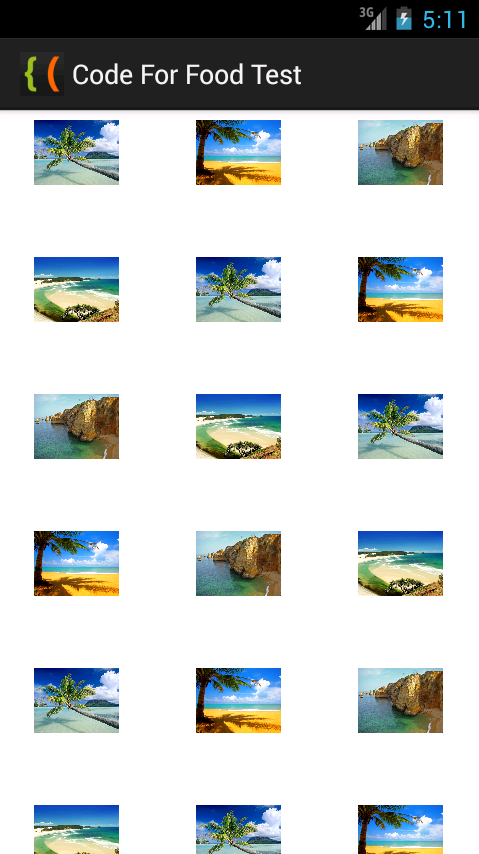
The results look like this:
Thanks for reading!
Read more »
First of all, well need to prepare some sample images. I put 4 images called sample1.jpg, sample2.jpg, sample3.jpg and sample4.jpg in the drawable-hdpi folder of my android project.
Once thats done, we can use them in our application.
Start by creating an Activity with a GridView:
<LinearLayout xmlns:android="http://schemas.android.com/apk/res/android"
    xmlns:tools="http://schemas.android.com/tools"
    android:layout_width="match_parent"
    android:layout_height="match_parent"
    android:orientation="vertical"
    tools:context=".MainActivity" >

<GridView
    android:id="@+id/grid"
    android:layout_width="fill_parent"
    android:layout_height="fill_parent"
    android:verticalSpacing="35dp"
    android:horizontalSpacing="5dp"
    android:numColumns="auto_fit"
    android:columnWidth="100dp"
    android:stretchMode="columnWidth"
    android:gravity="center"
    />

</LinearLayout>
To display images in a GridView, well need to create a custom adapter class. We will extend the BaseAdapter class and call our new custom class ImageAdapter.
If youre using Eclipse IDE, go to File > New > Class. Create the new java class, and use this code:
package com.kircode.codeforfood_test;

import android.content.Context;
import android.view.View;
import android.view.ViewGroup;
import android.widget.BaseAdapter;
import android.widget.GridView;
import android.widget.ImageView;

public class ImageAdapter extends BaseAdapter {


    private Integer[] mPictures = {
    R.drawable.sample1, R.drawable.sample2,
    R.drawable.sample3, R.drawable.sample4,
    R.drawable.sample1, R.drawable.sample2,
    R.drawable.sample3, R.drawable.sample4,
    R.drawable.sample1, R.drawable.sample2,
    R.drawable.sample3, R.drawable.sample4,
    R.drawable.sample1, R.drawable.sample2,
    R.drawable.sample3, R.drawable.sample4,
    R.drawable.sample1, R.drawable.sample2,
    R.drawable.sample3, R.drawable.sample4,
    R.drawable.sample1, R.drawable.sample2,
    R.drawable.sample3, R.drawable.sample4
    };
    private Context mContext;

    public ImageAdapter(Context c) {
        mContext = c;
    }

    public int getCount() {
        return mPictures.length;
    }

    public Object getItem(int position) {
        return mPictures[position];
    }

    public long getItemId(int position) {
        return mPictures[position];
    }

    // create a new ImageView for each item referenced by the Adapter
    public View getView(int position, View convertView, ViewGroup parent) {
        ImageView imageView;
        if (convertView == null) {  // if its not recycled, initialize some attributes
            imageView = new ImageView(mContext);
            imageView.setLayoutParams(new GridView.LayoutParams(85, 85));
            imageView.setScaleType(ImageView.ScaleType.CENTER_CROP);
            imageView.setPadding(10, 10, 10, 10);
        } else {
            imageView = (ImageView) convertView;
        }

        imageView.setImageResource(mPictures[position]);
        return imageView;
    }
}
The logic behind the code is simple, the important part is to include everything the class needs to function properly. Note that we declare the array of pictures in the class itself, and then use an ImageView to display each item. If the ImageView object already exists, we reuse it.
The code of MainActivity.java class is simple too - just apply the adapter to the grid. The only unusual thing here is the passing of getApplicationContext() value to the ImageAdapter constructor.
package com.kircode.codeforfood_test;

import android.app.Activity;
import android.os.Bundle;
import android.view.Menu;
import android.widget.GridView;

public class MainActivity extends Activity{

private GridView grid;

@Override
protected void onCreate(Bundle savedInstanceState) {
super.onCreate(savedInstanceState);
setContentView(R.layout.activity_main);

grid = (GridView)findViewById(R.id.grid);

ImageAdapter arrayAdapter = new ImageAdapter(getApplicationContext());
grid.setAdapter(arrayAdapter);
}

@Override
public boolean onCreateOptionsMenu(Menu menu) {
// Inflate the menu; this adds items to the action bar if it is present.
getMenuInflater().inflate(R.menu.activity_main, menu);
return true;
}

}
The results look like this:
Thanks for reading!
Working with Adobe Premiere Pros Basic 3D Video Effect PART 1
Level: Basic
Software: Adobe Premiere Pro
Version: 1.5
In this tutorial we will learn how to use Adobe Premiere Pros Basic 3D video effect. Heres a sample video file that shows what we hope to achieve by the end of this exercise:
Lets begin by creating a folder named Basic_3D_Effect. You may place this folder anywhere on your hard drive.
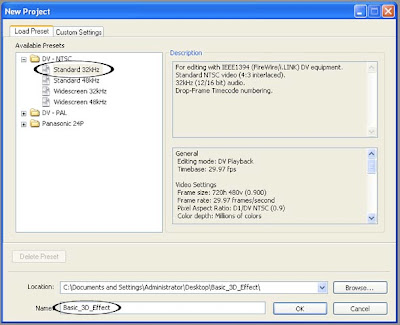
Next, create a new Adobe Premiere Pro 1.5 project. Select the DV-NTSC Standard 32kHz Preset. Name your project Basic_3D_Effect and save it inside the Basic_3D_Effect folder you just created. Click on OK.
Next, create a new Title by choosing File > New > Title...
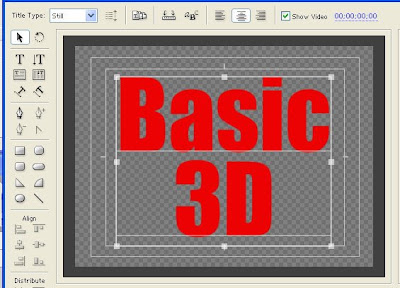
Using the Title designers Type Tool, type in the words "Basic 3D". Type the word "Basic" on one line and type "3D" on the next line similar to the image below.
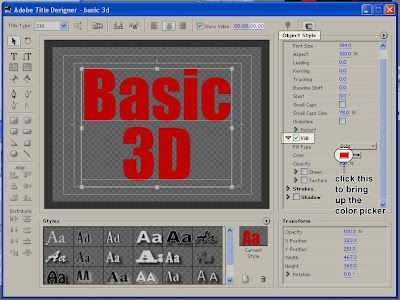
Use a big bold font and choose a color that isnt too bright. To change the color of your text, select it first, then go to the Object Style section of the Adobe Title Designer. Under the Fill properties, click on the color box to the right of the word Color. This will bring up the Color Picker window where you will be able to choose your desired color.
Save your Title file as basic_3D.prtl (make sure you save it in the Basic_3D_Effect folder as well) and close the Title Designer window.
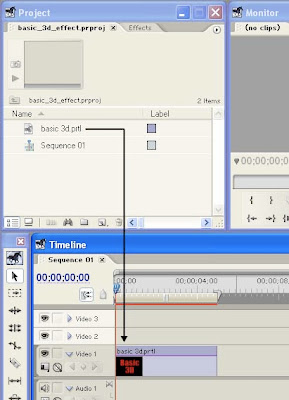
From the Project window, drag the basic_3D title down to the video 1 track of your Timeline. You can zoom in on your Timeline in order to see the clip better. Make sure that the clip is about 5 seconds in duration.
continue to Working with Adobe Premiere Pros Basic 3D Video Effect PART 2
Read more »
Software: Adobe Premiere Pro
Version: 1.5
In this tutorial we will learn how to use Adobe Premiere Pros Basic 3D video effect. Heres a sample video file that shows what we hope to achieve by the end of this exercise:
Lets begin by creating a folder named Basic_3D_Effect. You may place this folder anywhere on your hard drive.
Next, create a new Adobe Premiere Pro 1.5 project. Select the DV-NTSC Standard 32kHz Preset. Name your project Basic_3D_Effect and save it inside the Basic_3D_Effect folder you just created. Click on OK.
Next, create a new Title by choosing File > New > Title...
Using the Title designers Type Tool, type in the words "Basic 3D". Type the word "Basic" on one line and type "3D" on the next line similar to the image below.
Use a big bold font and choose a color that isnt too bright. To change the color of your text, select it first, then go to the Object Style section of the Adobe Title Designer. Under the Fill properties, click on the color box to the right of the word Color. This will bring up the Color Picker window where you will be able to choose your desired color.
Save your Title file as basic_3D.prtl (make sure you save it in the Basic_3D_Effect folder as well) and close the Title Designer window.
From the Project window, drag the basic_3D title down to the video 1 track of your Timeline. You can zoom in on your Timeline in order to see the clip better. Make sure that the clip is about 5 seconds in duration.
continue to Working with Adobe Premiere Pros Basic 3D Video Effect PART 2
Thursday, January 29, 2015
Android beginner tutorial Part 56 Activity stacks and tasks
Today we will learn about Activity stacks and tasks.
In Android all Activity objects are saved in a stack. Whenever an Activity launches another Activity, the new one is moved to the stack and becomes the active Activity. The previous one also remains in the stack, but it is moved lower. Activity objects in a stack are never repositioned, they can only be added or removed.
When the user presses the Back button on their device, the current Activity is pushed out of the stack and is replaced with the previous one, which becomes visible again.
If there are multiple Activities of the same class in a stack, they are treated as separate instances.
A stack with Activities in it is called a task, which can be put in the foreground, when one of its Activities is currently active, or in the background, where its completely out of user focus.
If the user doesnt interact with a task for a long period of time, the system clears all of that tasks Activities, except for the main one. To save the state of an Activity before it is destroyed, which is done after the onDestroy() method is called, you can use the onSaveInstanceState() method. Android calls it before creating an Activity, before calling onPause().
The system sends a Bundle object this way, which can be used to store some data to later be able to recreate the same Activity state. When the Activity is once again called, the system kindly sends the Bundle with all the parameters youve written as a parameter of the onCreate() method, as well as the onRestoreInstanceState() method, which is called after onStart(), so that one of them (or both) could return the Activity to what it looked like before.
The onSaveInstanceState() and onRestoreInstanceState() methods are not a part of the lifecycle of an Activity. They wont always be called by the system. For example, the onSaveInstanceState() method is called when the Activity become vulnerable to being destroyed by the system, but it isnt called if the user willingly closes it. Thats good, because it is an intuitive and expected behaviour.
Because onSaveInstanceState() is not always called, if youre saving data you should do that when the application gets paused - in the onPause() function.
That way it will be possible to later restart the destroyed Activity (if the system decides to destroy it) with the saved previous state.
That is all for today.
Thanks for reading!
Read more »
In Android all Activity objects are saved in a stack. Whenever an Activity launches another Activity, the new one is moved to the stack and becomes the active Activity. The previous one also remains in the stack, but it is moved lower. Activity objects in a stack are never repositioned, they can only be added or removed.
When the user presses the Back button on their device, the current Activity is pushed out of the stack and is replaced with the previous one, which becomes visible again.
If there are multiple Activities of the same class in a stack, they are treated as separate instances.
A stack with Activities in it is called a task, which can be put in the foreground, when one of its Activities is currently active, or in the background, where its completely out of user focus.
If the user doesnt interact with a task for a long period of time, the system clears all of that tasks Activities, except for the main one. To save the state of an Activity before it is destroyed, which is done after the onDestroy() method is called, you can use the onSaveInstanceState() method. Android calls it before creating an Activity, before calling onPause().
The system sends a Bundle object this way, which can be used to store some data to later be able to recreate the same Activity state. When the Activity is once again called, the system kindly sends the Bundle with all the parameters youve written as a parameter of the onCreate() method, as well as the onRestoreInstanceState() method, which is called after onStart(), so that one of them (or both) could return the Activity to what it looked like before.
The onSaveInstanceState() and onRestoreInstanceState() methods are not a part of the lifecycle of an Activity. They wont always be called by the system. For example, the onSaveInstanceState() method is called when the Activity become vulnerable to being destroyed by the system, but it isnt called if the user willingly closes it. Thats good, because it is an intuitive and expected behaviour.
Because onSaveInstanceState() is not always called, if youre saving data you should do that when the application gets paused - in the onPause() function.
That way it will be possible to later restart the destroyed Activity (if the system decides to destroy it) with the saved previous state.
That is all for today.
Thanks for reading!
Android beginner tutorial Part 90 Path and ArcShape
In this tutorial we will learn about drawing primitive shapes in Android using Path and ArcShape classes.
The Path class is similar in usage to the way shapes are drawn using AS3. It has the moveTo() and lineTo() methods that youve probably worked with before if you ever tried drawing graphics using Actionscript3.
Using this class it is possible to draw unordinary primitive shapes, like, for example, a star.
First we set up the path for the lines to follow:
You can then apply the drawing to a ShapeDrawable object.

Next class is ArcShape. This one lets us draw arcs, basically. There are two values you need to pass to the ArcShape constructor - float startAngle and float sweepAngle.
Example:

Now weve covered all the primitive shape drawing classes.
Thanks for reading!
Read more »
The Path class is similar in usage to the way shapes are drawn using AS3. It has the moveTo() and lineTo() methods that youve probably worked with before if you ever tried drawing graphics using Actionscript3.
Using this class it is possible to draw unordinary primitive shapes, like, for example, a star.
First we set up the path for the lines to follow:
Path p = new Path();
p.moveTo(50, 0);
p.lineTo(25, 100);
p.lineTo(100, 50);
p.lineTo(0, 50);
p.lineTo(75, 100);
p.lineTo(50, 0);
You can then apply the drawing to a ShapeDrawable object.
ShapeDrawable shape = new ShapeDrawable(new PathShape(p, 100, 100));
shape.setIntrinsicHeight(100);
shape.setIntrinsicWidth(100);
shape.getPaint().setColor(Color.RED);
shape.getPaint().setStyle(Paint.Style.STROKE);
Next class is ArcShape. This one lets us draw arcs, basically. There are two values you need to pass to the ArcShape constructor - float startAngle and float sweepAngle.
Example:
ShapeDrawable shape = new ShapeDrawable(new ArcShape(0, 250));
shape.setIntrinsicHeight(100);
shape.setIntrinsicWidth(100);
shape.getPaint().setColor(Color.RED);
Now weve covered all the primitive shape drawing classes.
Thanks for reading!
Creating a Flex AIR text editor Part 92
In this tutorial we are going to fix a bug with the line count text and start working on a comments feature.
The problem with linecount is that when the font size is big, like, over 40 points, 2-digit numbers already dont fit in the narrow box. To fix that, we need to make sure the box size changes according to the font size. Update the updateTextSize() function by adding a line to the beginning of the code which sets the lineCountWidth variables value:
The space for the line count number should be enough for most text files.
Now, we will start working on a comments feature, which is so useful to the developers. In the program, I am going to include 3 types of comments - line comment, block comment and xml comment, since they are the most used ones. The first two (// and /* */) are mostly used in script languages, while <!-- --> is used in XML based languages like HTML.
I am going to put 4 buttons on the tool bar, 3 buttons for the comments and 1 button to remove any comment symbols in the selected area.
I have created custom icons for this feature. Those are comment_line, comment_block and comment_xml. They are all based off comment.png icon from FamFamFams Silk icon set. I also used comment_delete.png from the same set as the fourth button.
So in the end I had these icons to use:


Well, now we need to put these icons in the lib directory of our project.
Find the place where the toolbar is created in the code and update it by adding 4 more icons:
Right now the buttons call 4 empty functions:
Also, since the toolbar content width has extended, if the user resizes the window to a too small size, the 4 icons might not fit in the screen. So I decided to increase the minWidth value of the WindowedApplication tag to 700:
And heres the whole code:
Thanks for reading!
Read more »
The problem with linecount is that when the font size is big, like, over 40 points, 2-digit numbers already dont fit in the narrow box. To fix that, we need to make sure the box size changes according to the font size. Update the updateTextSize() function by adding a line to the beginning of the code which sets the lineCountWidth variables value:
private function updateTextSize():void {
lineCountWidth = pref_fontsettings.fontsize * 4;
tabY = (toolBar.visible)?(toolBar.height):(0);
textX = (pref_linecount)?(lineCountWidth):(0);
var statusHeight:Number = (pref_status)?(statusBar.height):(0);
textWidth = (pref_sidepane)?(width - sidePaneWidth - textX):(width - textX);
tabWidth = textWidth + textX;
var tabbarScrollHeight:Number = (tabData.length * 170 > tabWidth)?(15):(0);
textY = tabBar.height + tabY + tabbarScrollHeight;
textHeight = height - textY - statusHeight;
focusManager.setFocus(textArea);
sidePaneHeight = textHeight + tabBar.height + tabbarScrollHeight;
sidePaneY = textY - tabBar.height - tabbarScrollHeight;
sidePaneX = width - sidePaneWidth;
}
The space for the line count number should be enough for most text files.
Now, we will start working on a comments feature, which is so useful to the developers. In the program, I am going to include 3 types of comments - line comment, block comment and xml comment, since they are the most used ones. The first two (// and /* */) are mostly used in script languages, while <!-- --> is used in XML based languages like HTML.
I am going to put 4 buttons on the tool bar, 3 buttons for the comments and 1 button to remove any comment symbols in the selected area.
I have created custom icons for this feature. Those are comment_line, comment_block and comment_xml. They are all based off comment.png icon from FamFamFams Silk icon set. I also used comment_delete.png from the same set as the fourth button.
So in the end I had these icons to use:


Well, now we need to put these icons in the lib directory of our project.
Find the place where the toolbar is created in the code and update it by adding 4 more icons:
<mx:HBox id="toolBar" width="100%" backgroundColor="#dddddd" height="30" visible="{pref_toolbar}" paddingTop="2" paddingLeft="3">
<custom:IconButton icon="@Embed(../lib/page.png)" toolTip="New document" click="doNew();" />
<custom:IconButton icon="@Embed(../lib/folder_page.png)" toolTip="Open" click="doOpen();" />
<custom:IconButton icon="@Embed(../lib/disk.png)" toolTip="Save" click="doSave(tabSelectedIndex);" />
<custom:IconButton icon="@Embed(../lib/disk_multiple.png)" toolTip="Save all" click="doSaveAll();" />
<custom:IconButton icon="@Embed(../lib/printer.png)" toolTip="Print" click="doPrint();" />
<custom:IconButton icon="@Embed(../lib/find.png)" toolTip="Find/replace" click="doFind();" />
<s:Label text="|" fontSize="18" color="#bbbbbb" paddingTop="4" />
<custom:IconButton icon="@Embed(../lib/arrow_undo.png)" toolTip="Undo" enabled="{canUndo}" click="doUndo();" />
<custom:IconButton icon="@Embed(../lib/arrow_redo.png)" toolTip="Redo" enabled="{canRedo}" click="doRedo();" />
<s:Label text="|" fontSize="18" color="#bbbbbb" paddingTop="4" />
<custom:IconButton icon="@Embed(../lib/cut.png)" toolTip="Cut" click="doCut();" enabled="{canCutCopy}" />
<custom:IconButton icon="@Embed(../lib/page_white_copy.png)" toolTip="Copy" click="doCopy();" enabled="{canCutCopy}" />
<custom:IconButton icon="@Embed(../lib/paste_plain.png)" toolTip="Paste" click="doPaste();" enabled="{canPaste}" />
<s:Label text="|" fontSize="18" color="#bbbbbb" paddingTop="4" />
<custom:IconButton icon="@Embed(../lib/zoom_in.png)" toolTip="Zoom in" click="doZoomIn();" enabled="{!fontOpen}" />
<custom:IconButton icon="@Embed(../lib/zoom_out.png)" toolTip="Zoom out" click="doZoomOut();" enabled="{!fontOpen}"/>
<s:Label text="|" fontSize="18" color="#bbbbbb" paddingTop="4" />
<custom:IconButton icon="@Embed(../lib/comment_line.png)" toolTip="Line comment" click="doLineComment();" />
<custom:IconButton icon="@Embed(../lib/comment_block.png)" toolTip="Block comment" click="doBlockComment();" />
<custom:IconButton icon="@Embed(../lib/comment_xml.png)" toolTip="XML comment" click="doXMLComment();"/>
<custom:IconButton icon="@Embed(../lib/comment_delete.png)" toolTip="Delete comment" click="doDeleteComment();"/>
</mx:HBox>
Right now the buttons call 4 empty functions:
private function doLineComment():void{

}

private function doBlockComment():void{

}

private function doXMLComment():void{

}

private function doDeleteComment():void{

}
Also, since the toolbar content width has extended, if the user resizes the window to a too small size, the 4 icons might not fit in the screen. So I decided to increase the minWidth value of the WindowedApplication tag to 700:
<s:WindowedApplication xmlns:fx="http://ns.adobe.com/mxml/2009"
xmlns:s="library://ns.adobe.com/flex/spark"
xmlns:mx="library://ns.adobe.com/flex/mx"
xmlns:custom="*"
creationComplete="init();" title="Kirpad" showStatusBar="{pref_status}"
minWidth="700" minHeight="200" height="700" width="900">
And heres the whole code:
<?xml version="1.0" encoding="utf-8"?>
<s:WindowedApplication xmlns:fx="http://ns.adobe.com/mxml/2009"
xmlns:s="library://ns.adobe.com/flex/spark"
xmlns:mx="library://ns.adobe.com/flex/mx"
xmlns:custom="*"
creationComplete="init();" title="Kirpad" showStatusBar="{pref_status}"
minWidth="700" minHeight="200" height="700" width="900">
<s:menu>
<mx:FlexNativeMenu dataProvider="{windowMenu}" showRoot="false" labelField="@label" keyEquivalentField="@key" itemClick="menuSelect(event);" />
</s:menu>
<fx:Script>
<![CDATA[
import flash.data.SQLConnection;
import flash.events.KeyboardEvent;
import flash.events.Event;
import flash.events.MouseEvent;
import flash.events.NativeWindowBoundsEvent;
import flash.filesystem.File;
import flash.filesystem.FileStream;
import flash.net.SharedObject;
import flash.text.TextLineMetrics;
import flashx.textLayout.accessibility.TextAccImpl;
import flashx.textLayout.edit.EditManager;
import flashx.textLayout.edit.TextScrap;
import flashx.textLayout.formats.TextLayoutFormat;
import mx.collections.ArrayCollection;
import mx.controls.Alert;
import mx.controls.TextArea;
import mx.events.FlexNativeMenuEvent;
import flashx.textLayout.elements.TextFlow;
import flashx.textLayout.elements.Configuration;
import flash.system.System;
import flash.desktop.Clipboard;
import flash.desktop.ClipboardFormats;
import flash.ui.Mouse;
import mx.events.CloseEvent;
import flash.ui.ContextMenu;
import flash.ui.ContextMenuItem;
import flash.events.ContextMenuEvent;
import mx.events.ResizeEvent;
import mx.core.FlexGlobals;
import mx.printing.FlexPrintJob;
import mx.printing.FlexPrintJobScaleType;
import flashx.undo.UndoManager;
import flashx.textLayout.operations.UndoOperation;
import flash.data.SQLConnection;
import flash.events.SQLEvent;
import flash.data.SQLStatement;
import flash.data.SQLResult;
import flash.data.SQLMode;
import flash.net.Responder;
import XML;
import XMLList;
import mx.managers.PopUpManager;
import flashx.textLayout.operations.InsertTextOperation;
import flashx.textLayout.edit.SelectionState;
import flash.events.NativeDragEvent;
import flash.desktop.NativeDragManager;
import flash.events.NativeWindowDisplayStateEvent;
import flash.display.NativeWindowDisplayState;
private var preferences:SharedObject = SharedObject.getLocal("kirpadPreferences");
[Bindable]
private var pref_wrap:Boolean = true;
[Bindable]
private var pref_status:Boolean = true;
[Bindable]
private var pref_toolbar:Boolean = true;
[Bindable]
private var pref_sidepane:Boolean = true;
[Bindable]
private var pref_linecount:Boolean = true;
[Bindable]
public var pref_fontsettings:Object = new Object();
[Bindable]
private var pref_recent:ArrayCollection = new ArrayCollection();
[Bindable]
private var pref_previously:ArrayCollection = new ArrayCollection();
[Bindable]
private var pref_keepprev:Boolean = true;
[Bindable]
private var pref_width:int;
[Bindable]
private var pref_height:int;
[Bindable]
private var pref_maximized:Boolean;
private var initHeight:Number;
private var heightFixed:Boolean = false;
private var statusMessage:String;
[Bindable]
private var textHeight:Number;
[Bindable]
private var textWidth:Number;
[Bindable]
private var textY:Number;
[Bindable]
private var textX:Number;
[Bindable]
private var tabY:Number;
[Bindable]
private var sidePaneY:Number;
[Bindable]
private var sidePaneX:Number;
[Bindable]
private var sidePaneHeight:Number;
[Bindable]
private var sidePaneWidth:Number = 180;
[Bindable]
private var sideContentWidth:Number = 170;
[Bindable]
private var tabWidth:Number;
[Bindable]
private var lineCountWidth:Number = 40;
[Bindable]
private var lineNumbers:String = "1";
[Bindable]
private var lineDisplayedNum:int = 1;
[Bindable]
private var tabSelectedIndex:int = 0;
[Bindable]
private var canUndo:Boolean = false;
[Bindable]
private var canRedo:Boolean = false;
[Bindable]
private var canPaste:Boolean = false;
[Bindable]
private var canCutCopy:Boolean = false;
private var previousTextInOperation:String = "";
private var currentTextInOperation:String = "";
private var previousIndex:int = 0;
private var rightclickTabIndex:int = 0;
private var untitledNum:int = 0;
private var tabsToClose:int = 0;
private var closeAfterConfirm:Boolean = false;
public var fontWindow:FontWindow = new FontWindow();
public var snippetWindow:SnippetWindow = new SnippetWindow();
private var undoManager:UndoManager;
private var editManager:EditManager;
private var saveWait:Boolean = false;
private var saveAsQueue:Array = [];
public var connection:SQLConnection;
public var connection2:SQLConnection;
private var snippetData:Array;
private var categoryData:Array;
[Bindable]
public var snippetXML:XMLList;
private var searchResults:Array = [];
private var selectedResult:int = 0;
private var currentEncoding:String = "utf-8";
[Bindable]
private var enc:ArrayCollection = new ArrayCollection([true, false, false]);
private var cm:ContextMenu = new ContextMenu();
[Bindable]
private var hasLocation:Boolean = false;
[Bindable]
private var fontOpen:Boolean = false;
private var isCtrl:Boolean = false;
private function init():void {
// Create a listener for every frame
addEventListener(Event.ENTER_FRAME, everyFrame);
//preferences.data.firsttime = null;
// Set preferences if loaded for the first time
if (preferences.data.firsttime == null) {
preferences.data.firsttime = true;
preferences.data.wrap = false;
preferences.data.status = true;
preferences.data.toolbar = true;
preferences.data.sidepane = true;
preferences.data.linecount = true;
preferences.data.recent = [];
preferences.data.previously = [];
preferences.data.keepprev = true;
preferences.data.fontsettings = {fontfamily:"Lucida Console", fontsize:14, fontstyle:"normal", fontweight:"normal", fontcolor:0x000000, bgcolor:0xffffff};
preferences.data.height = 600;
preferences.data.width = 900;
preferences.data.maximized = false;
preferences.flush();
}
// Set preferences loaded from local storage
pref_wrap = preferences.data.wrap;
pref_status = preferences.data.status;
pref_toolbar = preferences.data.toolbar;
pref_sidepane = preferences.data.sidepane;
pref_fontsettings = preferences.data.fontsettings;
pref_linecount = preferences.data.linecount;
pref_previously = new ArrayCollection(preferences.data.previously);
pref_recent = new ArrayCollection(preferences.data.recent);
pref_keepprev = preferences.data.keepprev;
pref_height = preferences.data.height;
pref_width = preferences.data.width;
pref_maximized = preferences.data.maximized;
height = pref_height;
width = pref_width;
if (pref_maximized) {
maximize();
}
// Set initHeight to the initial height value on start
initHeight = height;
addEventListener(NativeWindowDisplayStateEvent.DISPLAY_STATE_CHANGE, changeState);
// Allow insertion of tabs
var textFlow:TextFlow = textArea.textFlow;
var config:Configuration = Configuration(textFlow.configuration);
config.manageTabKey = true;
// Set status message
statusMessage = "[ " + new Date().toLocaleTimeString() + " ] Kirpad initialized";
updateStatus();
// Close all sub-windows if main window is closed
addEventListener(Event.CLOSING, onClose);
// Add listener for the event that is dispatched when new font settings are applied
fontWindow.addEventListener(Event.CHANGE, fontChange);
fontWindow.addEventListener(Event.CLOSING, fontClose);
// Update real fonts with the data from the settings values
updateFonts();
// Create a listener for resizing
addEventListener(NativeWindowBoundsEvent.RESIZE, onResize);
// Create drag drop listeners
addEventListener(NativeDragEvent.NATIVE_DRAG_ENTER, onDragIn);
addEventListener(NativeDragEvent.NATIVE_DRAG_DROP, onDragDrop);
// Context menu declaration for the tabbar control
var cm_close:ContextMenuItem = new ContextMenuItem("Close tab");
cm_close.addEventListener(ContextMenuEvent.MENU_ITEM_SELECT, tabContextClose);
var cm_closeother:ContextMenuItem = new ContextMenuItem("Close other tabs");
cm_closeother.addEventListener(ContextMenuEvent.MENU_ITEM_SELECT, tabContextCloseOther);
var cm_save:ContextMenuItem = new ContextMenuItem("Save");
cm_save.addEventListener(ContextMenuEvent.MENU_ITEM_SELECT, tabContextSave);
var cm_duplicate:ContextMenuItem = new ContextMenuItem("Duplicate");
cm_duplicate.addEventListener(ContextMenuEvent.MENU_ITEM_SELECT, tabContextDuplicate);
var cm_rename:ContextMenuItem = new ContextMenuItem("Rename");
cm_rename.addEventListener(ContextMenuEvent.MENU_ITEM_SELECT, tabContextRename);
var cm_delete:ContextMenuItem = new ContextMenuItem("Delete file");
cm_delete.addEventListener(ContextMenuEvent.MENU_ITEM_SELECT, tabContextDelete);
var cm_reload:ContextMenuItem = new ContextMenuItem("Reload file");
cm_reload.addEventListener(ContextMenuEvent.MENU_ITEM_SELECT, tabContextReload);
cm.items = [cm_close, cm_closeother, cm_save, cm_duplicate, cm_rename, cm_delete, cm_reload];
cm.hideBuiltInItems();
tabBar.contextMenu = cm;
tabBar.addEventListener(MouseEvent.RIGHT_MOUSE_DOWN, tabRightClick);
// Context menu declaration for the tab management list control
sideList.contextMenu = cm;
sideList.addEventListener(MouseEvent.RIGHT_MOUSE_DOWN, listRightClick);
// Listen to keyboard
addEventListener(KeyboardEvent.KEY_DOWN, onKeyDown);
addEventListener(KeyboardEvent.KEY_UP, onKeyUp);
// Listen to mouse wheel
addEventListener(MouseEvent.MOUSE_WHEEL, onMouseWheel);
// Undo management
undoManager = new UndoManager();
editManager = new EditManager(undoManager);
textArea.textFlow.interactionManager = editManager;
// Open previously open tabs
openPrevious();
// Select first tab
tabChange();
// Database management
var dbFile:File = File.applicationStorageDirectory.resolvePath("database.db");
connection = new SQLConnection();
connection2 = new SQLConnection();
connection2.open(dbFile, SQLMode.CREATE);
connection.addEventListener(SQLEvent.OPEN, onOpen);
connection.openAsync(dbFile, SQLMode.CREATE);
}
private function menuSelect(evt:FlexNativeMenuEvent):void {
(evt.item.@label == "New")?(doNew()):(void);
(evt.item.@label == "Open")?(doOpen()):(void);
(evt.item.@label == "Save")?(doSave(tabSelectedIndex)):(void);
(evt.item.@label == "Save As")?(doSaveAs(textArea.text, tabSelectedIndex)):(void);
(evt.item.@label == "Save All")?(doSaveAll()):(void);
(evt.item.@label == "Word wrap")?(pref_wrap = !pref_wrap):(void);
(evt.item.@label == "Cut")?(doCut()):(void);
(evt.item.@label == "Copy")?(doCopy()):(void);
(evt.item.@label == "Paste")?(doPaste()):(void);
(evt.item.@label == "Select all")?(doSelectall()):(void);
(evt.item.@label == "Status bar")?(pref_status = !pref_status):(void);
(evt.item.@label == "Tool bar")?(pref_toolbar = !pref_toolbar):(void);
(evt.item.@label == "Side pane")?(pref_sidepane = !pref_sidepane):(void);
(evt.item.@label == "Line count")?(pref_linecount = !pref_linecount):(void);
(evt.item.@label == "Font...")?(doFont()):(void);
(evt.item.@label == "Print")?(doPrint()):(void);
(evt.item.@label == "Undo")?(doUndo()):(void);
(evt.item.@label == "Redo")?(doRedo()):(void);
(evt.item.@label == "Find/Replace...")?(doFind()):(void);
(evt.item.@label == "Recent")?(openRecent()):(void);
("@encoding" in evt.item)?(doEncode(evt.item.@encoding, evt.item.@ind)):(void);
(evt.item.@label == "Rename...")?(openRename()):(void);
(evt.item.@label == "Delete file")?(doDelete()):(void);
(evt.item.@label == "Reload file")?(doReload()):(void);
(evt.item.@label == "From file...")?(doInsertFile()):(void);
(evt.item.@label == "File details")?(doFileDetails()):(void);
(evt.item.@label == "Timestamp")?(doTimestamp()):(void);
(evt.item.@label == "Keep previous tabs")?(pref_keepprev = !pref_keepprev):(void);
savePreferences();
updateStatus();
if (pref_wrap) {
pref_linecount = false;
}
updateTextSize();
countLines();
}
private function savePreferences():void {
preferences.data.wrap = pref_wrap;
preferences.data.status = pref_status;
preferences.data.toolbar = pref_toolbar;
preferences.data.fontsettings = pref_fontsettings;
preferences.data.sidepane = pref_sidepane;
preferences.data.linecount = pref_linecount;
preferences.data.previously = pref_previously.toArray();
preferences.data.recent = pref_recent.toArray();
preferences.data.keepprev = pref_keepprev;
preferences.data.width = pref_width;
preferences.data.height = pref_height;
preferences.data.maximized = pref_maximized;
preferences.flush();
}
private function doCut():void {
var selectedText:String = textArea.text.substring(textArea.selectionActivePosition, textArea.selectionAnchorPosition);
System.setClipboard(selectedText);
insertText("");
}
private function doCopy():void {
var selectedText:String = textArea.text.substring(textArea.selectionActivePosition, textArea.selectionAnchorPosition);
System.setClipboard(selectedText);
}
private function doPaste():void {
var myClip:Clipboard = Clipboard.generalClipboard;
var pastedText:String = myClip.getData(ClipboardFormats.TEXT_FORMAT) as String;
insertText(pastedText);
}
private function doSelectall():void {
textArea.selectAll();
}
private function insertText(str:String):void {
editManager.insertText(str);
}
private function cursorFix():void{
Mouse.cursor = "ibeam";
}
private function everyFrame(evt:Event):void {
if (!heightFixed && height==initHeight) {
height = initHeight - 20;
if (height != initHeight) {
heightFixed = true;
updateTextSize();
}
}
updateLineScroll();
if (sideList.selectedIndices.length==0) {
sideList.selectedIndex = tabSelectedIndex;
}
if (focusManager.getFocus() == textArea) {
canPaste = Clipboard.generalClipboard.hasFormat(ClipboardFormats.TEXT_FORMAT);
canCutCopy = (textArea.selectionActivePosition == textArea.selectionAnchorPosition)?(false):(true);
}else {
if (canPaste == true || canCutCopy == true) {
canPaste = false;
canCutCopy = false;
}
}
}
private function onResize(evt:ResizeEvent):void {
if(!pref_maximized){
pref_height = height;
pref_width = width;
savePreferences();
}
updateTextSize();
}
private function changeState(evt:NativeWindowDisplayStateEvent):void {
if (evt.afterDisplayState == NativeWindowDisplayState.MAXIMIZED) {
pref_maximized = true;
}else {
pref_maximized = false;
}
savePreferences();
}
private function updateTextSize():void {
lineCountWidth = pref_fontsettings.fontsize * 4;
tabY = (toolBar.visible)?(toolBar.height):(0);
textX = (pref_linecount)?(lineCountWidth):(0);
var statusHeight:Number = (pref_status)?(statusBar.height):(0);
textWidth = (pref_sidepane)?(width - sidePaneWidth - textX):(width - textX);
tabWidth = textWidth + textX;
var tabbarScrollHeight:Number = (tabData.length * 170 > tabWidth)?(15):(0);
textY = tabBar.height + tabY + tabbarScrollHeight;
textHeight = height - textY - statusHeight;
focusManager.setFocus(textArea);
sidePaneHeight = textHeight + tabBar.height + tabbarScrollHeight;
sidePaneY = textY - tabBar.height - tabbarScrollHeight;
sidePaneX = width - sidePaneWidth;
}
private function updateStatus():void {
var str:String = new String();
str = (pref_wrap)?("Word wrapping on"):(caretPosition());
status = "Encoding: " + currentEncoding + " " + str + " " + statusMessage;
}
private function caretPosition():String {
var pos:int = textArea.selectionActivePosition;
var str:String = textArea.text.substring(0, pos);
var lines:Array = str.split("
");
var line:int = lines.length;
var col:int = lines[lines.length - 1].length + 1;
return "Ln " + line + ", Col " + col;
}
private function doFont():void {
fontOpen = true;
fontWindow.open();
fontWindow.activate();
fontWindow.visible = true;
fontWindow.setValues(pref_fontsettings.fontsize, pref_fontsettings.fontfamily, pref_fontsettings.fontstyle, pref_fontsettings.fontweight, pref_fontsettings.fontcolor, pref_fontsettings.bgcolor);
}
private function onClose(evt:Event):void {
if(!closeAfterConfirm){
evt.preventDefault();
var allWindows:Array = NativeApplication.nativeApplication.openedWindows;
for (var i:int = 1; i < allWindows.length; i++)
{
allWindows[i].close();
}
// Check if there are any unsaved tabs
var needSaving:Boolean = false;
tabsToClose = 0;
for (var u:int = 0; u < tabData.length; u++) {
if (tabData[u].saved == false) {
needSaving = true;
tabsToClose++;
}
}
// If there are unsaved tabs, dont close window yet, set closeAfterConfirm to true and close all tabs
if (needSaving) {
closeAfterConfirm = true;
for (var t:int = 0; t < tabData.length; t++) {
closeTab(t);
}
}
if (!needSaving) {
removeEventListener(Event.CLOSING, onClose);
savePrevious();
FlexGlobals.topLevelApplication.close();
}
}
}
private function fontChange(evt:Event):void{
pref_fontsettings.fontfamily = fontWindow.fontCombo.selectedItem.fontName;
pref_fontsettings.fontsize = fontWindow.sizeStepper.value;
if (fontWindow.styleCombo.selectedIndex == 0) {
pref_fontsettings.fontstyle = "normal";
pref_fontsettings.fontweight = "normal";
}
if (fontWindow.styleCombo.selectedIndex == 1) {
pref_fontsettings.fontstyle = "italic";
pref_fontsettings.fontweight = "normal";
}
if (fontWindow.styleCombo.selectedIndex == 2) {
pref_fontsettings.fontstyle = "normal";
pref_fontsettings.fontweight = "bold";
}
if (fontWindow.styleCombo.selectedIndex == 3) {
pref_fontsettings.fontstyle = "italic";
pref_fontsettings.fontweight = "bold";
}
pref_fontsettings.fontcolor = fontWindow.colorPicker.selectedColor;
pref_fontsettings.bgcolor = fontWindow.bgColorPicker.selectedColor;
savePreferences();
updateFonts();
fontOpen = false;
}
private function fontClose(evt:Event):void {
fontOpen = false;
}
private function updateFonts():void{
textArea.setStyle("fontFamily", pref_fontsettings.fontfamily);
textArea.setStyle("fontSize", pref_fontsettings.fontsize);
textArea.setStyle("fontStyle", pref_fontsettings.fontstyle);
textArea.setStyle("fontWeight", pref_fontsettings.fontweight);
textArea.setStyle("color", pref_fontsettings.fontcolor);
textArea.setStyle("contentBackgroundColor", pref_fontsettings.bgcolor);
lineCount.setStyle("fontFamily", pref_fontsettings.fontfamily);
lineCount.setStyle("fontSize", pref_fontsettings.fontsize);
lineCount.setStyle("fontStyle", pref_fontsettings.fontstyle);
lineCount.setStyle("fontWeight", pref_fontsettings.fontweight);
lineCount.setStyle("color", pref_fontsettings.fontcolor);
lineCount.setStyle("contentBackgroundColor", pref_fontsettings.bgcolor);
updateSearch();
}
private function onTabClose(evt:Event):void {
var tabWidth:Number = tabBar.width / tabData.length;
var cIndex:int = Math.floor(tabBar.mouseX / tabWidth);
tabSelectedIndex = cIndex;
tabChange();
closeTab(tabSelectedIndex);
}
private function onListClose(evt:Event):void {
tabSelectedIndex = sideList.selectedIndex;
tabChange();
closeTab(tabSelectedIndex);
}
private function closeTab(index:int):void {
if (tabData[index].location == "" && tabData[index].textData == "" && tabData.length == 1) {
savePrevious();
FlexGlobals.topLevelApplication.close();
} else
if (tabData[index].location == "" && tabData[index].textData == "") {
tabsToClose--;
removeTab(index);
} else
if (tabData[index].saved) {
removeTab(index);
} else
if (!tabData[index].saved) {
Alert.show("Save " + tabData[index].title + " before closing?", "Confirmation", Alert.YES | Alert.NO, null, confirmClose);
}
function confirmClose(evt:CloseEvent):void {
tabsToClose--;
if (evt.detail == Alert.YES) {
tabSelectedIndex = index;
tabChange();
if(closeAfterConfirm){
removeTab(index, true);
}
doSave(index, false, true);
}else {
removeTab(index);
}
}
}
private function removeTab(index:int, waitForSave:Boolean = false):void {
if (tabData[index].location != "") {
addRecent(tabData[index]);
}
if(!closeAfterConfirm){
// if this is the last tab, create a new empty tab
if (tabData.length == 1) {
tabData.addItem( { title:"Untitled", textData:"", saved:false, location:""} );
}
statusMessage = "[ " + new Date().toLocaleTimeString() + " ] Tab closed: " + tabData[index].title;
updateStatus();
if (tabData.length > index+1) {
tabSelectedIndex = index;
}else
if (tabData.length <= index+1) {
tabSelectedIndex = tabData.length-2;
}
tabData.removeItemAt(index);
previousIndex = tabSelectedIndex;
// refresh tabBar tabs to clean component glitch
tabBar.dataProvider = new ArrayCollection([]);
tabBar.dataProvider = tabData;
tabBar.selectedIndex = tabSelectedIndex;
//textArea.text = tabData[tabSelectedIndex].textData;
changeTextTo(tabData[tabSelectedIndex].textData);
editManager.selectRange(tabData[tabSelectedIndex].selectedAnchor, tabData[tabSelectedIndex].selectedActive);
}
if (closeAfterConfirm && tabsToClose == 0 && waitForSave == false) {
savePrevious();
FlexGlobals.topLevelApplication.close();
}
if (waitForSave) {
saveWait = true;
}
countLines();
updateTextSize();
undoManager.clearAll();
textChange();
}
private function doNew():void {
statusMessage = "[ " + new Date().toLocaleTimeString() + " ] New tab created";
updateStatus();
untitledNum++;
tabData.addItem( { title:"Untitled("+untitledNum+")", textData:"", saved:false, location:""} );
tabSelectedIndex = tabData.length - 1;
hasLocation = false;
tabChange();
updateTextSize();
}
public function tabChange(from:String = "none", ind:int = 0, createOperation:Boolean = true):void {
if (from == "tabbar") {
tabSelectedIndex = tabBar.selectedIndex;
sideList.selectedIndex = tabSelectedIndex;
}
if (from == "sidelist") {
tabSelectedIndex = sideList.selectedIndex;
tabBar.selectedIndex = tabSelectedIndex;
}
if (from == "operation") {
tabSelectedIndex = ind;
}
tabData[previousIndex].textData = textArea.text;
tabData[previousIndex].selectedActive = textArea.selectionActivePosition;
tabData[previousIndex].selectedAnchor = textArea.selectionAnchorPosition;
if (createOperation) {
var operation:TabOperation = new TabOperation(previousIndex, tabSelectedIndex, undoManager);
undoManager.pushUndo(operation);
changeTextTo(tabData[tabSelectedIndex].textData);
var operation2:TabOperation = new TabOperation(previousIndex, tabSelectedIndex, undoManager);
undoManager.pushUndo(operation2);
}
previousIndex = tabSelectedIndex;
updateStatus();
countLines();
textChange();
//changeTitle();
updateSearch();
hasLocation = (tabData.getItemAt(tabSelectedIndex).location == )?(false):(true);
}
private function changeTextTo(str:String):void {
var tempSaved:Boolean = tabData[tabSelectedIndex].saved;
editManager.selectAll();
var insertOp:InsertTextOperation = new InsertTextOperation(editManager.getSelectionState(), str);
editManager.doOperation(insertOp);
tabData[tabSelectedIndex].saved = tempSaved;
editManager.selectRange(tabData[tabSelectedIndex].selectedAnchor, tabData[tabSelectedIndex].selectedActive);
textArea.scrollToRange(tabData[tabSelectedIndex].selectedAnchor, tabData[tabSelectedIndex].selectedActive);
changeTitle();
}
private function tabContextClose(evt:ContextMenuEvent):void{
closeTab(rightclickTabIndex);
}
private function tabContextCloseOther(evt:ContextMenuEvent):void {
var len:int = tabData.length - 1;
var removedBefore:int = 0;
// close those that dont need to be saved first
for (var i:int = len; i >= 0; i--) {
if (i != rightclickTabIndex && (tabData[i].saved || (!tabData[i].saved && tabData[i].textData=="" && tabData[i].location==""))) {
closeTab(i);
if (i < rightclickTabIndex) {
removedBefore++;
}
}
}
// update rightclickTabIndex with new position
rightclickTabIndex -= removedBefore;
// close those that need to be saved
len = tabData.length;
for (var u:int = 0; u < len; u++) {
if (u != rightclickTabIndex) {
closeTab(u);
}
}
}
private function tabContextSave(evt:ContextMenuEvent):void {
tabSelectedIndex = rightclickTabIndex;
tabChange();
doSave(rightclickTabIndex);
}
private function tabContextDuplicate(evt:ContextMenuEvent):void {
tabSelectedIndex = rightclickTabIndex;
tabChange();
statusMessage = "[ " + new Date().toLocaleTimeString() + " ] " + tabData[rightclickTabIndex].title + " duplicated";
updateStatus();
tabData.addItem( { title:"Copy of " + tabData[rightclickTabIndex].title, textData: tabData[rightclickTabIndex].textData, saved:false, location:""} );
tabSelectedIndex = tabData.length - 1;
tabChange();
updateTextSize();
}
private function tabRightClick(evt:MouseEvent):void {
var tabWidth:Number = tabBar.width / tabData.length;
var rcIndex:int = Math.floor(tabBar.mouseX / tabWidth);
rightclickTabIndex = rcIndex;
if (tabData[rightclickTabIndex].location == "") {
cm.items[4].enabled = false;
cm.items[5].enabled = false;
cm.items[6].enabled = false;
}else {
cm.items[4].enabled = true;
cm.items[5].enabled = true;
cm.items[6].enabled = true;
}
}
private function listRightClick(evt:MouseEvent):void {
var tabHeight:Number = 20;
var rcIndex:int = Math.floor((sideList.mouseY + sideList.scroller.verticalScrollBar.value) / tabHeight);
rightclickTabIndex = rcIndex;
if (tabData[rightclickTabIndex].location == "") {
cm.items[4].enabled = false;
cm.items[5].enabled = false;
cm.items[6].enabled = false;
}else {
cm.items[4].enabled = true;
cm.items[5].enabled = true;
cm.items[6].enabled = true;
}
}
private function onKeyDown(evt:KeyboardEvent):void {
if (evt.keyCode == 17) {
isCtrl = true;
}
if (evt.ctrlKey) {
// Ctrl+TAB - next tab
if (evt.keyCode == 9 && !evt.shiftKey) {
if (tabData.length - tabSelectedIndex > 1) {
tabSelectedIndex++;
tabChange();
}
}
// Ctrl+Shift+TAB - previous tab
if (evt.keyCode == 9 && evt.shiftKey) {
if (tabSelectedIndex > 0) {
tabSelectedIndex--;
tabChange();
}
}
// Ctrl+number (1-8) - go to numbered tab
if (evt.keyCode >= 49 && evt.keyCode <= 56) {
var num:int = evt.keyCode - 48;
if (tabData.length > num - 1) {
tabSelectedIndex = num - 1;
tabChange();
}
}
// Ctrl+9 - go to last tab
if (evt.keyCode == 57) {
tabSelectedIndex = tabData.length - 1;
tabChange();
}
// Ctrl + - - zoom out
if (evt.keyCode == 109 && !fontOpen) {
doZoomOut();
}
// Ctrl + + - zoom in
if (evt.keyCode == 107 && !fontOpen) {
doZoomIn();
}
}
}
private function onKeyUp(evt:KeyboardEvent):void {
if (evt.keyCode==17) {
isCtrl = false;
}
}
private function onMouseWheel(evt:MouseEvent):void {
if (isCtrl && !fontOpen) {
if (evt.delta > 0) {
doZoomIn();
}
if (evt.delta < 0) {
doZoomOut();
}
}
}
private function closeSidePane():void {
if(searchInput != null){
searchInput.text = "";
}
updateSearch();
pref_sidepane = !pref_sidepane
savePreferences();
updateTextSize();
}
private function countLines():void {
if (pref_linecount && !pref_wrap) {
var totalLines:int = textArea.text.split("
").length;
if (totalLines != lineDisplayedNum) {
updateTextSize();
updateLineCount(totalLines, totalLines-lineDisplayedNum, lineDisplayedNum);
lineDisplayedNum = totalLines;
}
}
}
private function updateLineCount(total:int, difference:int, current:int):void {
if (difference > 0) {
for (var i:int = current + 1; i < (total+1); i++) {
lineNumbers += "
" + (i);
}
}
if (difference < 0) {
var charsInTheEnd:int = 0;
for (var u:int = 0; u < -difference; u++) {
charsInTheEnd += ((current - u).toString().length + 1);
}
lineNumbers = lineCount.text.substring(0, lineCount.text.length - charsInTheEnd);
}
}
private function updateLineScroll():void{
lineCount.scroller.verticalScrollBar.value = textArea.scroller.verticalScrollBar.value;
}
private function doPrint():void {
var printJob:FlexPrintJob = new FlexPrintJob();
if (!printJob.start()) return;
tempText.visible = true;
tempText.setStyle("lineBreak", "toFit");
tempText.text = textArea.text;
tempText.width = printJob.pageWidth;
tempText.heightInLines = NaN;
tempText.setStyle("horizontalScrollPolicy", "off");
tempText.setStyle("verticalScrollPolicy", "off");
printJob.printAsBitmap = false;
printJob.addObject(tempText, "matchWidth");
printJob.send();
tempText.visible = false;
}
private function textChange():void {
tabData[tabSelectedIndex].textData = textArea.text;
canUndo = undoManager.canUndo();
canRedo = undoManager.canRedo();
focusManager.setFocus(textArea);
}
private function doUndo():void {
if (getClass(undoManager.peekUndo()) == TabOperation) {
undoManager.undo();
var tempSaved:Boolean = tabData[tabSelectedIndex].saved;
undoManager.undo();
tabData[tabSelectedIndex].saved = tempSaved;
}
editManager.selectRange(tabData[tabSelectedIndex].selectedAnchor, tabData[tabSelectedIndex].selectedActive);
undoManager.undo();
textChange();
}
private function doRedo():void {
if (getClass(undoManager.peekRedo()) == TabOperation) {
undoManager.redo();
var tempSaved:Boolean = tabData[tabSelectedIndex].saved;
undoManager.redo();
tabData[tabSelectedIndex].saved = tempSaved;
}
editManager.selectRange(tabData[tabSelectedIndex].selectedAnchor, tabData[tabSelectedIndex].selectedActive);
undoManager.redo();
textChange();
}
private function getClass(obj:Object):Class {
return Class(getDefinitionByName(getQualifiedClassName(obj)));
}
private function doOpen():void {
var file:File = new File();
file.browseForOpen("Open document", [new FileFilter("Text documents", "*.txt"), new FileFilter("All files", "*")]);
file.addEventListener(Event.SELECT, fileLoad);
function fileLoad(evt:Event):void {
loadFile(file);
}
}
private function loadFile(file:File):void {
if(fileDuplicateCheck(file.nativePath)){
var stream:FileStream = new FileStream();
stream.open(file, FileMode.READ);
var str:String = stream.readMultiByte(stream.bytesAvailable, currentEncoding);
stream.close();
str = str.replace(File.lineEnding, "
");
statusMessage = "[ " + new Date().toLocaleTimeString() + " ] " + file.name + " opened";
updateStatus();
tabData.addItem( { title:file.name, textData: str, saved:true, location:file.nativePath, selectedAnchor:0, selectedActive:0} );
tabSelectedIndex = tabData.length - 1;
tabChange();
updateTextSize();
}else {
Alert.show("File " + file.name + " is already open","Error");
}
}
private function fileDuplicateCheck(loc:String):Boolean {
var toReturn:Boolean = true;
for (var i:int = 0; i < tabData.length; i++) {
if (tabData[i].location == loc) {
toReturn = false;
tabSelectedIndex = i;
tabChange();
break;
}
}
return toReturn;
}
private function saveUpdate():void {
if (tabData[tabSelectedIndex].saved) {
tabData[tabSelectedIndex].saved = false;
tabBar.dataProvider = new ArrayCollection([]);
tabBar.dataProvider = tabData;
tabBar.selectedIndex = tabSelectedIndex;
sideList.dataProvider = tabData;
changeTitle();
}
}
private function doSave(ind:int, updateIndexNeeded:Boolean = true, closeAfterSave:Boolean = false):void {
if(!tabData[ind].saved){
if (tabData[ind].location != "") {
statusMessage = "[ " + new Date().toLocaleTimeString() + " ] " + tabData[ind].title + " saved";
updateStatus();
tabData[ind].saved = true;
saveFile(textArea.text, tabData[ind].location, updateIndexNeeded, closeAfterSave, ind);
}else{
doSaveAs(textArea.text, ind, updateIndexNeeded, closeAfterSave);
}
}else
if (tabData[ind].saved) {
doSaveQueue();
}
}
private function doSaveAll():void {
saveAsQueue = [];
for (var i:int = 0; i < tabData.length; i++) {
saveAsQueue.push(i);
}
doSaveQueue();
}
private function doSaveQueue():void {
if (saveAsQueue.length > 0) {
var ind:int = saveAsQueue[0];
saveAsQueue.splice(0, 1);
tabSelectedIndex = ind;
tabChange();
doSave(ind);
}
}
private function refreshData():void {
tabBar.dataProvider = new ArrayCollection([]);
tabBar.dataProvider = tabData;
tabBar.selectedIndex = 0;
tabBar.selectedIndex = tabSelectedIndex;
sideList.dataProvider = tabData;
}
private function doSaveAs(text:String, ind:int, updateIndexNeeded:Boolean = true, closeAfterSave:Boolean = false):void {
var file:File = new File();
file.browseForSave("Save " + tabData[ind].title);
file.addEventListener(Event.SELECT, fileSave);
file.addEventListener(Event.CANCEL, fileCancel);
function fileSave(evt:Event):void {
// check if the file is already open in kirpad
var alreadyOpen:Boolean = false;
for (var i:int = 0; i < tabData.length; i++) {
if (tabData[i].location == file.nativePath) {
alreadyOpen = true;
break;
}
}
if (file.name.length > 0) {
if(!alreadyOpen){
// See if user entered extension for the file (for example .txt)
// If not, add .txt by default
var extReg:RegExp = /.([a-z0-9]{2,})/i;
if (extReg.test(file.name)) {
tabData[ind].location = file.nativePath;
tabData[ind].title = file.name;
tabData[ind].saved = true;
saveFile(text, file.nativePath, updateIndexNeeded);
}else {
tabData[ind].location = file.nativePath + ".txt";
tabData[ind].title = file.name + ".txt";
tabData[ind].saved = true;
saveFile(text, file.nativePath + ".txt", updateIndexNeeded);
}
hasLocation = true;
if (closeAfterSave) {
removeTab(ind);
}
}else {
Alert.show("The file you are trying to save is already open in Kirpad!", "Oops!");
}
}else{
Alert.show("You need to enter a name for your file.", "Error");
}
}
function fileCancel(evt:Event):void {
if (closeAfterConfirm && tabsToClose == 0 && saveWait) {
savePrevious();
FlexGlobals.topLevelApplication.close();
}
doSaveQueue();
}
}
private function saveFile(text:String, location:String, updateIndexNeeded:Boolean = true, closeAfterSave:Boolean = false, ind:int = 0):void {
var file:File = new File(location);
var stream:FileStream = new FileStream();
stream.open(file, FileMode.WRITE);
var str:String = text;
//str = str.replace(/
/g, File.lineEnding);
stream.writeMultiByte(str, currentEncoding);
stream.close();
if (closeAfterConfirm && tabsToClose == 0 && saveWait) {
savePrevious();
FlexGlobals.topLevelApplication.close();
}
saveWait = false;
if (updateIndexNeeded) {
refreshData();
}
if(closeAfterSave){
removeTab(ind);
}
doSaveQueue();
tabData[tabSelectedIndex].saved = true;
changeTitle();
refreshFileBrowse();
refreshData();
}
private function updateDirectoryPath():void{
directoryLabel.text = fileList.directory.nativePath;
}
private function fileListLoad():void{
var file:File = new File(fileList.selectedPath);
loadFile(file);
}
private function onOpen(evt:SQLEvent):void {
// create snippets table
var stat:SQLStatement = new SQLStatement();
stat.sqlConnection = connection;
//stat.text = "DELETE FROM snippets";
stat.text = "CREATE TABLE IF NOT EXISTS snippets (id INTEGER PRIMARY KEY AUTOINCREMENT, snippetName TEXT, snippetText TEXT, categoryID INTEGER, snippetPosition INTEGER)";
stat.execute( -1, new Responder(onCreateSnippets));
}
private function onCreateSnippets(evt:SQLResult):void {
// create category table
var stat:SQLStatement = new SQLStatement();
stat.sqlConnection = connection2;
//stat.text = "DELETE FROM categories";
stat.text = "CREATE TABLE IF NOT EXISTS categories (id INTEGER PRIMARY KEY AUTOINCREMENT, categoryName TEXT, categoryPosition INTEGER)";
stat.execute( -1, new Responder(onCreateCategory));
}
private function onCreateCategory(evt:SQLResult):void {
// select snippets
var stat:SQLStatement = new SQLStatement();
stat.sqlConnection = connection;
stat.text = "SELECT id, snippetName, categoryID, snippetPosition FROM snippets ORDER BY id";
stat.execute( -1, new Responder(onSelectedSnippets));
}
private function onSelectedSnippets(evt:SQLResult):void {
// save selected snippets to a variable
snippetData = evt.data;
// select categories
var stat:SQLStatement = new SQLStatement();
stat.sqlConnection = connection2;
stat.text = "SELECT id, categoryName, categoryPosition FROM categories ORDER BY id";
stat.execute( -1, new Responder(onSelectedCategories));
}
private function onSelectedCategories(evt:SQLResult):void {
// save selected categories to a variable
categoryData = evt.data;
// call function to start creating the XML
createSnippetXML();
}
private function createSnippetXML():void {
snippetXML = new XMLList();
// add root tags if there are any items in any database
if (snippetData || categoryData) {
snippetXML = new XMLList(<root></root>);
}
// Create variable to store snippets which will be added in a batch
var prepareSnippets:Array = [];
// loop through categories to add them and their content
if (categoryData) {
// Sort categories
categoryData.sortOn("categoryPosition", Array.NUMERIC);
for (var i:int = 0; i < categoryData.length; i++) {
prepareSnippets = [];
var aCategory:XML = <category/>
aCategory.@id = categoryData[i].id;
aCategory.@label = symbolEncode(categoryData[i].categoryName);
aCategory.@categoryPosition = categoryData[i].categoryPosition;
aCategory.@isBranch = true;
snippetXML[0].appendChild(aCategory);
if(snippetData){
for (var a:int = snippetData.length-1; a >= 0; a--) {
if (snippetData[a].categoryID == categoryData[i].id) {
prepareSnippets.push(snippetData[a]);
snippetData.splice(a, 1);
}
}
}
// sort and add snippets to this category
prepareSnippets.sortOn("snippetPosition", Array.NUMERIC);
for (var u:int = 0; u < prepareSnippets.length; u++) {
var aSnippet:XML = <snippet/>;
aSnippet.@id = prepareSnippets[u].id;
aSnippet.@label = symbolEncode(prepareSnippets[u].snippetName);
aSnippet.@categoryID = prepareSnippets[u].categoryID;
aSnippet.@snippetPosition = prepareSnippets[u].snippetPosition;
aSnippet.@isBranch = false;
aCategory.appendChild(aSnippet);
}
}}
// look for snippets located in root tags (not in a category)
if(snippetData){
snippetData.sortOn("snippetPosition", Array.NUMERIC);
for (var t:int = 0; t < snippetData.length; t++) {
var aRootSnippet:XML = <snippet/>;
aRootSnippet.@id = snippetData[t].id;
aRootSnippet.@label = symbolEncode(snippetData[t].snippetName);
aRootSnippet.@categoryID = snippetData[t].categoryID;
aRootSnippet.@snippetPosition = snippetData[t].snippetPosition;
aRootSnippet.@isBranch = false;
snippetXML[0].appendChild(aRootSnippet);
}
}
}
private function snippetTreeChange(evt:Event):void {
if (evt.currentTarget.selectedItem.@isBranch == false) {
var stat:SQLStatement = new SQLStatement();
stat.sqlConnection = connection;
stat.text = "SELECT snippetText FROM snippets WHERE id=" + evt.currentTarget.selectedItem.@id;
stat.execute( -1, new Responder(insertSnippet));
evt.currentTarget.selectedIndex = -1;
}
}
private function insertSnippet(evt:SQLResult):void {
insertText(evt.data[0].snippetText);
}
private function doSnippet(createNew:Boolean = false, newText:String = ""):void{
snippetWindow.open();
snippetWindow.activate();
snippetWindow.visible = true;
snippetWindow.setValues(snippetXML, connection, connection2, createNew, newText);
}
private function symbolEncode(str:String):String {
str = str.replace(/&/g, &);
str = str.replace(/"/g, ");
str = str.replace(//g, ');
str = str.replace(/</g, <);
str = str.replace(/>/g, >);
return str;
}
private function symbolDecode(str:String):String{
str = str.replace(/"/g, ");
str = str.replace(/'/g, "");
str = str.replace(/</g, <);
str = str.replace(/>/g, >);
str = str.replace(/&/g, &);
return str;
}
private function labelDecode(obj:XML):String{
return symbolDecode(obj.@label);
}
private function doFind():void {
pref_sidepane = true
sidePaneButtons.selectedIndex = 3;
savePreferences();
updateTextSize();
countLines();
}
private function changePanelTab():void {
if (sidePaneButtons.selectedIndex == 3) {
focusManager.setFocus(searchInput);
}else {
focusManager.setFocus(textArea);
resetSearch();
}
updateSearch();
refreshFileBrowse();
}
private function updateSearch():void {
var allFormat:TextLayoutFormat = new TextLayoutFormat();
allFormat.color = pref_fontsettings.fontcolor;
textArea.setFormatOfRange(allFormat, 0, textArea.text.length);
if (searchInput != null) {
searchResults = [];
if (searchInput.text != "") {
var lastIndex:int = 0;
var selectFormat:TextLayoutFormat = new TextLayoutFormat();
selectFormat.color = 0xff0000;
var tempText:String = textArea.text;
var tempInput:String = searchInput.text;
if (!checkCase.selected) {
tempText = textArea.text.toLowerCase();
tempInput = searchInput.text.toLowerCase();
}
while (tempText.indexOf(tempInput, lastIndex) >= 0) {
var thisIndex:int = tempText.indexOf(tempInput, lastIndex);
searchResults.push(thisIndex);
lastIndex = thisIndex + 1;
if(checkHighlight.selected){
textArea.setFormatOfRange(selectFormat, thisIndex, thisIndex + searchInput.text.length);
}
}
moveResults(0);
resultText.text = "Matches found: " + searchResults.length;
}else{
resultText.text = "";
}
}
}
private function replaceSearch():void {
updateSearch();
if (searchResults.length > 0) {
var flags:String = "g";
if (!checkCase.selected) {
flags += "i";
}
var pattern:RegExp = new RegExp(searchInput.text, flags);
var resultText:String = textArea.text.replace(pattern, replaceInput.text);
var operation:TabOperation = new TabOperation(tabSelectedIndex, tabSelectedIndex, undoManager);
undoManager.pushUndo(operation);
changeTextTo(resultText);
var operation2:TabOperation = new TabOperation(tabSelectedIndex, tabSelectedIndex, undoManager);
undoManager.pushUndo(operation2);
resetSearch();
}
}
private function resetSearch():void {
if(searchInput!=null){
searchInput.text = "";
replaceInput.text = "";
updateSearch();
}
}
private function moveResults(ind:int):void {
if (searchResults.length > 0) {
focusManager.setFocus(textArea);
textArea.selectRange(searchResults[ind], searchResults[ind] + searchInput.text.length);
textArea.scrollToRange(searchResults[ind], searchResults[ind] + searchInput.text.length);
selectedResult = ind;
}
}
private function resultsUp():void{
if (searchResults.length-1 > selectedResult) {
moveResults(selectedResult + 1);
}else
if (searchResults.length-1 == selectedResult) {
moveResults(0);
}
}
private function resultsDown():void{
if (selectedResult > 0) {
moveResults(selectedResult - 1);
}else
if (selectedResult == 0) {
moveResults(searchResults.length-1);
}
}
private function addRecent(obj:Object):void {
for (var i:int = 0; i < pref_recent.length; i++) {
// remove if location is the same
if (pref_recent[i].location == obj.location) {
pref_recent.removeItemAt(i);
break;
}
}
pref_recent.addItemAt( { label:obj.title, location:obj.location }, 0);
if (pref_recent.length > 20) {
pref_recent.removeItemAt(pref_recent.length-1);
}
savePreferences();
}
private function selectRecent():void {
var location:String = pref_recent[recentList.selectedIndex].location;
if (new File(location).exists) {
loadFile(new File(location));
}else {
Alert.show("File not found at specified location.","Oops!");
}
}
private function doEncode(newEncoding:String, index:Number):void{
currentEncoding = newEncoding;
for (var i:int = 0; i < enc.length; i++) {
enc.setItemAt(false, i);
}
enc.setItemAt(true, index);
}
private function changeTitle():void {
// refresh tabs
refreshData();
// refresh title
var savedSymbol:String = (tabData[tabSelectedIndex].saved)?(""):("*");
title = "Kirpad - " + tabData[tabSelectedIndex].title + savedSymbol;
}
private function openRecent():void{
pref_sidepane = true;
sidePaneButtons.selectedIndex = 4;
}
private function tabContextRename(evt:ContextMenuEvent):void {
tabSelectedIndex = rightclickTabIndex;
tabChange();
openRename();
}
private function openRename():void{
PopUpManager.addPopUp(renameWindow, this, true);
PopUpManager.centerPopUp(renameWindow);
renameWindow.title = "Rename " + tabData[tabSelectedIndex].title;
renameInput.text = tabData[tabSelectedIndex].title;
focusManager.setFocus(renameInput);
}
private function closeRename():void{
PopUpManager.removePopUp(renameWindow);
}
private function doRename():void {
var location:String = tabData[tabSelectedIndex].location;
var titleOld:String = tabData[tabSelectedIndex].title;
var titleNew:String = renameInput.text;
var locationNew:String = location.substring(0, location.length - titleOld.length) + titleNew;
var validName:RegExp = /^(?!^(PRN|AUX|CLOCK$|NUL|CON|COMd|LPTd|..*)(..+)?$)[^x00-x1f\?*:";|/]+$/;
if (validName.test(titleNew)) {
// remove existing file if it exists
if (new File(location).exists) {
new File(location).deleteFile();
}
// Update properties and
// see if user entered extension for the file (for example .txt)
// If not, add .txt by default
// Then create the new file
var extReg:RegExp = /.([a-z0-9]{2,})/i;
if (extReg.test(titleNew)) {
tabData[tabSelectedIndex].location = locationNew;
tabData[tabSelectedIndex].title = titleNew;
tabData[tabSelectedIndex].saved = true;
saveFile(tabData[tabSelectedIndex].textData, locationNew, true);
}else {
tabData[tabSelectedIndex].location = locationNew + ".txt";
tabData[tabSelectedIndex].title = titleNew + ".txt";
tabData[tabSelectedIndex].saved = true;
saveFile(tabData[tabSelectedIndex].textData, locationNew + ".txt", true);
}
statusMessage = "[ " + new Date().toLocaleTimeString() + " ] " + titleNew + " renamed";
updateStatus();
}else {
Alert.show("New file name is blank or contains restricted characters. File was no renamed.", "Error");
}
}
private function tabContextDelete(evt:ContextMenuEvent):void {
tabSelectedIndex = rightclickTabIndex;
tabChange();
doDelete();
}
private function doDelete():void{
Alert.show("Delete " + tabData[tabSelectedIndex].location + " from computer?", "Confirmation", Alert.YES | Alert.NO, null, confirmDelete);
function confirmDelete(evt:CloseEvent):void {
if (evt.detail == Alert.YES) {
var file:File = new File(tabData[tabSelectedIndex].location);
if (file.exists) {
file.deleteFile();
closeTab(tabSelectedIndex);
statusMessage = "[ " + new Date().toLocaleTimeString() + " ] " + file.name + " deleted";
updateStatus();
refreshFileBrowse();
}else {
Alert.show("File not found at specified location!","Oops!");
}
}
}
}
private function tabContextReload(evt:ContextMenuEvent):void {
tabSelectedIndex = rightclickTabIndex;
tabChange();
doReload();
}
private function doReload():void{
var file:File = new File(tabData[tabSelectedIndex].location);
if (file.exists) {
var stream:FileStream = new FileStream();
stream.open(file, FileMode.READ);
var str:String = stream.readMultiByte(stream.bytesAvailable, currentEncoding);
stream.close();
str = str.replace(File.lineEnding, "
");
tabData[tabSelectedIndex].textData = str;
tabData[tabSelectedIndex].saved = true;
//textArea.text = str;
changeTextTo(tabData[tabSelectedIndex].textData);
//tabChange();
statusMessage = "[ " + new Date().toLocaleTimeString() + " ] " + file.name + " reloaded";
updateStatus();
}else {
Alert.show("File not found at specified location!","Oops!");
}
}
private function doInsertFile():void{
var file:File = new File();
file.browseForOpen("Open document", [new FileFilter("Text documents", "*.txt"), new FileFilter("All files", "*")]);
file.addEventListener(Event.SELECT, fileLoad);
function fileLoad(evt:Event):void {
var stream:FileStream = new FileStream();
stream.open(file, FileMode.READ);
var str:String = stream.readMultiByte(stream.bytesAvailable, currentEncoding);
stream.close();
str = str.replace(File.lineEnding, "
");
insertText(str);
}
}
private function doFileDetails():void {
var currentFile:File = new File(tabData[tabSelectedIndex].location);
var str:String = "";
str += "File: " + currentFile.nativePath.toString() + "
";
str += "Created: " + currentFile.creationDate.toLocaleString() + "
";
str += "Modified: " + currentFile.modificationDate.toLocaleString() + "
";
str += "Size: " + currentFile.size + " bytes";
insertText(str);
}
private function doTimestamp():void{
insertText(new Date().toLocaleString());
}
private function doZoomIn():void {
if(pref_fontsettings.fontsize<200){
pref_fontsettings.fontsize++;
}
textArea.setStyle("fontSize", pref_fontsettings.fontsize);
lineCount.setStyle("fontSize", pref_fontsettings.fontsize);
savePreferences();
updateTextSize();
}
private function doZoomOut():void {
if(pref_fontsettings.fontsize>2){
pref_fontsettings.fontsize--;
}
textArea.setStyle("fontSize", pref_fontsettings.fontsize);
lineCount.setStyle("fontSize", pref_fontsettings.fontsize);
savePreferences();
updateTextSize();
}
private function onDragIn(evt:NativeDragEvent):void {
NativeDragManager.acceptDragDrop(this);
}
private function onDragDrop(evt:NativeDragEvent):void {
var dragFile:File = new File(evt.clipboard.getData(ClipboardFormats.FILE_LIST_FORMAT)[0].nativePath);
loadFile(dragFile);
}
private function openPrevious():void {
if(pref_keepprev){
for (var i:int = 0; i < pref_previously.length; i++) {
var file:File = new File(pref_previously[i]);
if (file.exists) {
loadFile(file);
}
}
refreshData();
tabSelectedIndex = 0;
tabChange();
undoManager.clearAll();
}
}
private function savePrevious():void {
pref_previously.removeAll();
for (var i:int = 0; i < tabData.length; i++) {
if(tabData[i].location!=""){
pref_previously.addItem(tabData[i].location);
}
}
savePreferences();
}
private function refreshFileBrowse():void {
if(fileList){
fileList.refresh();
}
}
private function doLineComment():void{
}
private function doBlockComment():void{
}
private function doXMLComment():void{
}
private function doDeleteComment():void{
}
]]>
</fx:Script>
<fx:Declarations>
<s:TitleWindow id="renameWindow" width="300" height="120" close="closeRename();" title="Rename file">
<s:VGroup x="10" y="10" width="300" height="350">
<s:Label width="280" text="Rename to:"/>
<s:TextInput width="280" id="renameInput" maxChars="255" />
<s:HGroup>
<s:Button label="OK" click="doRename(); closeRename();" />
<s:Button label="Cancel" click="closeRename();" />
</s:HGroup>
</s:VGroup>
</s:TitleWindow>
<fx:XML id="windowMenu">
<root>
<menuitem label="File">
<menuitem label="New" key="n" controlKey="true" />
<menuitem label="Open" key="o" controlKey="true" />
<menuitem label="Recent">
</menuitem>
<menuitem type="separator"/>
<menuitem label="Rename..." enabled="{hasLocation}" />
<menuitem label="Delete file" enabled="{hasLocation}" />
<menuitem label="Reload file" enabled="{hasLocation}" />
<menuitem type="separator"/>
<menuitem label="Save" key="s" controlKey="true" />
<menuitem label="Save As" key="s" controlKey="true" shiftKey="true" />
<menuitem label="Save All" key="s" controlKey="true" altKey="true" />
<menuitem type="separator"/>
<menuitem label="Print" key="p" controlKey="true" />
<menuitem type="separator"/>
<menuitem label="Keep previous tabs" type="check" toggled="{pref_keepprev}" />
</menuitem>
<menuitem label="Edit">
<menuitem label="Undo" key="z" controlKey="true" enabled="{canUndo}" />
<menuitem label="Redo" key="y" controlKey="true" enabled="{canRedo}" />
<menuitem type="separator"/>
<menuitem label="Cut" key="x" controlKey="true" enabled="{canCutCopy}" />
<menuitem label="Copy" key="c" controlKey="true" enabled="{canCutCopy}" />
<menuitem label="Paste" key="v" controlKey="true" enabled="{canPaste}" />
<menuitem type="separator"/>
<menuitem label="Select all" key="a" controlKey="true" />
<menuitem type="separator"/>
<menuitem label="Find/Replace..." key="f" controlKey="true" />
</menuitem>
<menuitem label="Insert">
<menuitem label="From file..." />
<menuitem label="File details" enabled="{hasLocation}"/>
<menuitem label="Timestamp" />
</menuitem>
<menuitem label="Settings">
<menuitem label="Word wrap" type="check" toggled="{pref_wrap}" />
<menuitem label="Font..."/>
</menuitem>
<menuitem label="View">
<menuitem label="Tool bar" type="check" toggled="{pref_toolbar}" />
<menuitem label="Status bar" type="check" toggled="{pref_status}" />
<menuitem label="Line count" type="check" toggled="{pref_linecount}" />
<menuitem label="Side pane" type="check" toggled="{pref_sidepane}" />
</menuitem>
<menuitem label="Encoding">
<menuitem label="UTF-8" type="check" toggled="{enc.getItemAt(0)}" ind="0" encoding="utf-8" />
<menuitem label="Unicode" type="check" toggled="{enc.getItemAt(1)}" ind="1" encoding="unicode" />
<menuitem label="ASCII" type="check" toggled="{enc.getItemAt(2)}" ind="2" encoding="us-ascii" />
</menuitem>
</root>
</fx:XML>
<mx:ArrayCollection id="tabData">
<fx:Object title="Untitled" textData="" saved="false" seletedActive="0" selectedAnchor="0" location="" />
</mx:ArrayCollection>
<mx:ArrayCollection id="sidePaneData">
<fx:Object icon="@Embed(../lib/page.png)" tip="Tab management" />
<fx:Object icon="@Embed(../lib/folder_magnify.png)" tip="File browsing" />
<fx:Object icon="@Embed(../lib/book.png)" tip="Snippets" />
<fx:Object icon="@Embed(../lib/find.png)" tip="Search and replace" />
<fx:Object icon="@Embed(../lib/folder_page_white.png)" tip="Recent files" />
</mx:ArrayCollection>
<mx:ArrayCollection id="sidePaneTabHeadings">
<fx:String>Tab management</fx:String>
<fx:String>File browsing</fx:String>
<fx:String>Snippets</fx:String>
<fx:String>Search and replace</fx:String>
<fx:String>Recent files:</fx:String>
</mx:ArrayCollection>
</fx:Declarations>
<s:Group width="100%" height="100%">
<s:TextArea id="textArea" width="{textWidth}" height="{textHeight}" y="{textY}" x="{textX}" lineBreak="{(pref_wrap)?(toFit):(explicit)}" click="cursorFix(); updateStatus();" change="updateStatus(); countLines(); textChange(); saveUpdate(); resetSearch();" keyDown="updateStatus();" borderVisible="false" focusThickness="0" />
<s:Scroller horizontalScrollPolicy="auto" verticalScrollPolicy="off" width="{tabWidth}" y="{tabY}">
<s:Group>
<custom:CustomTabBar id="tabBar" dataProvider="{tabData}" itemRenderer="CustomTab" height="22" tabClose="onTabClose(event);" change="tabChange(tabbar);" selectedIndex="{tabSelectedIndex}" labelField="saved">
<custom:layout>
<s:HorizontalLayout gap="-1" columnWidth="170" variableColumnWidth="false"/>
</custom:layout>
</custom:CustomTabBar>
</s:Group>
</s:Scroller>
<s:TextArea id="lineCount" width="{lineCountWidth}" text="{lineNumbers}" visible="{pref_linecount}" height="{textHeight}" y="{textY}" editable="false" selectable="false" mouseEnabled="false" textAlign="right" verticalScrollPolicy="off" horizontalScrollPolicy="off" />
<mx:HBox id="toolBar" width="100%" backgroundColor="#dddddd" height="30" visible="{pref_toolbar}" paddingTop="2" paddingLeft="3">
<custom:IconButton icon="@Embed(../lib/page.png)" toolTip="New document" click="doNew();" />
<custom:IconButton icon="@Embed(../lib/folder_page.png)" toolTip="Open" click="doOpen();" />
<custom:IconButton icon="@Embed(../lib/disk.png)" toolTip="Save" click="doSave(tabSelectedIndex);" />
<custom:IconButton icon="@Embed(../lib/disk_multiple.png)" toolTip="Save all" click="doSaveAll();" />
<custom:IconButton icon="@Embed(../lib/printer.png)" toolTip="Print" click="doPrint();" />
<custom:IconButton icon="@Embed(../lib/find.png)" toolTip="Find/replace" click="doFind();" />
<s:Label text="|" fontSize="18" color="#bbbbbb" paddingTop="4" />
<custom:IconButton icon="@Embed(../lib/arrow_undo.png)" toolTip="Undo" enabled="{canUndo}" click="doUndo();" />
<custom:IconButton icon="@Embed(../lib/arrow_redo.png)" toolTip="Redo" enabled="{canRedo}" click="doRedo();" />
<s:Label text="|" fontSize="18" color="#bbbbbb" paddingTop="4" />
<custom:IconButton icon="@Embed(../lib/cut.png)" toolTip="Cut" click="doCut();" enabled="{canCutCopy}" />
<custom:IconButton icon="@Embed(../lib/page_white_copy.png)" toolTip="Copy" click="doCopy();" enabled="{canCutCopy}" />
<custom:IconButton icon="@Embed(../lib/paste_plain.png)" toolTip="Paste" click="doPaste();" enabled="{canPaste}" />
<s:Label text="|" fontSize="18" color="#bbbbbb" paddingTop="4" />
<custom:IconButton icon="@Embed(../lib/zoom_in.png)" toolTip="Zoom in" click="doZoomIn();" enabled="{!fontOpen}" />
<custom:IconButton icon="@Embed(../lib/zoom_out.png)" toolTip="Zoom out" click="doZoomOut();" enabled="{!fontOpen}"/>
<s:Label text="|" fontSize="18" color="#bbbbbb" paddingTop="4" />
<custom:IconButton icon="@Embed(../lib/comment_line.png)" toolTip="Line comment" click="doLineComment();" />
<custom:IconButton icon="@Embed(../lib/comment_block.png)" toolTip="Block comment" click="doBlockComment();" />
<custom:IconButton icon="@Embed(../lib/comment_xml.png)" toolTip="XML comment" click="doXMLComment();"/>
<custom:IconButton icon="@Embed(../lib/comment_delete.png)" toolTip="Delete comment" click="doDeleteComment();"/>
</mx:HBox>
<mx:Box id="sidePane" width="{sidePaneWidth}" y="{sidePaneY}" x="{sidePaneX}" height="{sidePaneHeight}" backgroundColor="#dddddd" visible="{pref_sidepane}" paddingTop="5" paddingLeft="5" horizontalScrollPolicy="off">
<s:Group>
<s:Label text="{sidePaneTabHeadings.getItemAt(sidePaneButtons.selectedIndex)}" width="{sidePaneWidth}" top="1" />
<custom:IconButton icon="@Embed(../lib/bullet_go.png)" toolTip="Hide side pane" click="closeSidePane();" top="-4" right="12"/>
</s:Group>
<mx:ToggleButtonBar id="sidePaneButtons" dataProvider="{sidePaneData}" iconField="icon" width="{sidePaneWidth-10}" toolTipField="tip" />
<mx:ViewStack id="sidePaneStack" height="100%" selectedIndex="{sidePaneButtons.selectedIndex}" change="changePanelTab();" >
<s:NavigatorContent id="tabs">
<custom:CustomList id="sideList" dataProvider="{tabData}" width="{sideContentWidth}" height="100%" itemRenderer="CustomListItem" selectedIndex="{tabSelectedIndex}" change="tabChange(sidelist);" tabClose="onListClose(event);" />
</s:NavigatorContent>
<s:NavigatorContent id="files">
<s:VGroup height="100%">
<s:HGroup width="100%">
<custom:IconButton icon="@Embed(../lib/arrow_up.png)" toolTip="Up" click="fileList.navigateUp();" enabled="{fileList.canNavigateUp}"/>
<s:Label width="140" id="directoryLabel" paddingTop="6" />
</s:HGroup>
<mx:FileSystemList width="{sidePaneWidth-10}" height="100%" id="fileList" directory="{File.desktopDirectory}" directoryChange="updateDirectoryPath();" creationComplete="updateDirectoryPath();" fileChoose="fileListLoad();" />
</s:VGroup>
</s:NavigatorContent>
<s:NavigatorContent id="snippets">
<s:VGroup height="100%" width="100%">
<mx:Tree height="100%" width="100%" id="snippetTree" showRoot="false" labelFunction="labelDecode" dataProvider="{snippetXML}" change="snippetTreeChange(event);" />
<s:Button width="100%" label="New snippet" click="doSnippet(true, textArea.text.substring(textArea.selectionActivePosition, textArea.selectionAnchorPosition));" />
<s:Button width="100%" label="Manage snippets" click="doSnippet();" />
</s:VGroup>
</s:NavigatorContent>
<s:NavigatorContent id="search">
<s:VGroup height="100%" width="100%">
<s:Label text="Find:"/>
<s:TextInput id="searchInput" width="100%" enter="updateSearch();" />
<s:Button id="searchButton" label="Search" width="100%" click="updateSearch();" />
<s:Label id="resultText" />
<s:HGroup>
<s:Button id="findPrevious" label="Previous" width="50%" click="resultsDown();" />
<s:Button id="findNext" label="Next" width="50%" click="resultsUp();" />
</s:HGroup>
<s:CheckBox label="Match case" id="checkCase" change="updateSearch()" />
<s:CheckBox label="Highlight all" id="checkHighlight" change="updateSearch()" />
<s:Label text=""/>
<s:Label text="Replace with:"/>
<s:TextInput id="replaceInput" width="100%" enter="replaceSearch()" />
<s:Button id="replaceButton" label="Replace all" width="100%" click="replaceSearch()" />
</s:VGroup>
</s:NavigatorContent>
<s:NavigatorContent id="recent">
<s:VGroup height="100%" width="100%">
<s:Label text="Recently closed files:"/>
<s:List id="recentList" width="{sideContentWidth}" height="100%" dataProvider="{pref_recent}" labelField="label" change="selectRecent();" />
</s:VGroup>
</s:NavigatorContent>
</mx:ViewStack>
</mx:Box>
</s:Group>
<s:TextArea id="tempText" borderVisible="false" visible="false"/>
</s:WindowedApplication>
Thanks for reading!
Subscribe to:
Posts (Atom)