Showing posts with label as3. Show all posts
Showing posts with label as3. Show all posts
Wednesday, February 4, 2015
AS3 Animation Tutorial Using the AS3 EnterFrame Event to Create Animation in Flash Video Tutorial
by Alberto Medalla
Lecturer, Ateneo de Manila University
You can use AS3 to add some animation to your Flash project using code. Instead of adding tweens on the timeline, youll be using AS3 to animate objects. In this ActionScript video tutorial, Ill show you a few simple examples on how to create animation in Flash using the AS3 EnterFrame event.
AS3 EnterFrame Event Animation Sample Code #1
Here is the code for the first example where the circle will continue to scale up as long as the movie is running.
AS3 EnterFrame Event Animation Sample Code #2
In the second example, the animation will stop when the circles size reaches 150 pixels.
AS3 EnterFrame Event Animation Sample Code #3
In the third example, the code has been modified to make the circle grow and then shrink repeatedly.
Read more »
Lecturer, Ateneo de Manila University
You can use AS3 to add some animation to your Flash project using code. Instead of adding tweens on the timeline, youll be using AS3 to animate objects. In this ActionScript video tutorial, Ill show you a few simple examples on how to create animation in Flash using the AS3 EnterFrame event.
AS3 Animation Tutorial - Using the AS3 EnterFrame Event to Create Animation in Flash
AS3 EnterFrame Event Animation Sample Code #1
Here is the code for the first example where the circle will continue to scale up as long as the movie is running.
var growthRate:Number = 2;

circle_mc.addEventListener(Event.ENTER_FRAME, grow);

function grow(e:Event):void
{
     e.target.width += growthRate;
     e.target.height += growthRate;
}
AS3 EnterFrame Event Animation Sample Code #2
In the second example, the animation will stop when the circles size reaches 150 pixels.
var growthRate:Number = 2;
var maxSize:Number = 150;

circle_mc.addEventListener(Event.ENTER_FRAME, grow);

function grow(e:Event):void
{
     e.target.width += growthRate;
     e.target.height += growthRate;
     if(e.target.width >= maxSize)
     {
          circle_mc.removeEventListener(Event.ENTER_FRAME, grow);
     }
}
AS3 EnterFrame Event Animation Sample Code #3
In the third example, the code has been modified to make the circle grow and then shrink repeatedly.
var growthRate:Number = 2;
var maxSize:Number = 150;
var minSize:Number = 100;
var scaleMode:String = "grow";

circle_mc.addEventListener(Event.ENTER_FRAME, growShrink);

function growShrink(e:Event):void
{
     if(scaleMode == "grow")
     {
          e.target.width += growthRate;
          e.target.height += growthRate;
          if(e.target.width >= maxSize)
          {
               scaleMode = "shrink";
          }
     }
     else if(scaleMode == "shrink")
     {
          e.target.width -= growthRate;
          e.target.height -= growthRate;
          if(e.target.width <= minSize)
          {
               scaleMode = "grow";
          }
     }
}
[VIEW MORE SAMPLES]
Click on the link to view more AS3 enterframe animation samples

Monday, February 2, 2015
Creating a Pentomino game using AS3 Part 18
In this tutorial well create a level validation system.
For a pentomino level to be valid, it has to pass a few checks. The two conditionals Im placing for a level to be valid is the correct cell count and correct shape count. The cell count must be divideable by 5 and remain a round number, and the number of shapes must be enough to fill all the cells.
First of all go to the pentomino_editor object in your Flash library and add a new button to the tool panel, give it an id of "btn_save".
Now go to the script file and in the constructor add a mouse click listener for this button. I also added 2 lines that set canPutShapes mouseEnabled and mouseChildren properties to false.
The click event handler traces "Save!" if the level passed validation. We use checkSave() function that returns a boolean value for validation.
First thing we do in that function is declare some variables and count how many cells there are using a loop:
Check if the total cell count number divided by 5 is not a round number, trace an error in that case and return false:
Now count how many available shapes there are:
As you can see, we use the values of the "count" NumericStepper objects inside each edit_shape object.
Then we check if the number of cells is greater than what the available shapes can provide:
And we return true if everything is ok.
Full function:
Full code:
Thanks for reading!
Read more »
For a pentomino level to be valid, it has to pass a few checks. The two conditionals Im placing for a level to be valid is the correct cell count and correct shape count. The cell count must be divideable by 5 and remain a round number, and the number of shapes must be enough to fill all the cells.
First of all go to the pentomino_editor object in your Flash library and add a new button to the tool panel, give it an id of "btn_save".
Now go to the script file and in the constructor add a mouse click listener for this button. I also added 2 lines that set canPutShapes mouseEnabled and mouseChildren properties to false.
public function pentomino_editor()
{
addEventListener(MouseEvent.MOUSE_MOVE, onMouseMove);
addEventListener(MouseEvent.MOUSE_DOWN, onMouseDown);
addEventListener(MouseEvent.MOUSE_UP, onMouseUp);
addEventListener(Event.ENTER_FRAME, onEnterFrame);

// add shape buttons
for (var i:int = 0; i < 4; i++) {
for (var u:int = 0; u < 3; u++) {
var shapeButton:MovieClip = new edit_shape();
shapeButton.x = 528 + u * 62;
shapeButton.y = 15 + i * 84;
addChild(shapeButton);
shapeButton.bg.alpha = 0.3;
shapeButton.shape.gotoAndStop(3 * i + u + 1);
shapeButtons.push(shapeButton);
shapeButton.addEventListener(MouseEvent.ROLL_OVER, buttonOver);
shapeButton.addEventListener(MouseEvent.ROLL_OUT, buttonOut);
}
}

// buttons
btn_mainmenu.addEventListener(MouseEvent.CLICK, doMainmenu);
btn_reset.addEventListener(MouseEvent.CLICK, function():void { newLevel() } );
btn_save.addEventListener(MouseEvent.CLICK, doSave);

// new level
newLevel();

addChild(gridShape);
addChild(canPutShape);
canPutShape.mouseEnabled = false;
canPutShape.mouseChildren = false;
}
The click event handler traces "Save!" if the level passed validation. We use checkSave() function that returns a boolean value for validation.
private function doSave(evt:MouseEvent):void {
if (checkSave()) {
trace("Save!");
}
}
First thing we do in that function is declare some variables and count how many cells there are using a loop:
// count total cells
var totalCells:int = 0;
var i:int;
var u:int;
var width:int = mapGrid[0].length;
var height:int = mapGrid.length;

for (i = 0; i < height; i++) {
for (u = 0; u < width; u++) {
if (mapGrid[i][u] == 1) totalCells++;
}
}
Check if the total cell count number divided by 5 is not a round number, trace an error in that case and return false:
// check if total cells can be divided by 5
if (totalCells / 5 != Math.round(totalCells / 5)) {
trace("Error! Incorrect cell count: " + totalCells);
return false;
}
Now count how many available shapes there are:
// count total available shape count
var totalShapes:int = 0;

for (i = 0; i < shapeButtons.length; i++) {
totalShapes += shapeButtons[i].count.value;
}
As you can see, we use the values of the "count" NumericStepper objects inside each edit_shape object.
Then we check if the number of cells is greater than what the available shapes can provide:
// check if there are enough shapes available
if (totalCells > totalShapes * 5) {
trace("Error! Not enough shapes available: " + totalShapes + " out of " + totalCells/5);
return false;
}
And we return true if everything is ok.
Full function:
private function checkSave():Boolean {
// count total cells
var totalCells:int = 0;
var i:int;
var u:int;
var width:int = mapGrid[0].length;
var height:int = mapGrid.length;

for (i = 0; i < height; i++) {
for (u = 0; u < width; u++) {
if (mapGrid[i][u] == 1) totalCells++;
}
}

// check if total cells can be divided by 5
if (totalCells / 5 != Math.round(totalCells / 5)) {
trace("Error! Incorrect cell count: " + totalCells);
return false;
}

// count total available shape count
var totalShapes:int = 0;

for (i = 0; i < shapeButtons.length; i++) {
totalShapes += shapeButtons[i].count.value;
}

// check if there are enough shapes available
if (totalCells > totalShapes * 5) {
trace("Error! Not enough shapes available: " + totalShapes + " out of " + totalCells/5);
return false;
}

return true;
}
Full code:
package
{
import flash.display.MovieClip;
import flash.display.Sprite;
import flash.events.Event;
import flash.events.KeyboardEvent;
import flash.events.MouseEvent;
import flash.geom.Point;
import flash.sampler.NewObjectSample;
import flash.utils.ByteArray;

/**
 * Open-source pentomino game engine
 * @author Kirill Poletaev
 */

public class pentomino_editor extends MovieClip
{
private var mapGrid:Array = [];
private var shapeButtons:Array = [];

private var gridShape:Sprite = new Sprite();
private var canPutShape:Sprite = new Sprite();
private var gridStartX:int;
private var gridStartY:int;
private var gridCellWidth:int;
private var canDraw:Boolean = false;
private var mouseDown:Boolean = false;
private var currentCell:Point = new Point(-1, -1);

public function pentomino_editor()
{
addEventListener(MouseEvent.MOUSE_MOVE, onMouseMove);
addEventListener(MouseEvent.MOUSE_DOWN, onMouseDown);
addEventListener(MouseEvent.MOUSE_UP, onMouseUp);
addEventListener(Event.ENTER_FRAME, onEnterFrame);

// add shape buttons
for (var i:int = 0; i < 4; i++) {
for (var u:int = 0; u < 3; u++) {
var shapeButton:MovieClip = new edit_shape();
shapeButton.x = 528 + u * 62;
shapeButton.y = 15 + i * 84;
addChild(shapeButton);
shapeButton.bg.alpha = 0.3;
shapeButton.shape.gotoAndStop(3 * i + u + 1);
shapeButtons.push(shapeButton);
shapeButton.addEventListener(MouseEvent.ROLL_OVER, buttonOver);
shapeButton.addEventListener(MouseEvent.ROLL_OUT, buttonOut);
}
}

// buttons
btn_mainmenu.addEventListener(MouseEvent.CLICK, doMainmenu);
btn_reset.addEventListener(MouseEvent.CLICK, function():void { newLevel() } );
btn_save.addEventListener(MouseEvent.CLICK, doSave);

// new level
newLevel();

addChild(gridShape);
addChild(canPutShape);
canPutShape.mouseEnabled = false;
canPutShape.mouseChildren = false;
}

private function onMouseMove(evt:MouseEvent):void {
if(mapGrid.length>0){
var mousePos:Point = new Point(Math.floor((mouseX - gridStartX) / gridCellWidth), Math.floor((mouseY - gridStartY) / gridCellWidth));
canPutShape.x = mousePos.x * gridCellWidth + gridStartX;
canPutShape.y = mousePos.y * gridCellWidth + gridStartY;
if (mousePos.x < mapGrid[0].length && mousePos.y < mapGrid.length && mousePos.x >= 0 && mousePos.y >= 0) {
canPutShape.alpha = 1;
}else {
canPutShape.alpha = 0;
}
}
}

private function newLevel():void {
canDraw = false;

var newScreen:MovieClip = new new_edit_screen();
addChild(newScreen);
newScreen.tWidth.restrict = "0-9";
newScreen.tHeight.restrict = "0-9";
newScreen.tWidth.text = 10;
newScreen.tHeight.text = 6;
newScreen.incorrect.alpha = 0;
newScreen.btn_continue.addEventListener(MouseEvent.CLICK, editContinue);

function editContinue(evt:MouseEvent):void {
if (newScreen.tWidth.text == "" || newScreen.tHeight.text == "" || newScreen.tWidth.text == "0" || newScreen.tHeight.text == "0") {
newScreen.incorrect.alpha = 1;
return;
}
newScreen.parent.removeChild(newScreen);
mapGrid = [];
var width:int = newScreen.tWidth.text;
var height:int = newScreen.tHeight.text;
for (var i:int = 0; i < height; i++) {
mapGrid[i] = [];
for (var u:int = 0; u < width; u++) {
mapGrid[i][u] = 1;
}
}
// grid settings
calculateGrid();
gridShape.x = gridStartX;
gridShape.y = gridStartY;

// draw tiles
drawGrid();

// canPutShape settings
canPutShape.graphics.clear();
canPutShape.graphics.lineStyle(2, 0xff0000);
canPutShape.graphics.drawRect(0, 0, gridCellWidth, gridCellWidth);
canPutShape.alpha = 0;

canDraw = true;
}
}

private function calculateGrid():void {
var columns:int = mapGrid[0].length;
var rows:int = mapGrid.length;

// free size: 520x460
// fit in: 510x450

// calculate width of a cell:
gridCellWidth = Math.round(510 / columns);

var width:int = columns * gridCellWidth;
var height:int = rows * gridCellWidth;

// calculate side margin
gridStartX = (520 - width) / 2;

if (height < 450) {
gridStartY = (450 - height) / 2;
}
if (height >= 450) {
gridCellWidth = Math.round(450 / rows);
height = rows * gridCellWidth;
width = columns * gridCellWidth;
gridStartY = (460 - height) / 2;
gridStartX = (520 - width) / 2;
}
}

private function drawGrid():void {
gridShape.graphics.clear();
var width:int = mapGrid[0].length;
var height:int = mapGrid.length;

var i:int;
var u:int;

// draw background
for (i = 0; i < height; i++) {
for (u = 0; u < width; u++) {
if (mapGrid[i][u] == 1) drawCell(u, i, 0xffffff, 1, 0x999999);
}
}
}

private function drawCell(width:int, height:int, fill:uint, thick:Number, line:uint):void {
gridShape.graphics.beginFill(fill);
gridShape.graphics.lineStyle(thick, line);
gridShape.graphics.drawRect(width * gridCellWidth, height * gridCellWidth, gridCellWidth, gridCellWidth);
}

private function buttonOver(evt:MouseEvent):void {
evt.currentTarget.bg.alpha = 1;
}

private function buttonOut(evt:MouseEvent):void {
evt.currentTarget.bg.alpha = 0.3;
}

private function doMainmenu(evt:MouseEvent):void {
(root as MovieClip).gotoAndStop(1);
}

private function onMouseDown(evt:MouseEvent):void {
mouseDown = true;
}

private function onMouseUp(evt:MouseEvent):void {
mouseDown = false;
currentCell = new Point(-1, -1)
}

private function onEnterFrame(evt:Event):void {
// if drawing is allowed and mouse is down
if (canDraw && mouseDown) {
var mousePos:Point = new Point(Math.floor((mouseX - gridStartX) / gridCellWidth), Math.floor((mouseY - gridStartY) / gridCellWidth));
// if valid coordinates
if (mousePos.x < mapGrid[0].length && mousePos.y < mapGrid.length && mousePos.x >= 0 && mousePos.y >= 0) {
// if the cell is not "current cell"
if (mousePos.x != currentCell.x || mousePos.y != currentCell.y) {
currentCell.x = mousePos.x;
currentCell.y = mousePos.y;
if (mapGrid[mousePos.y][mousePos.x] == 1) {
mapGrid[mousePos.y][mousePos.x] = 0;
}else {
mapGrid[mousePos.y][mousePos.x] = 1;
}
drawGrid();
}
}
}
}

private function doSave(evt:MouseEvent):void {
if (checkSave()) {
trace("Save!");
}
}

private function checkSave():Boolean {
// count total cells
var totalCells:int = 0;
var i:int;
var u:int;
var width:int = mapGrid[0].length;
var height:int = mapGrid.length;

for (i = 0; i < height; i++) {
for (u = 0; u < width; u++) {
if (mapGrid[i][u] == 1) totalCells++;
}
}

// check if total cells can be divided by 5
if (totalCells / 5 != Math.round(totalCells / 5)) {
trace("Error! Incorrect cell count: " + totalCells);
return false;
}

// count total available shape count
var totalShapes:int = 0;

for (i = 0; i < shapeButtons.length; i++) {
totalShapes += shapeButtons[i].count.value;
}

// check if there are enough shapes available
if (totalCells > totalShapes * 5) {
trace("Error! Not enough shapes available: " + totalShapes + " out of " + totalCells/5);
return false;
}

return true;
}

}

}
Thanks for reading!
Wednesday, January 28, 2015
Creating Optional Parameters in AS3
When a function has parameters, you dont always need to pass arguments to them. You can create parameters that are optional. To make a parameter optional, assign a value to it when it is created. This value will become the parameters default value - the value that will be used when no argument is passed to it. Below is an example:
If you call this function without passing any arguments, then the default values assigned to the parameters will be used. If you pass arguments, then these arguments will replace the default values.
If your parameters have no default values, then they become required parameters. This means that you must pass arguments to them whenever you call the function.
If you want to make some parameters required while making the other parameters optional, the required parameters must be defined first. The optional parameters should only be defined at the end of the parameter list, after all of the required parameters have been defined.
In the example below, the first two parameters have no default values assigned to them so this makes them both required parameters. And then a third optional parameter is added only after the first two required parameters have been defined.
If we placed the optional parameter at the beginning of this functions parameter list instead, then this would have resulted in an error.
Read more »
function greetPerson(greeting:String = "Hello", firstName:String = "John"):void
{
     trace(greeting + " " + firstName);
}

greetPerson();
greetPerson("Hi","Susan");
If you call this function without passing any arguments, then the default values assigned to the parameters will be used. If you pass arguments, then these arguments will replace the default values.
If your parameters have no default values, then they become required parameters. This means that you must pass arguments to them whenever you call the function.
function greetPerson(greeting:String, firstName:String):void
{
     trace(greeting + " " + firstName);
}

greetPerson();
// This function call will result in an error.
// Since the function parameters have no default values,
// arguments must be passed to them.
// Not passing any arguments to a function
// with required parameters will result in an error.
If you want to make some parameters required while making the other parameters optional, the required parameters must be defined first. The optional parameters should only be defined at the end of the parameter list, after all of the required parameters have been defined.
In the example below, the first two parameters have no default values assigned to them so this makes them both required parameters. And then a third optional parameter is added only after the first two required parameters have been defined.
function greetPerson(greeting:String, firstName:String, lastName:String = "Doe"):void
{
     trace(greeting + " " + firstName + " " + lastName);
}

greetPerson("Hello","John");
If we placed the optional parameter at the beginning of this functions parameter list instead, then this would have resulted in an error.
Saturday, January 24, 2015
Creating a Pentomino game using AS3 Part 14
In this part well start working on a level editor.
The level editor will allow the players to create their own levels by designing the base grid and specifying, how many of each shape is allowed.
Start by going to the main_menu object and adding a new button with id "btn_editor". Then go to main_menu.as and add a click event listener for this button, add a handler that goes to the thrid frame on the main timeline if the button is pressed.
On the third frame, create a MovieClip thats a duplicate of pentomino_game object. Its not the same movie clip, but a duplicate. Set its class path to "pentomino_editor". Now create a new class pentomino_editor.as based on pentomino_game.as code.
We need to delete a lot of code that wont be used from this script, so Im just going to explain what (and why) are we going to keep in the code.
We basically only need grid generation code and shape button code, since we are not going to actually put shapes on the grid. We dont need to rotate the shapes on roll over either, this would just confuse the users. We are going to keep both Reset and Main menu buttons, but only the Main menu button will be functional today. One of the most important things to note is that we wont create select_shape instances for each shape button, but instead well create edit_shape instances. They will also be 22 pixels higher, so the positioning code along the y axis will have to be slightly modified as well.
Overall, here is the whole code for pentomino_editor.as:
We use edit_shape MovieClip, but we dont have it yet. Go to your Flash project and create a new movie clip by duplicating select_shape. Delete the "count" text field and instead of it drag and drop a NumericStepper object from the components library (Ctrl+F7), position it so that its right under the square background, leave no gap between them.
In the end, this is what the screen looks like:
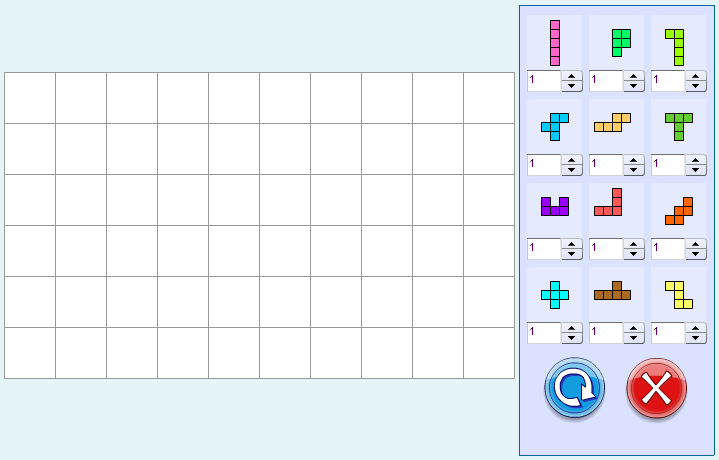
Thanks for reading!
Read more »
The level editor will allow the players to create their own levels by designing the base grid and specifying, how many of each shape is allowed.
Start by going to the main_menu object and adding a new button with id "btn_editor". Then go to main_menu.as and add a click event listener for this button, add a handler that goes to the thrid frame on the main timeline if the button is pressed.
package
{
import flash.display.MovieClip;
import flash.events.MouseEvent;

/**
 * Open-source pentomino game engine
 * @author Kirill Poletaev
 */

public class main_menu extends MovieClip
{

public function main_menu()
{
(root as MovieClip).stop();
btn_play.addEventListener(MouseEvent.CLICK, doPlay);
btn_editor.addEventListener(MouseEvent.CLICK, doEditor);
}

private function doPlay(evt:MouseEvent):void {
(root as MovieClip).gotoAndStop(2);
}

private function doEditor(evt:MouseEvent):void {
(root as MovieClip).gotoAndStop(3);
}
}

}
On the third frame, create a MovieClip thats a duplicate of pentomino_game object. Its not the same movie clip, but a duplicate. Set its class path to "pentomino_editor". Now create a new class pentomino_editor.as based on pentomino_game.as code.
We need to delete a lot of code that wont be used from this script, so Im just going to explain what (and why) are we going to keep in the code.
We basically only need grid generation code and shape button code, since we are not going to actually put shapes on the grid. We dont need to rotate the shapes on roll over either, this would just confuse the users. We are going to keep both Reset and Main menu buttons, but only the Main menu button will be functional today. One of the most important things to note is that we wont create select_shape instances for each shape button, but instead well create edit_shape instances. They will also be 22 pixels higher, so the positioning code along the y axis will have to be slightly modified as well.
Overall, here is the whole code for pentomino_editor.as:
package
{
import flash.display.MovieClip;
import flash.display.Sprite;
import flash.events.Event;
import flash.events.KeyboardEvent;
import flash.events.MouseEvent;
import flash.geom.Point;
import flash.utils.ByteArray;

/**
 * Open-source pentomino game engine
 * @author Kirill Poletaev
 */

public class pentomino_editor extends MovieClip
{
private var mapGrid:Array = [];
private var shapeButtons:Array = [];

private var gridShape:Sprite = new Sprite();
private var canPutShape:Sprite = new Sprite();
private var gridStartX:int;
private var gridStartY:int;
private var gridCellWidth:int;

public function pentomino_editor()
{
// default map
mapGrid = [
[1, 1, 1, 1, 1, 1, 1, 1, 1, 1],
[1, 1, 1, 1, 1, 1, 1, 1, 1, 1],
[1, 1, 1, 1, 1, 1, 1, 1, 1, 1],
[1, 1, 1, 1, 1, 1, 1, 1, 1, 1],
[1, 1, 1, 1, 1, 1, 1, 1, 1, 1],
[1, 1, 1, 1, 1, 1, 1, 1, 1, 1]
];

// grid settings
calculateGrid();
addChild(gridShape);
gridShape.x = gridStartX;
gridShape.y = gridStartY;

// draw tiles
drawGrid();

// add shape buttons
for (var i:int = 0; i < 4; i++) {
for (var u:int = 0; u < 3; u++) {
var shapeButton:MovieClip = new edit_shape();
shapeButton.x = 528 + u * 62;
shapeButton.y = 15 + i * 84;
addChild(shapeButton);
shapeButton.bg.alpha = 0.3;
shapeButton.shape.gotoAndStop(3 * i + u + 1);
shapeButtons.push(shapeButton);
shapeButton.addEventListener(MouseEvent.ROLL_OVER, buttonOver);
shapeButton.addEventListener(MouseEvent.ROLL_OUT, buttonOut);
}
}

// buttons
btn_mainmenu.addEventListener(MouseEvent.CLICK, doMainmenu);
}

private function calculateGrid():void {
var columns:int = mapGrid[0].length;
var rows:int = mapGrid.length;

// free size: 520x460
// fit in: 510x450

// calculate width of a cell:
gridCellWidth = Math.round(510 / columns);

var width:int = columns * gridCellWidth;
var height:int = rows * gridCellWidth;

// calculate side margin
gridStartX = (520 - width) / 2;

if (height < 450) {
gridStartY = (450 - height) / 2;
}
if (height >= 450) {
gridCellWidth = Math.round(450 / rows);
height = rows * gridCellWidth;
width = columns * gridCellWidth;
gridStartY = (460 - height) / 2;
gridStartX = (520 - width) / 2;
}
}

private function drawGrid():void {
gridShape.graphics.clear();
var width:int = mapGrid[0].length;
var height:int = mapGrid.length;

var i:int;
var u:int;

// draw background
for (i = 0; i < height; i++) {
for (u = 0; u < width; u++) {
if (mapGrid[i][u] == 1) drawCell(u, i, 0xffffff, 1, 0x999999);
}
}
}

private function drawCell(width:int, height:int, fill:uint, thick:Number, line:uint):void {
gridShape.graphics.beginFill(fill);
gridShape.graphics.lineStyle(thick, line);
gridShape.graphics.drawRect(width * gridCellWidth, height * gridCellWidth, gridCellWidth, gridCellWidth);
}

private function buttonOver(evt:MouseEvent):void {
evt.currentTarget.bg.alpha = 1;
}

private function buttonOut(evt:MouseEvent):void {
evt.currentTarget.bg.alpha = 0.3;
}

private function doMainmenu(evt:MouseEvent):void {
(root as MovieClip).gotoAndStop(1);
}
}

}
We use edit_shape MovieClip, but we dont have it yet. Go to your Flash project and create a new movie clip by duplicating select_shape. Delete the "count" text field and instead of it drag and drop a NumericStepper object from the components library (Ctrl+F7), position it so that its right under the square background, leave no gap between them.
In the end, this is what the screen looks like:
Thanks for reading!
Tuesday, January 20, 2015
Creating a Pentomino game using AS3 Part 25
Today well add the ability to set names for saved levels and start working on reading and displaying saved levels.
Firstly go to save_screen MovieClip in Flash and add a second frame there - add an input text field with id "tName" and a button with id "btn_save_final". This will be the step that comes after the user presses "Save level locally" - he will be asked to pick a name for the level before saving it.
In save_screen.as, add a line that stops the MC at first frame in the constructor:
In the onSave() function, go to second frame and add a listener for btn_save_final button that calls onSaveFinal handler function:
The handler calls closeHandler, removes the event listener and the window, and saves the level using Pentomino.saveLevelLocal(). We pass a thrid value here - tName.text:
Full save_screen.as class:
In main.as in the saveLevelLocal() function we take this third parameter and apply its value to levelObjects "name" property:
In saved_levels.as declare 3 new variables: levels, pages and currentPage:
The levels array takes values from SharedObjects levels array, unless its null. The pages value is calculated in the constructor. We also call a function goPage(1) in the constructor:
Before we move on to goPage() function, open the saved_levels MovieClip in Flash and set the ids of 3 saved level item MovieClips to item1, item2 and item3.
Now well add the goPage() function. The function receives page number and updates the tPage text field, then sets alpha of all level items to 0 and mouseEnabled and mouseChildren values to false. Then we calculate the index in the levels array for each level in the page (there are 3 levels on each page) and if that item on that specific page exists, set the respective level items alpha to 1, mouseEnabled and mouseChildren to true, and tTitles text value to the "name" property of the respective level item in the array.
Thats all for now.
Full saved_level.as code so far:
Thanks for reading!
Read more »
Firstly go to save_screen MovieClip in Flash and add a second frame there - add an input text field with id "tName" and a button with id "btn_save_final". This will be the step that comes after the user presses "Save level locally" - he will be asked to pick a name for the level before saving it.
In save_screen.as, add a line that stops the MC at first frame in the constructor:
stop();
In the onSave() function, go to second frame and add a listener for btn_save_final button that calls onSaveFinal handler function:
private function onSave(evt:MouseEvent):void {
this.gotoAndStop(2);
btn_save_final.addEventListener(MouseEvent.CLICK, onSaveFinal);
}
The handler calls closeHandler, removes the event listener and the window, and saves the level using Pentomino.saveLevelLocal(). We pass a thrid value here - tName.text:
private function onSaveFinal(evt:MouseEvent):void {
closeHandler.call();
btn_save_final.removeEventListener(MouseEvent.CLICK, onSaveFinal);
this.parent.removeChild(this);
Pentomino.saveLevelLocal(currentGrid, currentShapes, tName.text);
}
Full save_screen.as class:
package
{
import flash.display.MovieClip;
import flash.events.MouseEvent;

/**
 * Open-source pentomino game engine
 * @author Kirill Poletaev
 */

public class save_screen extends MovieClip
{

private static var Pentomino:MovieClip;
private var currentGrid:Array;
private var currentShapes:Array;
private var closeHandler:Function;

public function save_screen(pentominoReference:MovieClip, getGrid:Array, getShapes:Array, onClose:Function)
{
stop();
Pentomino = pentominoReference;
currentGrid = getGrid;
currentShapes = getShapes;
closeHandler = onClose;
btn_play.addEventListener(MouseEvent.CLICK, onPlay);
btn_save.addEventListener(MouseEvent.CLICK, onSave);
btn_cancel.addEventListener(MouseEvent.CLICK, onCancel);
}

private function onPlay(evt:MouseEvent):void {
removeEverything();
Pentomino.playLevel(currentGrid, currentShapes);
}

private function onSave(evt:MouseEvent):void {
this.gotoAndStop(2);
btn_save_final.addEventListener(MouseEvent.CLICK, onSaveFinal);
}

private function onSaveFinal(evt:MouseEvent):void {
closeHandler.call();
btn_save_final.removeEventListener(MouseEvent.CLICK, onSaveFinal);
this.parent.removeChild(this);
Pentomino.saveLevelLocal(currentGrid, currentShapes, tName.text);
}

private function onCancel(evt:MouseEvent):void {
closeHandler.call();
removeEverything();
}

private function removeEverything():void {
btn_play.removeEventListener(MouseEvent.CLICK, onPlay);
btn_save.removeEventListener(MouseEvent.CLICK, onSave);
btn_cancel.removeEventListener(MouseEvent.CLICK, onCancel);
this.parent.removeChild(this);
}

}

}
In main.as in the saveLevelLocal() function we take this third parameter and apply its value to levelObjects "name" property:
package
{
import flash.display.MovieClip;
import flash.net.SharedObject;

/**
 * Open-source pentomino game engine
 * @author Kirill Poletaev
 */

public class main extends MovieClip
{

public function main()
{
}

public function playLevel(grid:Array, shapes:Array):void {
gotoAndStop(2);
game.playLevel(grid, shapes);
}

public function saveLevelLocal(grid:Array, shapes:Array, levelName:String):void {
var sharedObject:SharedObject = SharedObject.getLocal("myLevels");
if (sharedObject.data.levels == null) sharedObject.data.levels = [];
var levelObject:Object = new Object;
levelObject.grid = grid;
levelObject.shapes = shapes;
levelObject.name = levelName;
sharedObject.data.levels.push(levelObject);
sharedObject.flush();
}

}

}
In saved_levels.as declare 3 new variables: levels, pages and currentPage:
private var levels:Array = [];
private var pages:int;
private var currentPage:int;
The levels array takes values from SharedObjects levels array, unless its null. The pages value is calculated in the constructor. We also call a function goPage(1) in the constructor:
public function saved_levels()
{
savedLevels = SharedObject.getLocal("myLevels");
btn_back.addEventListener(MouseEvent.CLICK, doBack);
if (savedLevels.data.levels != null) levels = savedLevels.data.levels;
tInfo.text = levels.length + " levels (" + savedLevels.size + "B)";
pages = Math.floor(levels.length / 3) + 1;
goPage(1);
}
Before we move on to goPage() function, open the saved_levels MovieClip in Flash and set the ids of 3 saved level item MovieClips to item1, item2 and item3.
Now well add the goPage() function. The function receives page number and updates the tPage text field, then sets alpha of all level items to 0 and mouseEnabled and mouseChildren values to false. Then we calculate the index in the levels array for each level in the page (there are 3 levels on each page) and if that item on that specific page exists, set the respective level items alpha to 1, mouseEnabled and mouseChildren to true, and tTitles text value to the "name" property of the respective level item in the array.
private function goPage(pageNum:int):void {
currentPage = pageNum;
tPage.text = "Page " + currentPage + "/" + pages;
item1.alpha = item2.alpha = item3.alpha = 0;
item1.mouseEnabled = item2.mouseEnabled = item3.mouseEnabled = false;
item1.mouseChildren = item2.mouseChildren = item3.mouseChildren = false;

if (levels[3 * (currentPage-1)] != null) {
item1.alpha = 1;
item1.mouseEnabled = true;
item1.mouseChildren = true;
item1.tTitle.text = levels[3 * (currentPage-1)].name;
}

if (levels[3 * (currentPage-1)+1] != null) {
item2.alpha = 1;
item2.mouseEnabled = true;
item2.mouseChildren = true;
item2.tTitle.text = levels[3 * (currentPage-1)+1].name;
}

if (levels[3 * (currentPage-1)+2] != null) {
item3.alpha = 1;
item3.mouseEnabled = true;
item3.mouseChildren = true;
item3.tTitle.text = levels[3 * (currentPage-1)+2].name;
}
}
Thats all for now.
Full saved_level.as code so far:
package
{
import flash.display.MovieClip;
import flash.events.MouseEvent;
import flash.net.SharedObject;

/**
 * Open-source pentomino game engine
 * @author Kirill Poletaev
 */

public class saved_levels extends MovieClip
{
private var savedLevels:SharedObject;
private var levels:Array = [];
private var pages:int;
private var currentPage:int;

public function saved_levels()
{
savedLevels = SharedObject.getLocal("myLevels");
btn_back.addEventListener(MouseEvent.CLICK, doBack);
if (savedLevels.data.levels != null) levels = savedLevels.data.levels;
tInfo.text = levels.length + " levels (" + savedLevels.size + "B)";
pages = Math.floor(levels.length / 3) + 1;
goPage(1);
}

private function goPage(pageNum:int):void {
currentPage = pageNum;
tPage.text = "Page " + currentPage + "/" + pages;
item1.alpha = item2.alpha = item3.alpha = 0;
item1.mouseEnabled = item2.mouseEnabled = item3.mouseEnabled = false;
item1.mouseChildren = item2.mouseChildren = item3.mouseChildren = false;

if (levels[3 * (currentPage-1)] != null) {
item1.alpha = 1;
item1.mouseEnabled = true;
item1.mouseChildren = true;
item1.tTitle.text = levels[3 * (currentPage-1)].name;
}

if (levels[3 * (currentPage-1)+1] != null) {
item2.alpha = 1;
item2.mouseEnabled = true;
item2.mouseChildren = true;
item2.tTitle.text = levels[3 * (currentPage-1)+1].name;
}

if (levels[3 * (currentPage-1)+2] != null) {
item3.alpha = 1;
item3.mouseEnabled = true;
item3.mouseChildren = true;
item3.tTitle.text = levels[3 * (currentPage-1)+2].name;
}
}

private function doBack(evt:MouseEvent):void {
(root as MovieClip).gotoAndStop(1);
}
}

}
Thanks for reading!
Subscribe to:
Posts (Atom)