Showing posts with label premiere. Show all posts
Showing posts with label premiere. Show all posts
Wednesday, February 25, 2015
Kable MY Malaysias Premiere Instructional Technology Website
 Kable.MY
"This website provides the latest news, articles and tutorials on emerging technologies for educational purposes, and serves as a hub for educators to congregate and share ideas that can be put into practice. It is hoped that this website will be on the forefront of Malaysias instructional technology and inspire educators to use technologies to enhance their instructions."
NEW!
19 hours ago, I got a pleasant e-mail from Hafiz Hanif, who invited me to visit his new Kable.MY website. I was also invited to be a freelance writer for the website, but I told him instead of being a freelance writer, why not use whatever you like from ZaidLearn, and then link back to the original post (article). The reason is that whatever I write to share (to anyone), I will post it on ZaidLearn (First!). Anyway, this post is not about ZaidLearn, but about this awesome Kable.MY website that I just discovered, thanks to Hafiz Hanif.
Although, Kable.MY is still brand new, and probably needs some time to build up a substantial collection of awesome articles (unless they reuse with attribution and permission from great Edubloggers out there), I am really impressed with the website design, and the first few articles too are very useful and relevant.
INSPIRING!
Also, I like their teams learning philosophy and spirit:
"We are a bunch of normal educators like you, with the enthusiasm to provide the latest and fun ways to teach students, to inspire them with the use of technologies that are often regarded as a separate entity from our instructional strategies. Here, we share our thoughts on how to integrate technologies into your everyday teaching and learning activities, and how to understand the design of certain applications, how to re-purpose the applications to suit our educational needs, and how to get control over our own methodological strategies (Source)."
Yes, certainly a good start! The challenge is to keep that volcanic creative eruption continuously flowing, and if the passion and focus is there... WOW, this could evolve into something really special!
Thinking of it, after being inspired by Kable.MYs awesome website design, I believe it is time to relook and rethink the website design of ZaidLearn, which has not really changed much since its inception. But then again, neither has Googles homepage either. But, then again I have yet to find that swoosh factor that fits ZaidLearns flavor and content. One thing for sure, I would want the revamped website to infuse a lot of (white) dreaming space free from anything.
I believe it is time to erupt some changes soon...Need another 102 days to think about it!
Kable.MY, thanks for this inspiring website, and hopefully it will inspire more educators in Malaysia to share their learning stories and tips. Yes, why not :)

Saturday, January 31, 2015
Working with Adobe Premiere Pros Basic 3D Video Effect PART 1
Level: Basic
Software: Adobe Premiere Pro
Version: 1.5
In this tutorial we will learn how to use Adobe Premiere Pros Basic 3D video effect. Heres a sample video file that shows what we hope to achieve by the end of this exercise:
Lets begin by creating a folder named Basic_3D_Effect. You may place this folder anywhere on your hard drive.
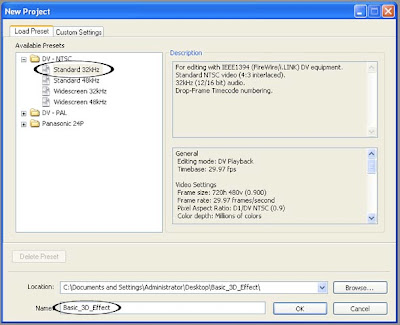
Next, create a new Adobe Premiere Pro 1.5 project. Select the DV-NTSC Standard 32kHz Preset. Name your project Basic_3D_Effect and save it inside the Basic_3D_Effect folder you just created. Click on OK.
Next, create a new Title by choosing File > New > Title...
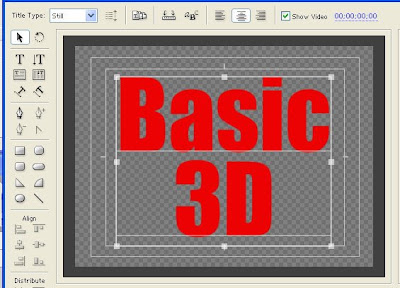
Using the Title designers Type Tool, type in the words "Basic 3D". Type the word "Basic" on one line and type "3D" on the next line similar to the image below.
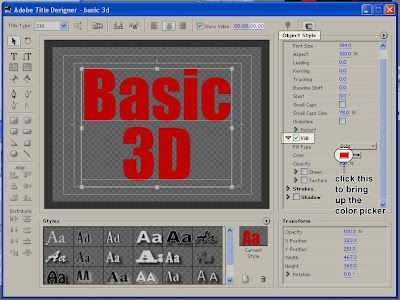
Use a big bold font and choose a color that isnt too bright. To change the color of your text, select it first, then go to the Object Style section of the Adobe Title Designer. Under the Fill properties, click on the color box to the right of the word Color. This will bring up the Color Picker window where you will be able to choose your desired color.
Save your Title file as basic_3D.prtl (make sure you save it in the Basic_3D_Effect folder as well) and close the Title Designer window.
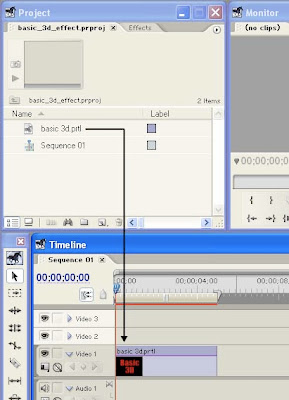
From the Project window, drag the basic_3D title down to the video 1 track of your Timeline. You can zoom in on your Timeline in order to see the clip better. Make sure that the clip is about 5 seconds in duration.
continue to Working with Adobe Premiere Pros Basic 3D Video Effect PART 2
Read more »
Software: Adobe Premiere Pro
Version: 1.5
In this tutorial we will learn how to use Adobe Premiere Pros Basic 3D video effect. Heres a sample video file that shows what we hope to achieve by the end of this exercise:
Lets begin by creating a folder named Basic_3D_Effect. You may place this folder anywhere on your hard drive.
Next, create a new Adobe Premiere Pro 1.5 project. Select the DV-NTSC Standard 32kHz Preset. Name your project Basic_3D_Effect and save it inside the Basic_3D_Effect folder you just created. Click on OK.
Next, create a new Title by choosing File > New > Title...
Using the Title designers Type Tool, type in the words "Basic 3D". Type the word "Basic" on one line and type "3D" on the next line similar to the image below.
Use a big bold font and choose a color that isnt too bright. To change the color of your text, select it first, then go to the Object Style section of the Adobe Title Designer. Under the Fill properties, click on the color box to the right of the word Color. This will bring up the Color Picker window where you will be able to choose your desired color.
Save your Title file as basic_3D.prtl (make sure you save it in the Basic_3D_Effect folder as well) and close the Title Designer window.
From the Project window, drag the basic_3D title down to the video 1 track of your Timeline. You can zoom in on your Timeline in order to see the clip better. Make sure that the clip is about 5 seconds in duration.
continue to Working with Adobe Premiere Pros Basic 3D Video Effect PART 2
Subscribe to:
Posts (Atom)