Showing posts with label one. Show all posts
Showing posts with label one. Show all posts
Sunday, March 1, 2015
One Secret Recipe to Great Memory is
 Trying hard to forget it!
"The harder you try to forget something, the more likely you will remember it!"
- Zaid Ali Alsagoff
- Zaid Ali Alsagoff
FORGET IT!
Have you noticed that when you try hard to forget something that you dont want to remember (e.g. a crappy presentation you did!), it becomes harder to forget it. It just sticks in your mind like glue....Forget! Forget! Forget! It isnt going to happen! Memorable incidents whether bad or good will stick longer (or are easier to retrieve from the memory archive).Or you are preparing for an important exam trying really hard to remember something, and you simply cant remember anything! And then when you finally do remember it, you forgot something else! And it just continues in a stressful cycle until the end of the exam. Interestingly, within days after the exam many of those important memories are archived somewhere, nowhere to be found or retrieved anymore (unless used!). Memory or memory retrieval is a funny thing.
The secret? One word: EMOTION!MALE BRAIN VS FEMALE BRAIN
Have you wondered why it is nearly impossible to win an argument with your wife (sister/girlfriend/mother/any women for that sake), especially if its about personal, emotional, or social incidents. You will have one big point (It wasnt me!), and then she will have a few hundred small points that you cant challenge or remember. It will be like...but, but, but, but, but... Oh man, I wish I had such great memory for details. That would make my life easier (or worse)!Dont believe me, watch this:
MY 32 CENTS!
Have you wondered why subjects you enjoy to study are easier to learn and remember? What happens in your mind when you enjoy something? You keep on thinking about it! If you dont enjoy it? You think about something else!The secret? One word: REPETITION
Things you like, you repeatedly think about in your mind.
To improve your memory you could eat healthy, exercise well, play brain games, use millions of memory techniques, and all the other who-ha prescribed by the memory gurus. I have tried them all without too much lasting success.
But I do know that when I try really hard to forget something, it usually sticks better than any other method that I have ever tried. I suppose in the process of trying hard to forget I am evoking an emotional state (e.g. angry), and by doing it repeatedly it makes it nearly impossible to forget.
In a never forgetting memory shell, make whatever you want to remember memorable by trying hard to forget it in an emotional state repeatedly.
Now, forget what you have just read! FORGET! FORGET! FORGET! FORGET!
If you cant remember, you havent tried hard enough to forget! GET IT?
Who cares if you can remember (digital databases do a better job!), if you cant understand, apply or create some form of value from it! That makes more sense... Now I get it!
What about you? What is your secret recipe to great memory (with understanding!)?

Monday, February 16, 2015
Drill down from one dashboard to another dashboard custom parameter example in pentaho CDE
This post teach you how to drill down from one dashboard to another dashboard by passing parameters.
Example developed on :
1) BA server - 4.8 version
2) C-Tools 13.09 version
3) Web browser : Mozilla firefox(Always preferable for pentaho C-Tools)
4) Database : foodmart (postgreSQL - jasper server default db).
Before learning this post I suggest you to have a glance at the previous post on the same drill down with out any parameters concept.
http://pentaho-bi-suite.blogspot.in/2013/11/drill-down-from-one-dashboard-to.html
Aim of the concept :
1) Click on state slice in dashboard 1
2) As soon as you click on particular state slice, you will be navigating to another dashboard displaying all the details of that state in another dashboard in the form a table.
i.e, Drill down from Pie Chart to Tabular display of data by passing parameter.
Dashboard 1 :
Create your chart(s) as shown in below figure you
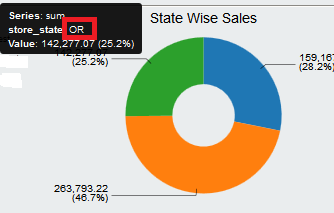
1) Create a Simple parameter lets say param_custom_state ( No need of giving any default value )
2) Go to chart component properties
-> Give the data source(query created in data source section) that will fit for the above chart .
-> Give the above created parameter for "Listeners" as well for "Parameters".
3) In the clickAction write below code
function sendParameter(scene){
var url=http://localhost:8085/pentaho/content/pentaho-cdf-dd/Render?solution=CDEExploring&path=%2FTest&file=test_dev_drill.wcdf;
var vars = scene.vars;
var c = vars.category.value;
var v = vars.value.value;
alert("category: " + c + "
value: " + v);
value: " + v);
window.location=url+¶m_custom_state=+c;
}
NOTE : also look at this thread for URL passing.
http://forums.pentaho.com/showthread.php?165490-Need-help-with-dashboard-drill-down-url
NOTE :
1) URL = 2nd dashboard URL
2) url+parameter(which you are passing)
3) On pie chart, slice will take the category value( here the category value is "state" and represented by c)
4) This "state" will be the custom parameter for the 2nd dashboard.
5) Give alert function whether the code is working fine or not (This is a testing methodology).
6) Note that drill down code slightly vary for other charts in pentaho CDE bz of protovis scripting changes as well as per new things in CCC2.(i.e., For bar chart drill down the given code may be differ from the code written here).
6) Note that drill down code slightly vary for other charts in pentaho CDE bz of protovis scripting changes as well as per new things in CCC2.(i.e., For bar chart drill down the given code may be differ from the code written here).
5) Save the dashboard and see the preview.. Once you click on slice itll alert saying that the selected state along with the value and then you can see the drill down to another dashboard.
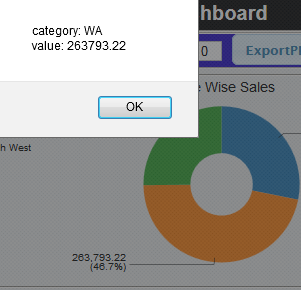
Dashboard 2:
NOTE that you have to create 2nd dashboard separately and have to know how to get the URL of it.(Open In New Window)
Create a table component and suitable query for it where your query for the tabular display should take the input parameter "state" which is your custom parameter and on the table component give it as parameter also.
For instance : in where clause of your query .
where
s.store_state like ${param_custom_state}
1) Go to "Generic" section and click on custom parameter
2) Give the name for it (it is not mandatory to give the same name but preferable to give the same parameter name that you are receiving from 1st dashboard).
3) In the Java script code write below code
param_custom_state = Dashboards.getQueryParameter("param_custom_state");
Once you click on WA state in the above image , you will navigate to another dashboard which displays that particular state details. Sample image is shown below.
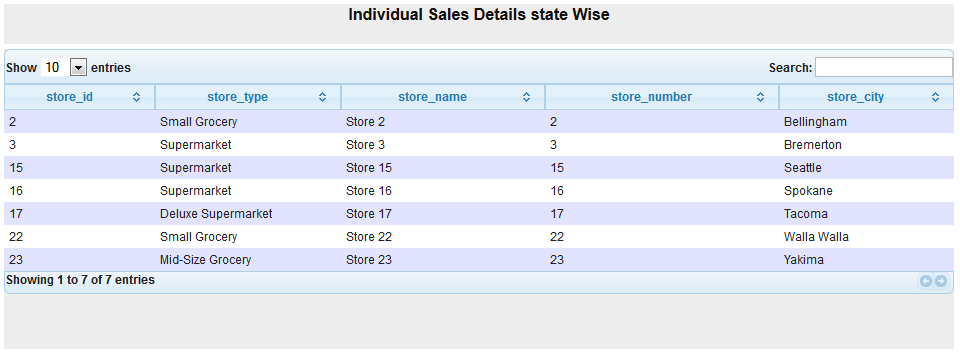
This is the way how you can work custom parameter for drill down functionality.
For tricks and tips navigate through my blog post and discover some thing interest in pentaho..
Add your inputs and improvements in comments :)
Same topic discussed in below posts :
1) http://pentaho-bi-suite.blogspot.in/2013/11/drill-down-from-one-dashboard-to.html
2) http://pentaho-bi-suite.blogspot.in/2013/12/pentaho-cde-dashboard-complete-example.html
Same topic discussed in below posts :
1) http://pentaho-bi-suite.blogspot.in/2013/11/drill-down-from-one-dashboard-to.html
2) http://pentaho-bi-suite.blogspot.in/2013/12/pentaho-cde-dashboard-complete-example.html
Thursday, February 12, 2015
Creative One Page Multi Purpose PSD Template
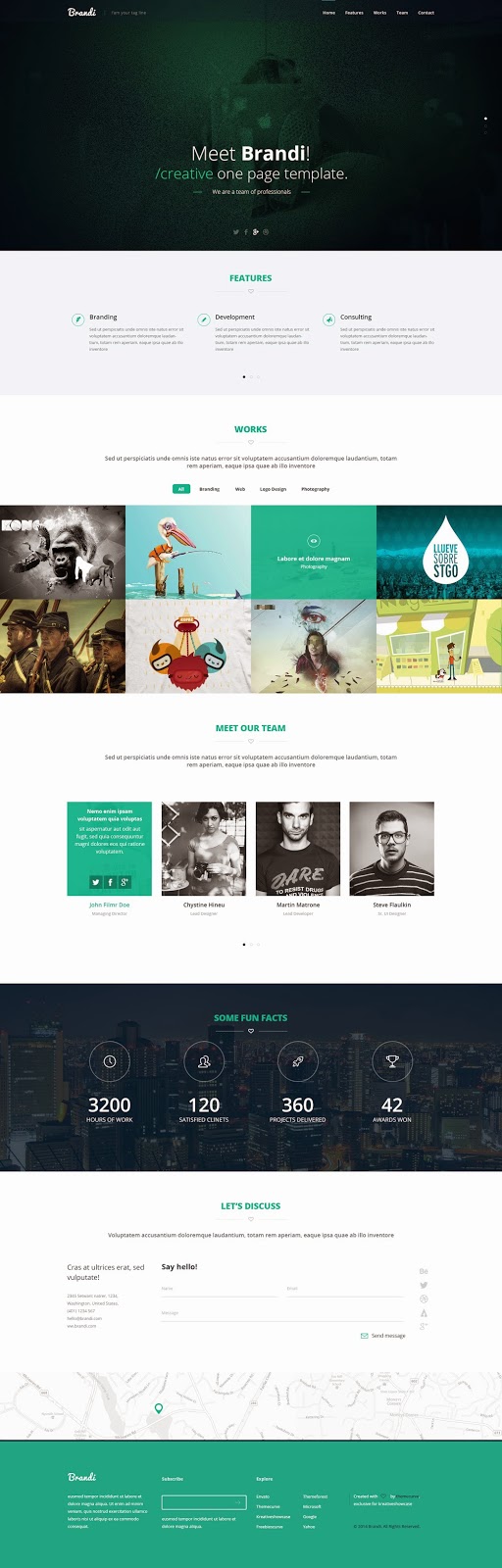
Free Download One Page Multi-Purpose Template PSD. Brandi, a truly one page PSD template. No matter if you use it as a photographer, travel / web design agency, nonprofit / environmental organization or even as a music / video producer. Enjoy!
Type : PSD
Category : Web Templates
License : Free
Author : Kreativeshowcase
Download
Subscribe to:
Posts (Atom)