Showing posts with label rom. Show all posts
Showing posts with label rom. Show all posts
Monday, February 2, 2015
Allwinner T730 V6 1 Gsl1680 2CAM Tablet Stock Rom
T730 V6.1 GSL1680-APX209-RTL8188CTV SIM-BT + WIFI +2 CAM Android Tablet Firmware
Allwinner A13 Chipset

Encyclopedia:-
Allwinner A1X Chips
Flashing Tools
- Flashing Tool : LiveSuit Pack
- Flashing Tool: Phoenix Usb Pro
Flashing Tutorials
- Livesuit Tutorial : how to flashing tablet with Livesuit
- Phoenix Usb PrO Video Tutorial :Video Tutorial
Recommended Tools
You can also use : Android Multi Tools
Allwinner T730 v1.0
Allwinner T730 V6.1
Allwinner A13 V5.0
Does I really need to restore my Android Tablet?
Related Posts:
Allwinner T730 v1.0
Allwinner T730 V6.1
Allwinner A13 V5.0
Does I really need to restore my Android Tablet?
ROM file will be used when your Android tablet facing various problems .
1. Forgotten Pattern Lock .
2.Too many pattern attempts / Reset user lock.
3. Tablets PC stuck on Gmail account.
4. Android Tablets PC stuck on Android logo.
5. Tablet Android hang on startup / Multiple errors generating by OS.
6. Google play store having problems or generating errors.
7.Upgrading to new Android OS.
6. Google play store having problems or generating errors.
7.Upgrading to new Android OS.
you can use this Android Tablet firmware, ROM to restore your Android China tablets to generic firmwares or upgrades . Make sure to charge battery . Power failure during flashing may result dead or broken tablets.
Note : Flashing generic tablet firmware should be last option.
.
DOWNLOAD OFFICIAL FIRMWARE

Thursday, January 22, 2015
Allwinner A13 Q8 51324 Tablet Firmware software ROM
Q8 51324 Tablet Firmware software
Board id : Q8
Chipset : Allwinner A13
Flashing Tool : Livesuit
Flashing Tutorial : how to flashing tablet with Livesuit
You can also use : Android Multi Tools
how to know what Chipset does your tablet have ?
 |
| There are many Chipset so be very carefull . |
The following firmware / ROM file will be used when your Android tablet facing various problems . In case of
1. Forgotten Pattern Lock ,
2.Too many pattern attampt / Reset user lock
3.Tablet stuck on Gmail account
4. Tablet stuck on Android logo
5.Tablet hang on start up
you can use this Android Tablet firmware ROM to make your Android China tablet working again . Make sure to charge battery . Power failuer during flashing may result dead or broken tablet.
Flashing stock firmware should be last option
1. Forgotten Pattern Lock ,
2.Too many pattern attampt / Reset user lock
3.Tablet stuck on Gmail account
4. Tablet stuck on Android logo
5.Tablet hang on start up
you can use this Android Tablet firmware ROM to make your Android China tablet working again . Make sure to charge battery . Power failuer during flashing may result dead or broken tablet.
Flashing stock firmware should be last option
DOWNLOAD TABLET FIRMWARE
Tuesday, January 20, 2015
MyPhone A848 Stock ROM to unbrick your phone
Hi,
Done uploading the firmware / stock rom for MyPhone A848. You can use this rom to unbrick your phone.
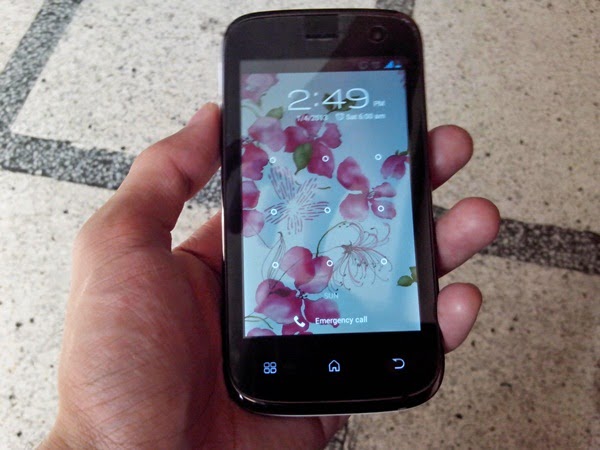
Firmware Here -->MyPhone A848
Alternative Driver --> AutoInstaller
VCOM Driver -->VCOM Manual
SPFlashTool --> SPFlashTool
"Extract the files to your desired folder" See picture below
"Use SPFlashtool v3.1220.01 or your desired flashtool"

Installing Driver
First try the Alternative Driver, which is the AutoInstaller. Just open the install.bat then it will automatically install the driver. Then proceed to flashing. If it did not work then proceed with VCOM driver that you had downloaded. Then install it manually follow the guide below.
Video Reference using Driver Auto Installer (watch in HD)
When installing it manually your phone must be turned off, then connect it to your computer/laptop while pressing VOLUME UP or VOLUME DOWN. This will detect and look for the driver.

1. This is the first time that you will connect your phone and it will search for the correct driver. You can connect your phone without battery in it.
 2. Check include this location ... ... and click on browse. Look for USB VCOM Driver and Click on 2K_XP_COM folder if you are using Windows XP or Win7 for Windows 7 and then press OK when you are done picking the right folder for the driver.

3. If the driver is successfully installed MediaTek DA USB VCOM will appear in the New Hardware Wizard.
Reference Video Installing the Driver (watch it in HD)
Reference Video Flashing your phone (watch it in HD)
Flashing
1. Launch FlashTool
2. Click on Scatter-Loading, and load your scatter file. (see example below with loaded file in Flash Tool


Reference Video using Flashtool version 5.xxxx (watch it in HD)
3. After you load the file, press F9 or Press Download to Flash your Phone.
4. If Download is not possible, you can press Firmware Upgrade.
"Hard reset your phone after flashing"
I hope this tutorial help you. Please drop a comment if something is not clear to you.
Read more »
Done uploading the firmware / stock rom for MyPhone A848. You can use this rom to unbrick your phone.
Firmware Here -->MyPhone A848
Alternative Driver --> AutoInstaller
VCOM Driver -->VCOM Manual
SPFlashTool --> SPFlashTool
"Extract the files to your desired folder" See picture below
"Use SPFlashtool v3.1220.01 or your desired flashtool"
Installing Driver
First try the Alternative Driver, which is the AutoInstaller. Just open the install.bat then it will automatically install the driver. Then proceed to flashing. If it did not work then proceed with VCOM driver that you had downloaded. Then install it manually follow the guide below.
Video Reference using Driver Auto Installer (watch in HD)
When installing it manually your phone must be turned off, then connect it to your computer/laptop while pressing VOLUME UP or VOLUME DOWN. This will detect and look for the driver.
1. This is the first time that you will connect your phone and it will search for the correct driver. You can connect your phone without battery in it.
3. If the driver is successfully installed MediaTek DA USB VCOM will appear in the New Hardware Wizard.
Reference Video Installing the Driver (watch it in HD)
Reference Video Flashing your phone (watch it in HD)
Flashing
1. Launch FlashTool
2. Click on Scatter-Loading, and load your scatter file. (see example below with loaded file in Flash Tool
Reference Video using Flashtool version 5.xxxx (watch it in HD)
3. After you load the file, press F9 or Press Download to Flash your Phone.
4. If Download is not possible, you can press Firmware Upgrade.
5. After you press Download or Firmware Upgrade re-insert your battery and connect your Phone to the PC. Press Volume Down or Volume Up while connecting to PC.
"Hard reset your phone after flashing"
I hope this tutorial help you. Please drop a comment if something is not clear to you.
Subscribe to:
Posts (Atom)