Showing posts with label run. Show all posts
Showing posts with label run. Show all posts
Saturday, February 14, 2015
Complete guide to run any program from this blog
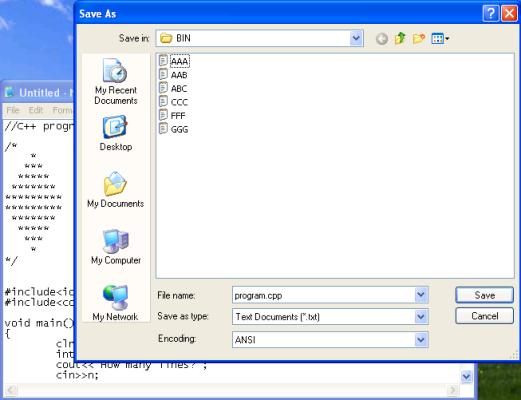
Hello everyone, few days ago one of my blog visitor sent me a mail. He was facing problem to run program from this blog. That’s why I thought that I should write a small guide regarding this. The step by step process is given below by which you can easily run or use any program form this blog on your computer.
Also Read: Basic concepts of OOP
Also Read: Basic concepts of OOP
How to run any program
1. First of all copy the whole program that you want to use.
2. Now open notepad and paste the whole code that you have just copied.
3. Save it with any name and with .cpp extension for c++ program and with .c extension for c program, for example program.cpp as shown in above picture.
4. After that copy and paste this notepad file to Bin folder.
5. Open Turbo C compiler and open the program that you have just copied.
6. Now just compile and run it.
How to run graphics program
It may be possible that some graphics program will show error and not run on your computer. So to remove errors just change the path c:\tc\bgi to the path of bgi folder because it contents the file which is needed to run graphics program.If you have further queries than feel free to ask.

Wednesday, February 11, 2015
HowTo Run fsck on Emergency Mode on Fedora 19
Problem:

systemd-fsck[529]: /dev/mapper/fedora_XXX--home: UNEXPECTED INCONSISTENCY; RUN fsck MANUALLY...
Welcome to emergency mode! After logging in, type "journalctl -xb" to view system logs, "ststemctl reboot" to reboot, "systemctl default" to try again to boot into ddefault mode.
Give root password for maintenance
(or type Control-D to continue):
Solution #1 (untested):
1. type in your root password (you will not see anything when you are typing, but its typing)
2. type fsck
- if you get an error message like the one below, try Solution #2 or Solution #3
/dev/mapper/fedora_XXX--root is mounted
e2fsck: Cannot continue, aborting.
3. if there are questions about fixing, ignoring, forcing, salvage, etc, always answer y (yes)
Solution #2 (untested):
- we will continue from step 2 of solution #1
1. type the commands below, remember to substitute XXX with the one specified in your error
umount /dev/mapper/fedora_XXX--root
umount /dev/mapper/fedora_XXX--home
umount /dev/mapper/fedora_XXX--swap
2. type fsck /dev/mapper/fedora_XXX--root
3. if there are questions about fixing, ignoring, forcing, salvage, etc, always answer y (yes)
4. repeat step 2 & 3 with --home & --swap just to be sure
Solution #3 (tested):
1. boot into your LiveCD or LiveUSB
2. once logged in, open gnome-disks utility from the applications (I think its called Disks)
3. unmount all the /dev/mapper/fedora_XXX--root & home & swap
4. open a gnome-terminal (terminal)
5. type su -
6. enter your root password
7. type fsck /dev/mapper/fedora_XXX--root
8. if there are questions about fixing, ignoring, forcing, salvage, etc, always answer y (yes)
9. repeat step 7 & 8 with --home & --swap just to be sure
(if you found problems in my solutions, please correct me, also if you can share your solutions & fixes please do so. thanks. I wasnt been able to test other errors simply because I fixed my problem with solution #3, if ever I came across the same problem, Ill try the other methods)
Subscribe to:
Posts (Atom)